Why I cannot resize my fat32 partition?

3 years ago by tubbadu to c/linux

Hello! I have a 215Gb fat32 partition on my external SSD, and a 100Gb unallocated space right next to it, and I's like to extend it to 315Gb. So, on KDE partition manager, I right-click on the fat32 partition, select "resize/move", and this is the windows that pops up:
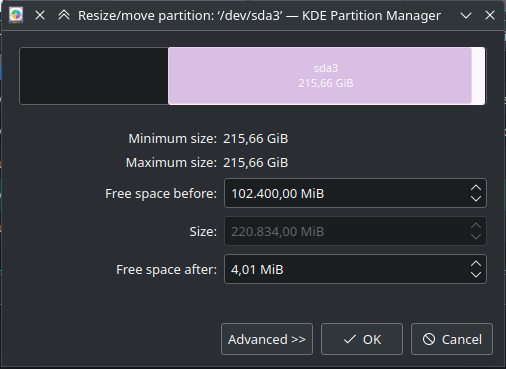
as you can see, the textbox with the size is grayed out, so I can only move the partition, but not resize it. Why? the device is not mounted of course, and I can operate on other partitions without problems.

thanks in advance!

load all comments
elshandra 16 points 3 years ago

You can only extend at the end. You would need to move it first.

path: 0 2016941, hotness: undefined, score: 16, children: 2
tubbadu 2 points 3 years ago

but why isn't it giving me the possibility to extend it to the right by 4.01 Mb then?

path: 0 2016941 2017207, hotness: undefined, score: 2, children: 1
eth0slash0 6 points 3 years ago

4.01Mb may be too small for a single block.

path: 0 2016941 2017207 2019712, hotness: undefined, score: 6, children: 0
linux
linux

@lemmy.ml

login for more options
68145
9471
5816

From Wikipedia, the free encyclopedia

Linux is a family of open source Unix-like operating systems based on the Linux kernel, an operating system kernel first released on September 17, 1991 by Linus Torvalds. Linux is typically packaged in a Linux distribution (or distro for short).

Distributions include the Linux kernel and supporting system software and libraries, many of which are provided by the GNU Project. Many Linux distributions use the word "Linux" in their name, but the Free Software Foundation uses the name GNU/Linux to emphasize the importance of GNU software, causing some controversy.

Rules

  • Posts must be relevant to operating systems running the Linux kernel. GNU/Linux or otherwise.
  • No misinformation
  • No NSFW content
  • No hate speech, bigotry, etc

Related Communities

Community icon by Alpár-Etele Méder, licensed under CC BY 3.0

go to feed...