
Introducing Tempo: A Lightweight Music Client for Subsonic on Android
3 years ago by antoniocappiello to c/selfhosted
Hey all,
I wanted to share an exciting lockdown-project that I've been working on called Tempo, an open-source and lightweight music client built specifically for Subsonic servers on Android.
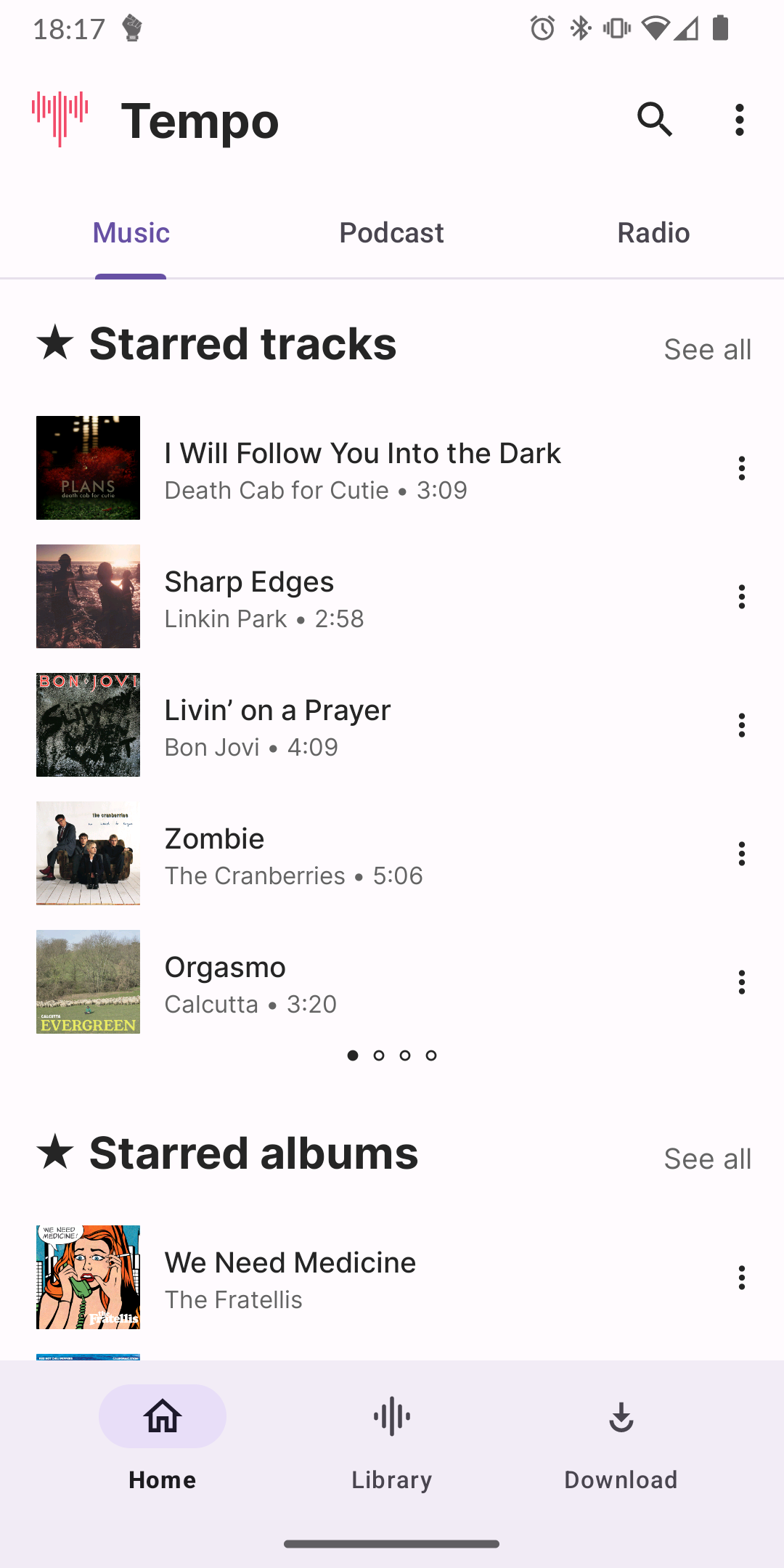
Tempo puts you, the user, at the center of your music listening experience. With a sleek and intuitive interface, Tempo enhances your music journey based on your listening history, randomness, and even integrates with Last.fm for optional scrobbling support.
Key Features of Tempo:
- Seamless integration with your Subsonic server.
- Clean and user-friendly interface.
- Stream music directly from your Subsonic server, with offline mode (actively being developed).
- Create, edit, and manage playlists.
- Gapless playback.
- Rudimentary Chromecast support for streaming to compatible devices.
- Optional Last.fm integration for scrobbling, if supported by your Subsonic server.
- Activate transcoding on your server to optimize streaming with a transcoding profile.
Tempo is currently in the alpha phase of development, and as the sole developer behind the project, I'm actively working on improving the app. Your understanding and patience are greatly appreciated.
If you find Tempo useful, please consider supporting the project by starring it on GitHub. Your stars help promote the app to a wider audience and encourage further development.
Check out some screenshots of Tempo here. I'm excited to hear your thoughts and answer any questions you may have.
Let's build Tempo into the go-to music client for Subsonic on Android, together!
antoniocappiello


Using the Subsonic API with great imagination :D
For the Instant Mix and Radio Stations section I use the getSimilarSongs endpoint to generate a mix starting from an artist, album or song. For the Best Of section I use the endpoint getTopSongs, while for the new releases I take all the albums released during the current year, sorted by date added.
If I had to write APIs from scratch, I wouldn't have done all this, but having to take advantage of the fame of Subsonic's APIs, I couldn't do otherwise.

@lemmy.world
A place to share alternatives to popular online services that can be self-hosted without giving up privacy or locking you into a service you don't control.
Rules:
Be civil.
No spam.
Posts are to be related to self-hosting.
Don't duplicate the full text of your blog or readme if you're providing a link.
Submission headline should match the article title.
No trolling.
Promotion posts require active participation, with an account that is at least 30 days old. F/LOSS without a paywall has exceptions, with requirements. See the rules link for details. Tags [CBH] or [AIP] are required, see the links in Rule 8 for details.
AI-related discussions and AI-involved promotional posts have additional requirements for tagging, as noted in Rule 7 and the AI & Promotional Post Expanded Rules post, and find example disclosures here.
Resources:
- selfh.st Newsletter and index of selfhosted software and apps
- awesome-selfhosted software
- awesome-sysadmin resources
- Self-Hosted Podcast from Jupiter Broadcasting
Any issues on the community? Report it using the report flag.
Questions? DM the mods!
go to feed...
@lemmy.world
A place to share alternatives to popular online services that can be self-hosted without giving up privacy or locking you into a service you don't control.
Rules:
Be civil.
No spam.
Posts are to be related to self-hosting.
Don't duplicate the full text of your blog or readme if you're providing a link.
Submission headline should match the article title.
No trolling.
Promotion posts require active participation, with an account that is at least 30 days old. F/LOSS without a paywall has exceptions, with requirements. See the rules link for details. Tags [CBH] or [AIP] are required, see the links in Rule 8 for details.
AI-related discussions and AI-involved promotional posts have additional requirements for tagging, as noted in Rule 7 and the AI & Promotional Post Expanded Rules post, and find example disclosures here.
Resources:
- selfh.st Newsletter and index of selfhosted software and apps
- awesome-selfhosted software
- awesome-sysadmin resources
- Self-Hosted Podcast from Jupiter Broadcasting
Any issues on the community? Report it using the report flag.
Questions? DM the mods!
go to feed...
Cool project, thanks for sharing! I wish you were doing iOS, there's still not a great SubSonic client there.
Out of curiosity, how are you doing the mixes based on a song? Where do you get the list of similar songs from?
save