Loudness equalization on linux

2 years ago by GregorGizeh to c/linux4noobs

Hey guys, I made the switch to Linux about a week ago and have mo complaints so far. Except maybe this: I can't seem to find a way in Linux to get proper loudness equalization like I got on windows.

My issue is that I have a bunch of media, especially shows and movies, that are suffering from way too loud gunshots, explosions, music and so forth and really quiet dialogue. I know this is because sound engineers make the audio fit for cinemas and not my living room, it is a problem nonetheless.

Under windows there is a simple toggle in even the most basic sound cards and settings called loudness equalization, that corrects those perceived differences quite effectively, which Linux is lacking. A bit of web search led me to the term ReplayGain, which seems to be the proper name for it, and I enabled it for my media from within the player apps. However it doesn't really work like i am used to.

Sounds and language constantly change volume mid sentence, which is very irritating to me. ReplayGain also doesn't really help avoiding those sudden bursts of loudness, I still blast awake my neighbors on accident when watching a move later at night.

Is there some way to get at that windows audio codec or whatever they use, that works so much better?

Thanks for reading
Varyk 10 points 2 years ago

I use vlc, works regardless of the drivers you have and they have built in equalizers that you can easily adjust the max/min volume for until you find the volume you like, including one specifically for the dynamic range you're talking about.

It's been set how I like it for so long that I'm not sure anymore what the exact option is, but I'll try to find it and I'm sure you could find it in the audio settings.

It's some dynamic range compressor something in the audio options that you can very easily adjust for the maximum volume so that explosions won't be so crazy loud but you can keep voices at their normal volume.

Ah, here. It is under tools effects Compressor. Enable the compressor.

https://www.vlchelp.com/...

You can use hotkeys to fiddle with the threshold until you find something that makes explosions or loud music quiet without affecting dialogue

path: 0 10149117, hotness: undefined, score: 10, children: 0
hollyberries 7 points 2 years ago

I don't have an answer for the windows audio codec.

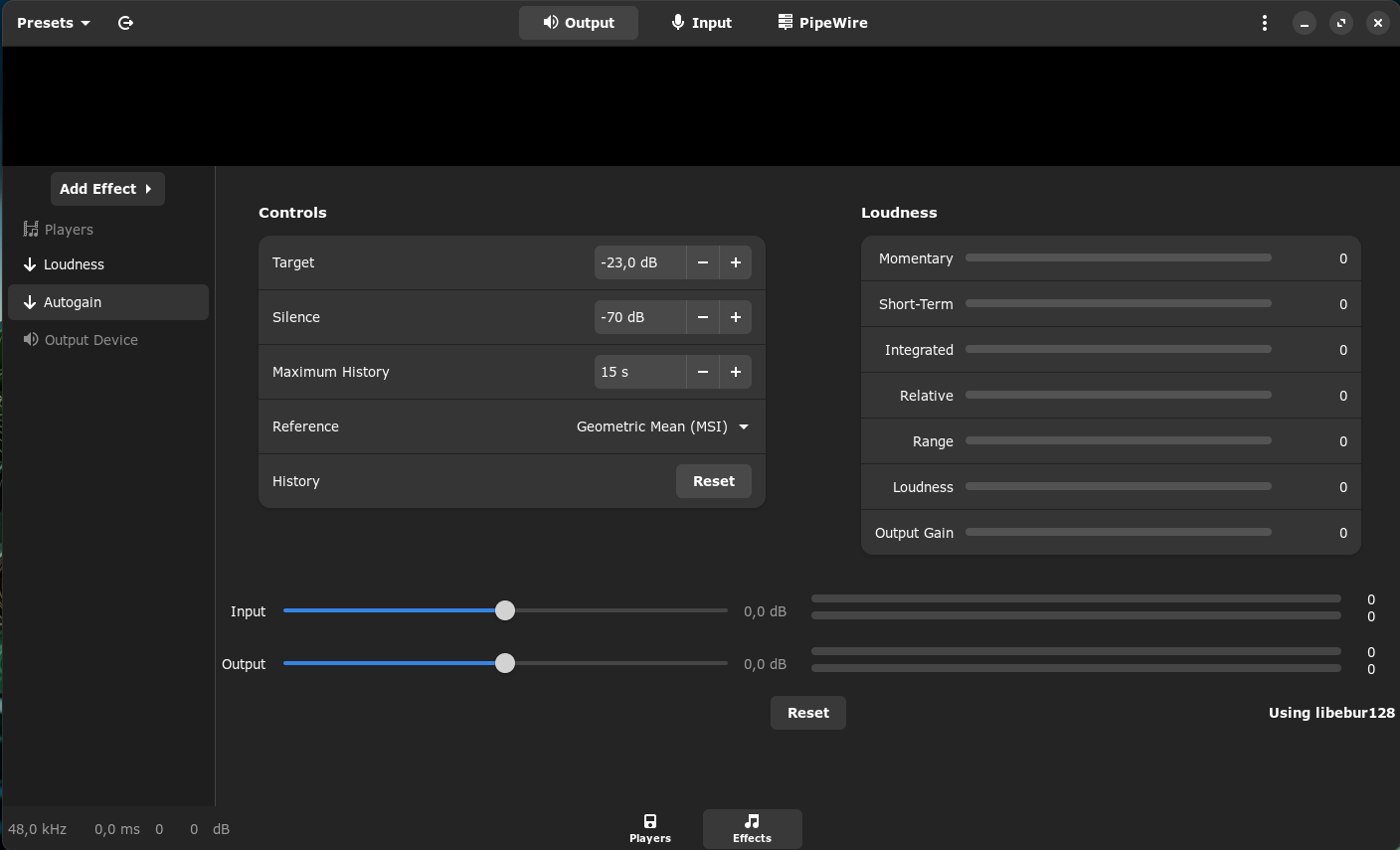
Perhaps EasyEffects with the auto gain plugin would help in the meantime?

Screenshot is mine:

AI Generated alt-text: A screenshot of EasyEffects. The layout is divided into sections. On the left, there are controls for "Loudness" and "Autogain", each collapsible. There is also a setting for the "Output Device". The central panel titled "Controls" contains settings for "Target", "Silence", "Maximum History", "Reference", and "History". Each has adjustable parameters like decibel levels and time settings. The right panel, titled "Loudness", has sliders for various loudness metrics such as "Momentary", "Short-Term", "Integrated", "Relative", "Range", "Loudness", and "Output Gain". All sliders are currently set to zero. Below, there are simple input and output level meters displaying "0,0 dB". At the bottom left corner, it shows the audio properties: "48,0 kHz, 0,0 ms 0 0 dB". The bottom right corner indicates the software is "Using libebur128".

path: 0 10148999, hotness: undefined, score: 7, children: 0
tal 6 points 2 years ago

I haven't used it, but it looks like there's a program called pulseeffects that can do some real-time processing for PulseAudio, including that:

https://www.maketecheasier.com/...

EDIT: For more-generally applying effects, there's also a Linux "audio effect plugin" standard called LADSPA, large library of those, and I know that I've seen ways to apply it to streams in realtime.

googles

https://askubuntu.com/...

If you wanted to do something like reverb or pitch-shift all the audio being played back, I expect that that'd let you do that.

path: 0 10149357, hotness: undefined, score: 6, children: 0
christopher 3 points 2 years ago path: 0 10172492, hotness: undefined, score: 3, children: 0
meleethecat 3 points 2 years ago

ReplayGain is more about making the volume level consistent between tracks. It’s really good for playlists and mixes because you don’t up with some tracks being too quiet and then some being much louder.

path: 0 10154162, hotness: undefined, score: 3, children: 0
GregorGizeh 3 points 2 years ago

Appreciate the replies! I will try the effects apps when I get home later. For vlc, that is actually what I am currently using to watch my media, and where I enabled the replaygain function to unsatisfactory effect. I will try and tinker with the range some more, perhaps I configured it wrong.

path: 0 10155433, hotness: undefined, score: 3, children: 0
linux4noobs
linux4noobs

@programming.dev

login for more options
4500
307
83

linux4noobs


Noob Friendly, Expert Enabling

Whether you're a seasoned pro or the noobiest of noobs, you've found the right place for Linux support and information. With a dedication to supporting free and open source software, this community aims to ensure Linux fits your needs and works for you. From troubleshooting to tutorials, practical tips, news and more, all aspects of Linux are warmly welcomed. Join a community of like-minded enthusiasts and professionals driving Linux's ongoing evolution.


Seeking Support?
  • Mention your Linux distro and relevant system details.
  • Describe what you've tried so far.
  • Share your solution even if you found it yourself.
  • Do not delete your post. This allows other people to see possible solutions if they have a similar problem.
  • Properly format any scripts, code, logs, or error messages.
  • Be mindful to omit any sensitive information such as usernames, passwords, IP addresses, etc.

Community Rules

  • Keep discussions respectful and amiable. This community is a space where individuals may freely inquire, exchange thoughts, express viewpoints, and extend help without encountering belittlement. We were all a noob at one point. Differing opinions and ideas is a normal part of discourse, but it must remain civil. Offenders will be warned and/or removed.
  • Posts must be Linux oriented
  • Spam or affiliate links will not be tolerated.

go to feed...
