
Starship is a customizable prompt with support for multiple shells, including Nushell.
Starship v1.23.0 includes:
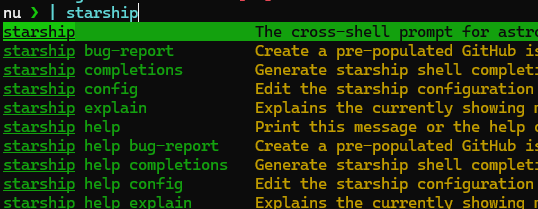
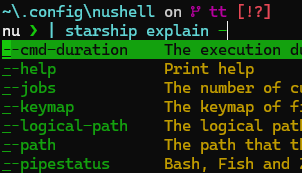
completions: Offer Nushell completions (#6366) (df454d5)
The completions can be generated in the env.nu into an autoload dir:
starship completions nushell | save --force $'($nu.user-autoload-dirs | last)/starship-completions.nu'
I have a setup that generates env files only once per day, resulting in faster shell startup otherwise.
call-if-old $'($nu.user-autoload-dirs | last)/starship-completions.nu' {|filepath| starship completions nushell | save -f $filepath }
call-if-old is a command I defined.
Completions Demonstration:

@programming.dev
What is Nushell?
Nushell is a powerful shell and scripting language with strong typing, querying, and piping functionalities.
From the official documentation; Introduction:
The goal of this project is to take the Unix philosophy of shells, where pipes connect simple commands together, and bring it to the modern style of development. Thus, rather than being either a shell, or a programming language, Nushell connects both by bringing a rich programming language and a full-featured shell together into one package.
Nu takes cues from a lot of familiar territory: traditional shells like bash, object based shells like PowerShell, gradually typed languages like TypeScript, functional programming, systems programming, and more. But rather than trying to be a jack of all trades, Nu focuses its energy on doing a few things well:
- Being a flexible cross-platform shell with a modern feel
- Solving problems as a modern programming language that works with the structure of your data
- Giving clear error messages and clean IDE support
Examples
Shell Examples…
0x[7F000001] | chunks 1 | each { into int } | str join "."
# => 127.0.0.1
ls | where size > 1kb
# => ╭───┬───────────────────┬──────┬─────────┬────────────╮
# => │ # │       name        │ type │  size   │  modified  │
# => ├───┼───────────────────┼──────┼─────────┼────────────┤
# => │ 0 │ Gemfile           │ file │ 1.1 KiB │ 3 days ago │
# => │ 1 │ Gemfile.lock      │ file │ 6.9 KiB │ 3 days ago │
# => │ 2 │ LICENSE           │ file │ 1.1 KiB │ 3 days ago │
# => │ 3 │ SUMMARY.md        │ file │ 3.7 KiB │ 3 days ago │
# => ╰───┴───────────────────┴──────┴─────────┴────────────╯
help commands | where name == each | first | get params.name
# => ╭───┬──────────────────╮
# => │ 0 │ closure          │
# => │ 1 │ --help(-h)       │
# => │ 2 │ --keep-empty(-k) │
# => ╰───┴──────────────────╯
http get https://programming.dev/api/v3/site | get all_languages | length
# => 184

http get https://programming.dev/api/v3/site | get taglines.content
# => ╭───┬────────────────────────────────────╮
# => │ 0 │ Broken communities have been fixed │
# => ╰───┴────────────────────────────────────╯
Web-Links
go to feed...
@programming.dev
What is Nushell?
Nushell is a powerful shell and scripting language with strong typing, querying, and piping functionalities.
From the official documentation; Introduction:
The goal of this project is to take the Unix philosophy of shells, where pipes connect simple commands together, and bring it to the modern style of development. Thus, rather than being either a shell, or a programming language, Nushell connects both by bringing a rich programming language and a full-featured shell together into one package.
Nu takes cues from a lot of familiar territory: traditional shells like bash, object based shells like PowerShell, gradually typed languages like TypeScript, functional programming, systems programming, and more. But rather than trying to be a jack of all trades, Nu focuses its energy on doing a few things well:
- Being a flexible cross-platform shell with a modern feel
- Solving problems as a modern programming language that works with the structure of your data
- Giving clear error messages and clean IDE support
Examples
Shell Examples…
0x[7F000001] | chunks 1 | each { into int } | str join "."
# => 127.0.0.1
ls | where size > 1kb
# => ╭───┬───────────────────┬──────┬─────────┬────────────╮
# => │ # │       name        │ type │  size   │  modified  │
# => ├───┼───────────────────┼──────┼─────────┼────────────┤
# => │ 0 │ Gemfile           │ file │ 1.1 KiB │ 3 days ago │
# => │ 1 │ Gemfile.lock      │ file │ 6.9 KiB │ 3 days ago │
# => │ 2 │ LICENSE           │ file │ 1.1 KiB │ 3 days ago │
# => │ 3 │ SUMMARY.md        │ file │ 3.7 KiB │ 3 days ago │
# => ╰───┴───────────────────┴──────┴─────────┴────────────╯
help commands | where name == each | first | get params.name
# => ╭───┬──────────────────╮
# => │ 0 │ closure          │
# => │ 1 │ --help(-h)       │
# => │ 2 │ --keep-empty(-k) │
# => ╰───┴──────────────────╯
http get https://programming.dev/api/v3/site | get all_languages | length
# => 184

http get https://programming.dev/api/v3/site | get taglines.content
# => ╭───┬────────────────────────────────────╮
# => │ 0 │ Broken communities have been fixed │
# => ╰───┴────────────────────────────────────╯
Web-Links
go to feed...