Issues booting after trying to install nvidia drivers

a year ago by Hadriscus to c/linux4noobs

Hi folks,

I have a problem, a big problem. I have posted a thread over at the Debian forums, but I'm unfortunately in a hurry (my workstation is bricked) so I'm going to cross-post it here (Skullgrid@lemmy.world kindly redirected me to this community for help).

I'm going to paste the text from the Debian help thread below, hopefully someone has an idea how I can pull myself out of this mess.

Quite a bit has happened, so I'll give you a short version with what I think is essential information, and if you need other details please do ask.

Essentially, I tried getting the nvidia driver on a fresh Trixie install using this tutorial (https://fostips.com/...). I reached the part where it says "After reinstalled the driver, restart your computer.", that's when the terminal turned blue and told me with big centered text that the free driver (?) was already installed and it's conflicting with the new one I am trying to install, but I just need to reboot in order to solve the conflict. So I rebooted and I was greeted by the following prompt.

This goes nowhere, it never boots into Debian. Thinking I had broken Debian, I thought to myself, no big deal, Debian had an issue anyways (see https://forums.debian.net/viewtopic.php?p=827488), I'll try another random distro (Bazzite) see if it helps. But after installing Bazzite over Trixie, I got the following prompts at boot :

(this one is a bit blurry, it says "Verification failed: (0x1A) Security Violation")

If I go for "Continue boot" it just cycles over and over again on these prompts. And I don't know what to make of the other choices here.

I can see it's related to the operation I did with the nvidia driver, but I don't understand how the problem wasn't solved by wiping my drive with another distro ? twice... now I have tried with Nobara as well, only to get the same prompts. How can I solve this issue ? my computer is bricked and I really hope that's fixable. Anyone has a clue ?

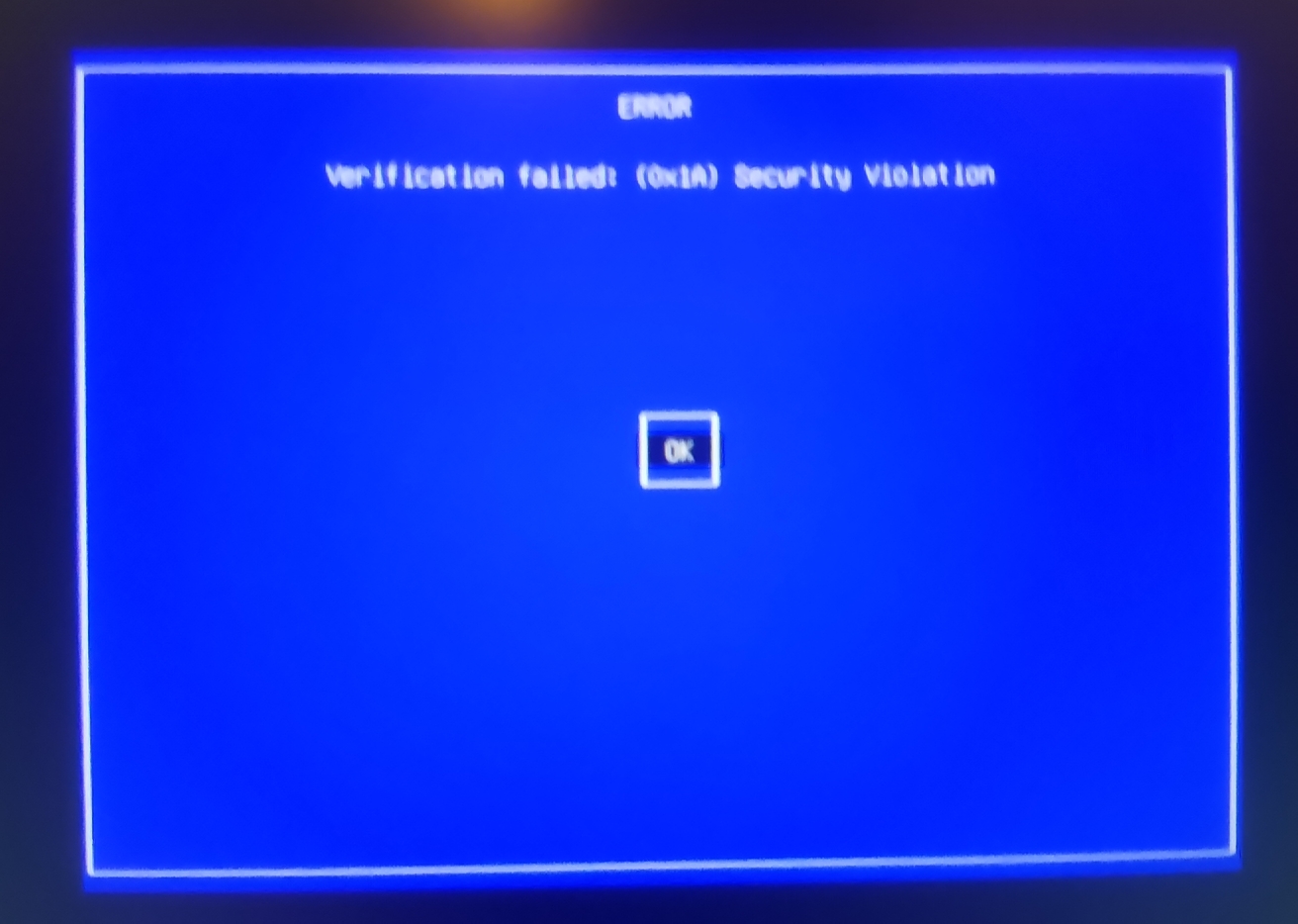
Like I said, don't hesitate to ask if there's something I haven't said...

Cheers,

brucethemoose 8 points a year ago

Not the best advice but:

  • …Do you need secure boot? The absolute easiest solution would be to disable it in the BIOS, as it’s quite finicky. This is what I do.

  • When you get to the part of “enable no free repositories” in any distro to get Nvidia working, that’s code for “we don’t support Nvidia, we aren’t responsible for something breaking and you’re on your own.” Nobara is not a bad choice (as it does support Nvidia), but in general I’d recommend a distro with 1st party Nvidia support. Probably openSUSE if it’s a workstation. Long term, this is how you avoid Nvidia problems.

Again, I’m not trying to say “you’re linuxing wrong,” but with my lack of knowledge on secure boot, I’m emphasizing my extremely poor experience of distros that do not directly prioritize Nvidia support/fixes.

path: 0 20197059, hotness: undefined, score: 8, children: 6
Hadriscus 2 points a year ago

oh, but I am, lol. I am totally Linuxing wrong, I'm new to this thing, if you don't count my clumsy forays a decade or two ago. So your advice would be to go for a distro that bundles the nvidia drivers? I'm not sure what first-party means here?

In any case thanks for the clarification, and for the advice of disabling secureboot. As I said to a few other commenters already, it's disabled now and the system boots again. I have lots on my plate still, but at least this part is...... more or less solved. Cheers!

path: 0 20197059 20213470, hotness: undefined, score: 2, children: 5
brucethemoose 2 points a year ago

Yes, exactly. Specifically, I mean the Nvidia proprietary drivers are explicitly available in the repos and installed by default if detected, which is not the case on Debian apparently.

I'd recommend openSUSE or an Arch-based distro like CachyOS, both of which put great efforts into Nvidia support in my experience.

path: 0 20197059 20213470 20216041, hotness: undefined, score: 2, children: 4
Hadriscus 1 point a year ago

I heard about CachyOS from CGI peers, good words. I might try it next. Thanks again

path: 0 20197059 20213470 20216041 20216717, hotness: undefined, score: 1, children: 3
brucethemoose 2 points a year ago

I’ve been on Cachy (with Nvidia cards) for years, in fact the same partition/install for a long time. I don’t even mess with the system anymore; it just works.

I have zero inclination to distro hop.

That being said, any Arch based distro is hands on.

  • You should be vaguely familiar with your system (as in “I run KDE Wayland, I have an Nvidia card and AMD integrated graphics, I run pipewire audio and this brand of WiFi,” stuff like that).

  • When you update, you watch the console for warnings or instructions from the maintainers.

  • You read the Arch wiki, you make informed choices about what you install if you need, say, a working printer or a particular boot manager.

Stuff is less… preconfigured and staged than other distros, but the benefit is critical mass and problems getting fixed quick, as opposed to just living with them in other distros. CachyOS (which basically sits on top of Arch) helps a lot with this preconfiguration though, as I’ve loved all the tweaks/configs they ship.

path: 0 20197059 20213470 20216041 20216717 20218315, hotness: undefined, score: 2, children: 2
omgboom 7 points a year ago

Fuck secure boot, all my homies disable secure boot

path: 0 20200350, hotness: undefined, score: 7, children: 1
Jumuta -2 points a year ago

security you don't understand is security you don't have

path: 0 20200350 20205898, hotness: undefined, score: -2, children: 0
brickfrog 5 points a year ago

This probably won't help you now (unless you decide to re-install Debian) but just for reference Debian's wiki does have some very through documentation on the Nvidia driver installation process

https://wiki.debian.org/NvidiaGraphicsDrivers

Judging from your post / the wiki page, assuming you do have Secure Boot enabled it looks like you forgot to enroll the MOK before installing the Nvidia driver. The steps also mention using dracut to add a .conf to blacklist (disable) the default nouveau driver so typically that's done before your reboot.

PS - If you started out doing this with a fresh Trixie install would it be easy enough just to re-install and then re-do the Nvidia instructions? Plus technically if you wanted you could disable Secure Boot in your BIOS before the install and skip the extra Secure Boot configuration entirely.

path: 0 20196921, hotness: undefined, score: 5, children: 3
Hadriscus 1 point a year ago

Thanks for linking to the doc. I usually rtfm, not sure why I did not have that reflex here heheh.

Regarding the secureboot issue, I followed the instructions in the tutorial in the order they were presented to me. Maybe I did forget a step! I can't really say now. In any case, I disabled secureboot and it boots again. However would you say I should fix whatever I did with the MOK key? I can't tell if it's really serious. Or can I continue using my machine in this state? I mean, with secureboot disabled? Did I break something?

Yes indeed I will wipe everything from a live image and start over. However I will definitely try a different distro, one that bundles the drivers from the get-go, the reason is : I am trying to test my video card with Linux. I've been having intensifying issues and I suspect a hardware failure, but I couldn't be sure until I used the card with Linux and it exhibits similar symptoms. So that's what this whole thing is about.

Thanks a lot for the help. I was feeling very distressed yesterday, it's better now. Cheers

path: 0 20196921 20213581, hotness: undefined, score: 1, children: 2
brickfrog 2 points a year ago

You can leave Secure Boot disabled IMO, it's kind of up to you. Either way if you're going to wipe and re-install then you can start over with or without Secure Boot - Just keep in mind you may need to perform extra steps if you opt to leave Secure Boot enabled.

path: 0 20196921 20213581 20216822, hotness: undefined, score: 2, children: 1
Hadriscus 2 points a year ago

yea I won't forget this episode heheheh. Thanks. I am writing this from Nobara 42. My machine is back in a working state (until I get to the crux of my issue, which is a hardware issue unfortunately). I cannot thank you enough (and the other folk). Cheers,

path: 0 20196921 20213581 20216822 20218225, hotness: undefined, score: 2, children: 0
SinTan1729 3 points a year ago

I agree with the other comments saying that you don't really need secure boot. But if you're like me, you might be tempted to get it to work anyway. In that case, here's a (hopefully) useful link.

path: 0 20225615, hotness: undefined, score: 3, children: 1
Hadriscus 2 points a year ago

Thanks a lot, yea even though I understand I can do without it, it's still somewhere in the back of my mind, unresolved.... for now I'll focus on getting my workstation up and running again (I have a graphics card failure on top of it all), but that link is safe in my bookmarks. Much appreciated !!

path: 0 20225615 20226960, hotness: undefined, score: 2, children: 0
Skullgrid 2 points a year ago

reposting my previous comment to help troubleshooters :

you done fucked up the secure boot settings I think. I am in no way qualified to help you.

I don't even understand how you can install a different OS. Work off a live USB if you even can.

As far as I understand this is the bit you fucked up. btw, the images in the debian forum post just show "filename1.jpg" as text and don't display. post on !/c/linux4noobs@programming.dev

Step 2: Enroll MOK key for Secure Boot

Debian updates its kernel (minor versions) regularly for security updates and fixes. Without re-building kernel modules every time, DKMS is used, which however needs be signed for secure boot using a machine owner key (MOK).

1. First, run the command below to check if Debian was installed with UEFI boot by running the command below in terminal:

ls /sys/firmware/efi

The command tells to list the /sys/firmware/efi directory content. If it says “No such file or directory”, then you have Debian installed as legacy boot.

2. Next, run command to check if secure boot enabled:

sudo mokutil --sb-state

If both UEFI and secure boot enabled (as the screenshot below shows you), then you need to run commands below one by one to create and enroll MOK key.

3. First, run the command below to manually generate a mok key.

sudo dkms generate_mok

Run sudo apt install dkms if the dkms command not found, and set a password for the key.

4. Next, run command to import the key:

sudo mokutil --import /var/lib/dkms/mok.pub

5. Finally, reboot your computer. At next boot, it should pop-up a screen (see the screenshot below), asking to perform MOK menagement.

There, just choose to Enroll MOK -> continue -> confirm -> enter password (you set when creating the key) -> reboot.

After enabled non-free repository and enrolled MOK key, you may then run the commands below to install NVIDIA driver.

First, install the kernel headers for DKMS:

sudo apt install linux-headers-$(dpkg --print-architecture)
path: 0 20195686, hotness: undefined, score: 2, children: 8
Hadriscus 1 point a year ago

The install process for Bazzite and Nobara seemed to go without a hitch, made me think I was out of the woods...

path: 0 20195686 20195818, hotness: undefined, score: 1, children: 7
Skullgrid 1 point a year ago

I think you need to enroll the mok key. I hope you remember the password you set when going through those steps.

NB : I have no fucking idea on secure boot.

path: 0 20195686 20195818 20195915, hotness: undefined, score: 1, children: 6
Hadriscus 1 point a year ago

Ok, I will look this up and try to understand what it means. I do remember the pass I set, it's just my regular password. But not sure where to type it, because when I choose "enroll key from disk" it opens a file browser where I can navigate between my disks, then into the file systems...... but I don't know what I am looking for

path: 0 20195686 20195818 20195915 20196023, hotness: undefined, score: 1, children: 5
Skullgrid 2 points a year ago

I assume this file?

/var/lib/dkms/mok.pub

path: 0 20195686 20195818 20195915 20196023 20196457, hotness: undefined, score: 2, children: 4
Hadriscus 1 point a year ago path: 0 20196349, hotness: undefined, score: 1, children: 0
linux4noobs
linux4noobs

@programming.dev

login for more options
4505
307
83

linux4noobs


Noob Friendly, Expert Enabling

Whether you're a seasoned pro or the noobiest of noobs, you've found the right place for Linux support and information. With a dedication to supporting free and open source software, this community aims to ensure Linux fits your needs and works for you. From troubleshooting to tutorials, practical tips, news and more, all aspects of Linux are warmly welcomed. Join a community of like-minded enthusiasts and professionals driving Linux's ongoing evolution.


Seeking Support?
  • Mention your Linux distro and relevant system details.
  • Describe what you've tried so far.
  • Share your solution even if you found it yourself.
  • Do not delete your post. This allows other people to see possible solutions if they have a similar problem.
  • Properly format any scripts, code, logs, or error messages.
  • Be mindful to omit any sensitive information such as usernames, passwords, IP addresses, etc.

Community Rules

  • Keep discussions respectful and amiable. This community is a space where individuals may freely inquire, exchange thoughts, express viewpoints, and extend help without encountering belittlement. We were all a noob at one point. Differing opinions and ideas is a normal part of discourse, but it must remain civil. Offenders will be warned and/or removed.
  • Posts must be Linux oriented
  • Spam or affiliate links will not be tolerated.

go to feed...