Home Assistant with proxy (bridge network to host network connection)

3 years ago by life8853 to c/selfhosted

This is more of a docker question than a selfhosted question, but i think that most of people here should be familiar with docker.

HA runs with network-mode : host (in order for autodiscovery to work) when my Nginx Proxy Manager is running on a bridge network (and in a different docker-compose.yml file), which makes them not see each other as far as I know. Could I maybe add an additional network to the HA like this:

networks:
  default:
    driver: host
  nginxnetwork:
     external: true
b1g_bake 1 point 3 years ago

I don't have it setup this way myself. I just have nginx point to http://1.2.3.4:8123 where 1.2.3.4 is the LAN IP of your docker host.

I know there are ways to connect containers with the backend docker network and I think that is what you are trying to do. I've seen examples for Caddy and Traefik doing it this way to make setup "easier".

path: 0 438762, hotness: undefined, score: 1, children: 0
rambos 1 point 3 years ago

Ill jump in while you are waiting on answer from more experienced user. My HA runs on host network and most of other containers are on their default network including NPM. NPM can manage them all, but I think you have to enable access from additional reverse proxy address in HA config

path: 0 433426, hotness: undefined, score: 1, children: 3
rambos 1 point 3 years ago

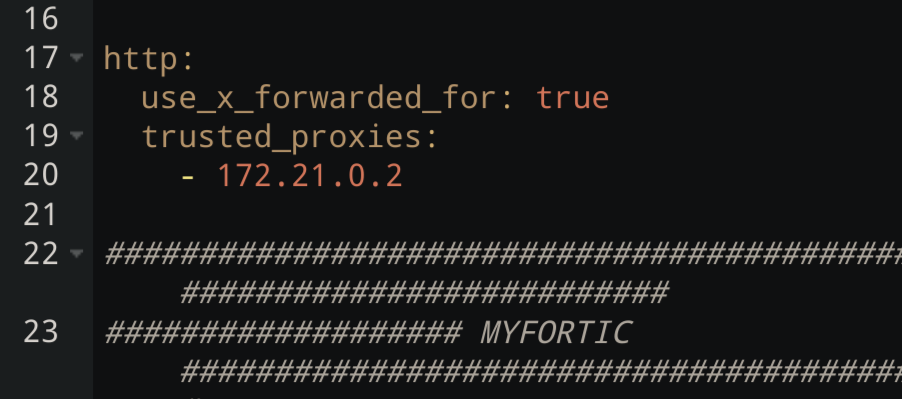
I have this in my configuration.yaml

http: use_x_forwarded_for: true trusted_proxies: - 10.0.0.200

10.0.0.200 should be your npm docker IP

path: 0 433426 433835, hotness: undefined, score: 1, children: 2
rambos 1 point 3 years ago

I dont know how to use code block in jerboa lol.

path: 0 433426 433835 433897, hotness: undefined, score: 1, children: 0
life8853 1 point 3 years ago

I do have this setup, but i don't think that npm can reach the HA, i have tried through direct IP and 127.0.0.1 and none of them seemed to work.

path: 0 433426 433835 434951, hotness: undefined, score: 1, children: 0
cdombroski 1 point 3 years ago

Pretty sure that if you're using host networking you can't add an additional bridge network. I use macvlan to provide host-like access to the network (the container gets it's own ip on your actual network) and then use bridges to connect to my reverse proxy (and also the zwave controller)

path: 0 440945, hotness: undefined, score: 1, children: 0
selfhosted
selfhosted

@lemmy.world

login for more options
63017
6817
5980

A place to share alternatives to popular online services that can be self-hosted without giving up privacy or locking you into a service you don't control.

Rules:

Detailed Rules Post

  1. Be civil.

  2. No spam.

  3. Posts are to be related to self-hosting.

  4. Don't duplicate the full text of your blog or readme if you're providing a link.

  5. Submission headline should match the article title.

  6. No trolling.

  7. Promotion posts require active participation, with an account that is at least 30 days old. F/LOSS without a paywall has exceptions, with requirements. See the rules link for details. Tags [CBH] or [AIP] are required, see the links in Rule 8 for details.

  8. AI-related discussions and AI-involved promotional posts have additional requirements for tagging, as noted in Rule 7 and the AI & Promotional Post Expanded Rules post, and find example disclosures here.

Resources:

Any issues on the community? Report it using the report flag.

Questions? DM the mods!

go to feed...
