Reorganized my BE6502 breadboard computer

7 months ago by interrupt_tv to c/electronics

My main project has been paused while I waited for a shipment of components. Who knew I would need an XNOR gate IC?

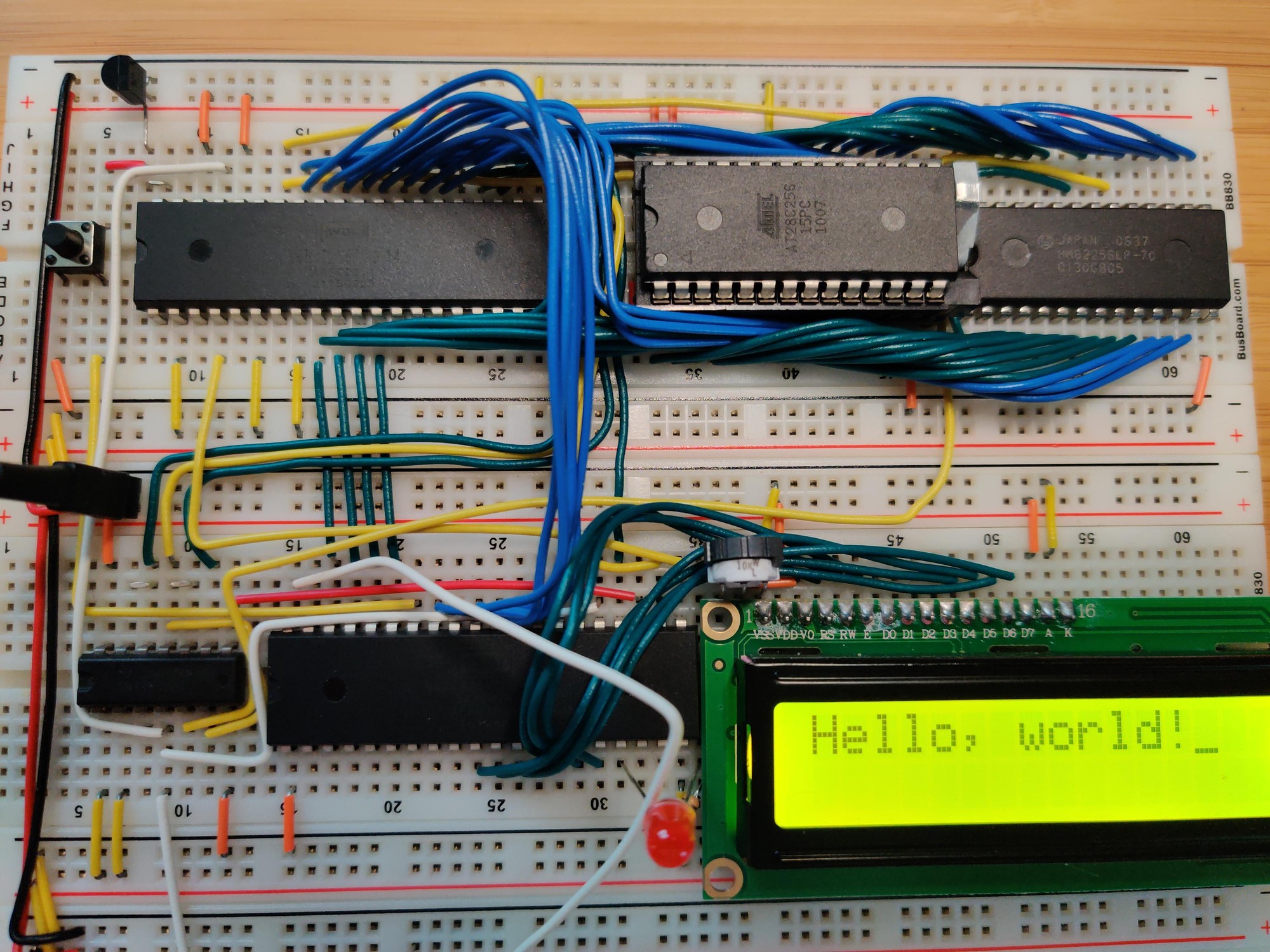
In the meantime I switched back to working through Ben Eater's videos on the 6502. I'm up to the ones on implementing the PS/2 keyboard interface. Before getting too far into it, I decided it was finally time to clean up the layout of the computer's components. Ben's layout, while compact, is also pretty messy. The address and data buses wind all over the place, making them difficult to understand and access for diagnostics or expansion. Also when I first built it I hadn't bothered to take any power rails off of the boards before connecting them together, so my power rails were doubled up:
2qmhr9dONxZwnFA.jpg

Inspired by some layouts that I'd seen on r/beneater, I went with a layout that has all the bus lines running vertically through the center of each board. Components are placed on the sides and connect to the bus lines instead of directly to each other. There are 27 bus lines:

  • 8 data lines (light green for the low nibble, dark green for high)
  • Reset (gray)
  • Clock (white)
  • 16 address lines (alternating light and dark blue for each nibble)
  • CPU read/write signal (orange)

There's just enough room on the left side for the DIP40 ICs. The DIP28s go on the right, with a few columns to spare. Since the data bus starts at column 21, it aligns nicely with the numeric labels on the breadboard. The 1st data line is at column 21, 2nd line is at 22, 3rd at 23, and so on. I put the reset and clock lines in between the data and address busses in order to maintain this pattern for the address lines: 1st at 31, up to 16th at 46. I guess I could have gotten 0-based indexing instead of 1-based if I had put the DIP40s on the right side, but the 6502 really wants to be on the left side due to its pin layout.

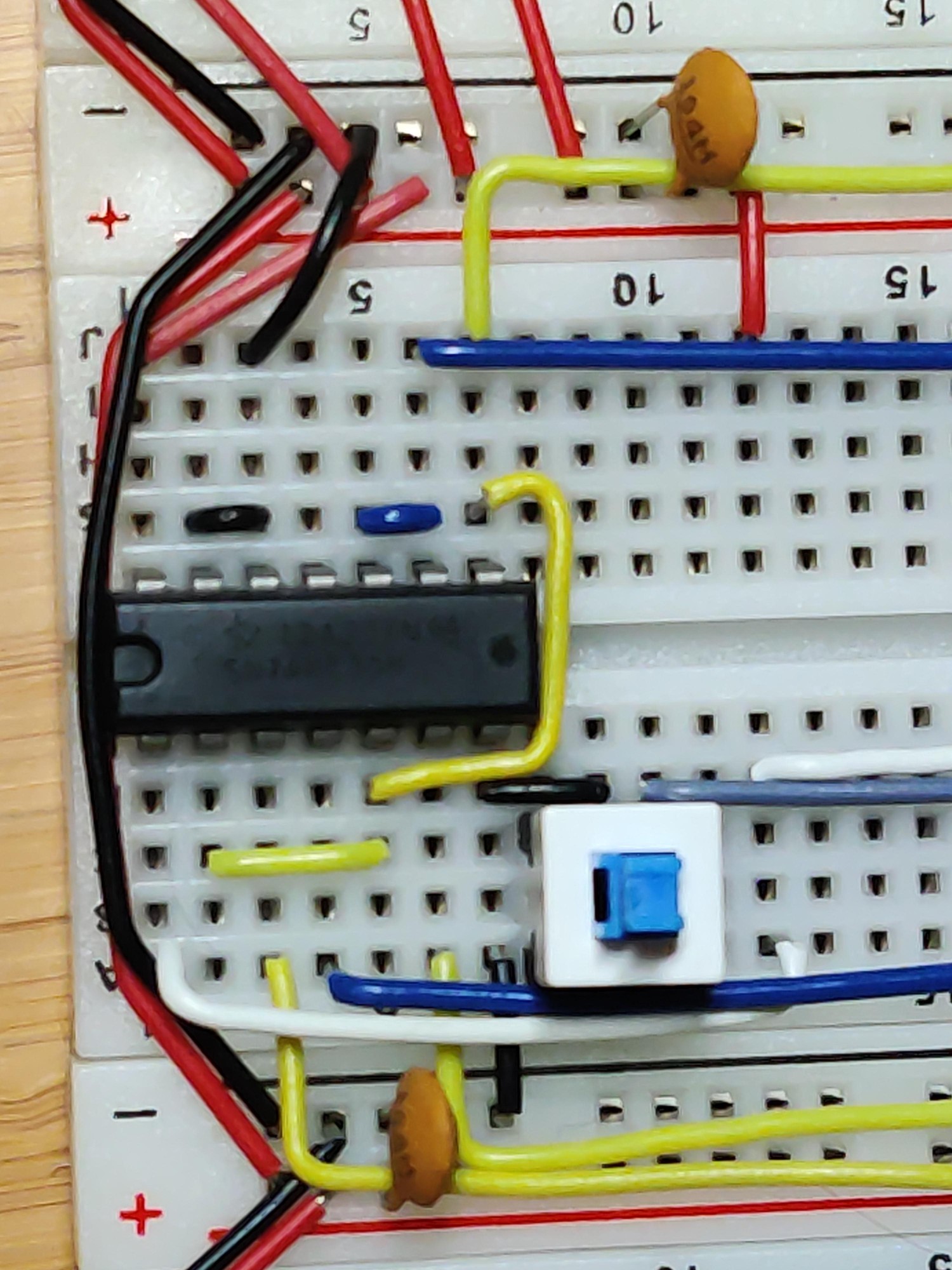
I also did some creative wiring in order to fit the reset button below the oscillator so that it wouldn't take up any extra real estate:
A681824S5Law1RY.jpg

The center pins of the button share a column with the GND pin of the oscillator. The left pins are in the unusable space between the oscillator and the NAND IC. The right pins are in an otherwise unused column that runs underneath the oscillator. Since the reset button doesn't take up any extra space, there's room for an additional DIP14 next to the oscillator, and another two DIP14s or DIP16s to the right of the bus on that board.

hayvan 18 points 7 months ago

I just came a little. That's some beautiful wire management.

path: 0 22856275, hotness: undefined, score: 18, children: 1
CapuccinoCoretto 1 point 4 months ago

Is there a /c/cableporn?

path: 0 22856275 24255175, hotness: undefined, score: 1, children: 0
adam_y 8 points 7 months ago
path: 0 22856729, hotness: undefined, score: 8, children: 0
Bazell 6 points 7 months ago

Are you planning to make it capable of running Doom?

path: 0 22856925, hotness: undefined, score: 6, children: 2
xthexder 2 points 7 months ago path: 0 22856925 22866707, hotness: undefined, score: 2, children: 1
Bazell 2 points 7 months ago

Great. Good luck.

path: 0 22856925 22866707 22867162, hotness: undefined, score: 2, children: 0
YerbaYerba 5 points 7 months ago path: 0 22859890, hotness: undefined, score: 5, children: 1
interrupt_tv 4 points 7 months ago

Definitely a great resource. I've got it bookmarked to read more of later. From the address decoding chapter, I can now better appreciate Ben's weird memory layout that leaves half of the RAM inaccessible. It allows you to hook up a ton of peripherals and use the individual address lines to select them. You can even select multiple devices to write to simultaneously, depending on which part of the address space you access.

path: 0 22859890 22864463, hotness: undefined, score: 4, children: 0
WolfLink 5 points 7 months ago

It’s a lot neater than mine! Nice job!

path: 0 22883522, hotness: undefined, score: 5, children: 1
interrupt_tv 1 point 7 months ago

With extra USB cables as a garnish. Very nice.

path: 0 22883522 22883866, hotness: undefined, score: 1, children: 0
Defectus 4 points 7 months ago

Impressive! Would love to have the time and knowledge to this

path: 0 22866456, hotness: undefined, score: 4, children: 1
interrupt_tv 5 points 7 months ago path: 0 22866456 22866566, hotness: undefined, score: 5, children: 0
defaultusername 4 points 7 months ago

I love the socketed IC on the breadboard. Also how long did this take you? Very impressive.

path: 0 22864141, hotness: undefined, score: 4, children: 1
interrupt_tv 4 points 7 months ago

Thank you. I've got the PCB design and assembly instructions here if you want to make your own: https://codeberg.org/interrupt_tv/alpz-bb

Not sure exactly how long it took. I worked on it off and on over the span of a few days.

path: 0 22864141 22864540, hotness: undefined, score: 4, children: 0
RamenJunkie 2 points 7 months ago

Dude out here doing cable management on his breadboard.

path: 0 22860158, hotness: undefined, score: 2, children: 0
theneverfox 1 point 7 months ago

Wait... This isn't click bait? Audible expression

path: 0 22883012, hotness: undefined, score: 1, children: 1
interrupt_tv 1 point 7 months ago

I reorganized my breadboard computer. What happened next will shock and amaze you!

path: 0 22883012 22883294, hotness: undefined, score: 1, children: 0
electronics
electronics

@discuss.tchncs.de

login for more options
2933
100
23

Projects, pictures, industry discussions and news about electronic engineering & component-level electronic circuits.

Rules

1: Be nice.

2: Be on-topic (eg: Electronic, not electrical).

3: No commercial stuff, buying, selling or valuations.

4: No circuit design repair, tools or component use / sourcing questions. Those go in ASKElectronics.

5: No excessively promoting your own sites, social media, videos etc.


Ask questions in https://discuss.tchncs.de/c/askelectronics


go to feed...