
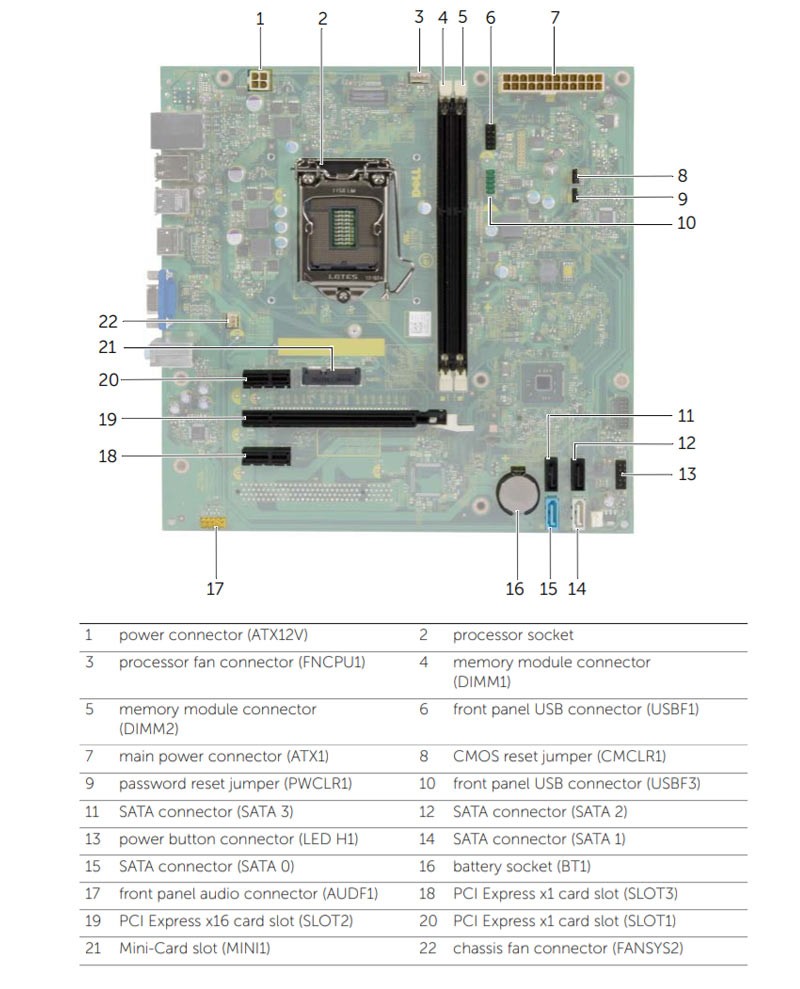
I'm using the motherboard from a Dell Inspiron 3847 for this build but I can't figure out the front IO and I can't find instructions for this motherboard anywhere. In the original case the front panel IO is handled by a single cable. Is what I'm trying to do hopeless? Surely there's a way to connect this to my new case.
What the fuck is this connector? This isn't JFP1.
2 months ago by daggermoon to c/buildapc
BCsven 11 points 2 months ago
They are proprietary and typically have a pin jumpered to ground as the dell cables sense disconnects. Some dells already have after market adapters. Let me check my notes...
Notes: I bought these, but looks like they don't have your model with 12 pin. https://store.harbinrepairs.com/...
While waiting on the order I had wired my own with some tiny connectors, after finding a wiring pinout.
daggermoon 3 points 2 months ago
I found an adapter on eBay. I'm kind of embarrassed that I couldn't find it before making this post. I wasn't searching for the right thing. In conclusion, a second look often pays off and also fuck Dell.
Edit: In case this helps someone in the future, here's the link.
BCsven 2 points 2 months ago
Awesome! Yeah dell makes it complicated, but there is method behind their madness.
Their cables all check if they are connected to what they are supposed to be connected to, so that mass assembly troubleshooting is automatic.
So the work around on the adapter board and manual wire setups is to jump one pin over to another to fake that the cable is connected to the item at the other end.
Why they chose to mess with fan wires is beyond me though...that's just cruel
frongt 8 points 2 months ago
https://www.google.com/search?q=ledh1+pinout
Bunch of good results there. First result on the images page has people discussing this exact problem: https://forums.tomshardware.com/...
daggermoon 5 points 2 months ago
I did see that graphic. Number 6 is USB though.
daggermoon 1 point 2 months ago
No worries, an easy mistake given how similar they look. Fuck Dell for using proprietary connectors.
fuckwit_mcbumcrumble 4 points 2 months ago
Led, and that many pins makes me think it’s for gamer lights. Any chance they share the same board with a higher end computer?
daggermoon 2 points 2 months ago
This is the front panel connector. I'm guessing it's referring to the HDD LED.
Romkslrqusz 2 points 2 months ago
I’m seeing “PWRSW1” in the cluster to the left.
It is possible to deduce which header is the power switch.
Do you have a multimeter and do you know how to use it?
You want to start by figuring out which pins are GND. Ultimately, you’re looking for a 3.3V signal that is always on.
Connect your power button to a pair of pins that correspond to 3.3V and GND. Pressing the power button pulls that 3.3V signal low, which tells the embedded controller that it’s time to boot up.
If you still have the case, you can also use the connector to make the same determination. With a multimeter set to continuity mode and each probe connected to the right pin, pressing the power button will result in a ‘beep’
daggermoon 1 point 2 months ago
I don't have a multimeter but I need one and I need to learn to use one. Is there one you recommend to noobs? In any case, I think I found an adapter that should solve my issue. Thank you!
tal 0 points 2 months ago
Searching, I can see some other people asking about "LEDH1" connectors, so I'd guess that it's probably something Dell proprietary. My own past experience has been that Dell doesn't always use standard connectors.
You can probably trace out the leads if you still have the old case and connector. You do that, get a pinout, you can probably rig up your own cable from the old one and splicing wires.
I wouldn't hassle with it myself, would just get a different motherboard, but if the time tradeoff is worth it to you...shrugs
daggermoon 1 point 2 months ago
At this point I'm determined to use this board as I've already put enough time and money into upgrading that shitass optiplex. It's surprisingly usable with Cachy OS.
LifeInMultipleChoice 0 points 2 months ago
https://m.youtube.com/watch?v=N1A32o4WcHA&t=117s&pp=2AF1kAIB
go to feed...
go to feed...
It’s for the LEDs to make your computer go faster.
save