
For those of you who use Raspberry Pi’s in your home environment, I’m curious as to what you use them for. What applications are you running on them? Do you have your Pi’s setup in a cluster?
Adulated_Aspersion 11 points 3 years ago
I'll give you $5 for it!
kionite231 2 points 3 years ago
Sold!!
notfromhere 1 point 3 years ago
Try running a server image on it without desktop and then logging into it over the network from another device like a laptop via ssh
dandroid 1 point 3 years ago
My usecase required a GUI. I was trying to have a mini PC connected to my TV to watch live sports games in a web browser (pirated streams). I was getting micro stutters with a raspberry pi, which made sports unwatchable.
notfromhere 0 points 3 years ago
I had similar problems doing the same thing with a Pi 4.
ippokratis 26 points 3 years ago
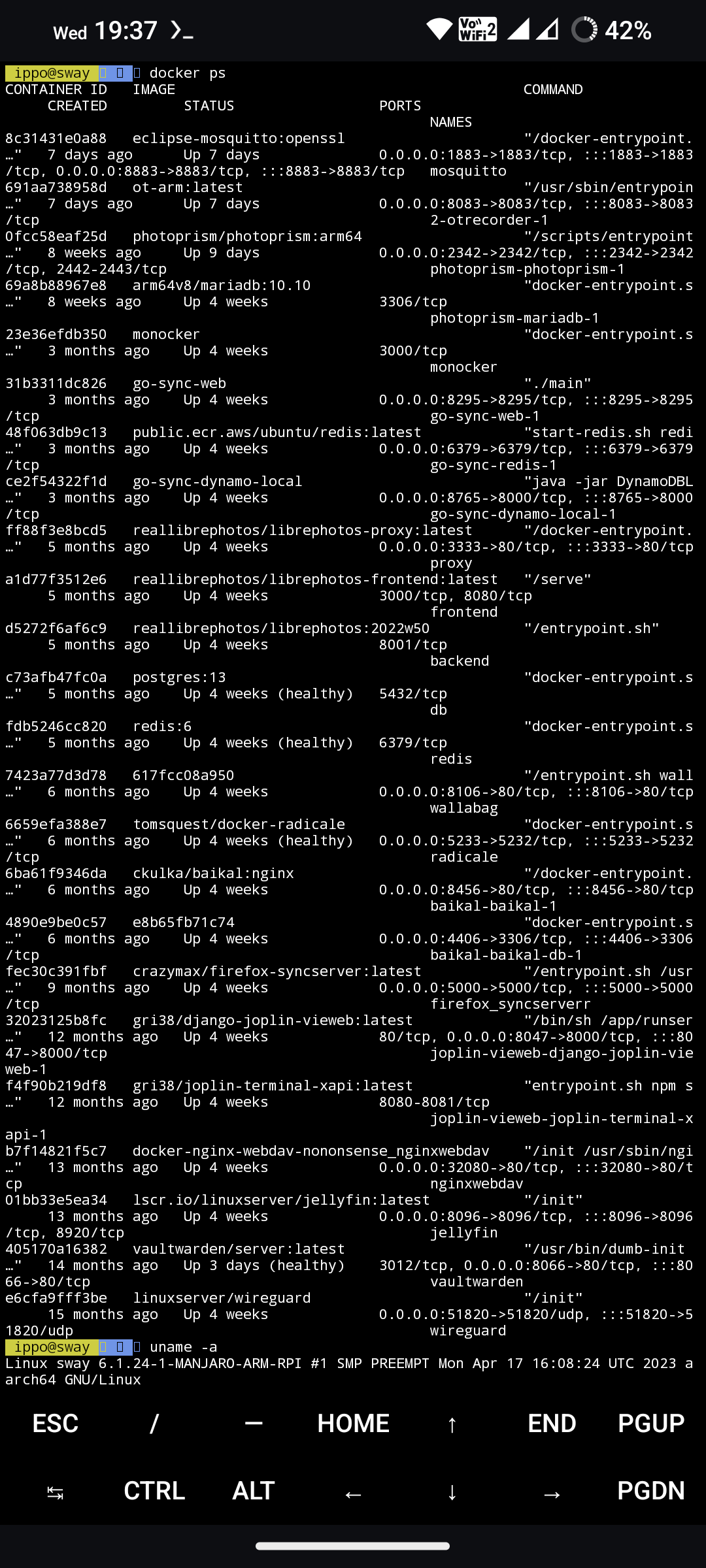
RPI4/400 is perfectly capable as a little home server. All it needs is a good SD card.
Owntracks,photoprism,monocker,brave go m-sync,libre photos,wallabag,radicals e,Baikal,Firefox sync,Joplin web,webdav server,jellyfin,vaultwarden,wireguard
ByteWizard 9 points 3 years ago
Get an eMMC module ($10) for the Pi or buy something similar with one built-in. Much faster and more reliable.
BallsInTheShredder 3 points 3 years ago
Hey where? I need that! Have a spare m2 and want to use it!
Rai 4 points 3 years ago
https://www.amazon.com/dp/B08MJ3CSW7
This is my case! It only takes SATA m.2 drives, which which I also had a spare of sitting around!
So now I have this badass SSD pi4 4GB and all it does is share a 5TB hard drive between all my computers through OMV.
I need to learn how to do a docker. I HAVE FAILED at docker and Portainer. All I want is to have it also torrent through a VPN.
Edit: OH AND I FORGOT it turns your rubbish mini HDMI bullshit ass dick connectors into REAL HDMI
Rai 2 points 3 years ago
Hmmm, I’m just using OMV on mine to make it a server that I can use to transfer files around my house.
Do you have any tips on where I could get started doing more? I haven’t had success with Docker or Portainer and I’d love to have some software hosting files like OMV, and a torrent client running through a VPN in another container.
ippokratis 1 point 3 years ago
OMV is quite limiting and maybe a little heavy for the pi(?)
Docker is straightforward Idk what to say You install docker and docker compose on host and run some compose.yml's to spin up your services
ippokratis 2 points 3 years ago
I use https://github.com/...
There are many dockerised fileservers
Rai 2 points 3 years ago
I’m running an Argon for that sweet SSD action as well!
I’m only using OMV right now and it works, but I’d LOVE to get a container with torrents via VPN… I can’t do it, though. I’m awful at it. Do you have any resources on how to set up Portainer? It changed recently, and was a weeeeird process to set up in OMV.
i_lost_my_bagel 15 points 3 years ago
This lemmy instance is running on my Pi
YIj54yALOJxEsY20eU 12 points 3 years ago
Lets see...
- nord vpn client
- qbittorrent (through nord vpn)
- proxy server (through nord vpn)
- wireguard vpn server
- ssh client so I can port forward through the vpn server to/from connected clients
- jellyfin
- ntfy (self hosted notifications)
- pi-hole (vital for the local dns)
- nginx
- gitea
- wallabag
- minecraft server
- container registery
- smb share for my friend (I help them with content creation)
- smb share for a live recording profile I set up on android
Those are just docker containers, it also is a backup server for all the devices I own. It also runs all non sensitive data on an unencrypted partition then will auto decrypt the sensitive partion through ssh via my desktop. This means my vpn server will always run so I can connect, wake on lan my desktop, decrypt it and log in. Im sure I'm missing things.
notfromhere 1 point 3 years ago
My list is very similar but I have my Pis in a k3s cluster with a NAS for PVs. That allows me to not worry about what physical device is hosting the service, and I built it so I can intermix amd64 devices when I start adding in my used laptops into the mix.
a_fancy_kiwi 10 points 3 years ago
I have one pi (rpi 4b) that I still use. I have it in an Argon One V2 case for the daughter board that lets me boot from an M.2 SATA SSD. I got tired of the corrupted SD cards. It’s actually reliable now.
Anyway, I mainly only use it because in the event of a power outage, as soon as power is restored, it automatically turns on. If I’m not home, I can SSH back into my network and send a WoL packet to my actual server to turn it back on.
The pi also runs:
- Scrypted so I can view my ring cameras in the Apple Home app and so I get the “someone is at the door” notifications on my Apple TV
- Pi-Hole
- Pi-VPN
Kaldo 9 points 3 years ago
I feel old, I don't understand 90% of words in this thread lol.
I just have kodi on Libreelec with a jellyfin plugin on my rpi4 and even that struggled with overheating at times. So I run most stuff on my pc instead. I'm tempted to try the portainer to get some experience with docker tho.
notfromhere 1 point 3 years ago
I have k3s running on my Pi cluster and have dozens of services running on them. USB drives for the lot of them.
notfromhere 0 points 3 years ago
Sure! I’m using ansible to manage the hosts, install k3s, and deploy the manifests. I’m looking at switching to nixos for reproducibility purposes. I have a couple Pi 4’s, and a handful of Pi 3Bs. Each one is booting off USB drives (Pi 4s have SSDs and others have thumb drives). Then I have an old computer I turned into a NAS server that is hosting NFS for the PVs of each pod. Then I have a rackmount gigabit switch, and I set up tailscale on each node, and reference everything by the tailnet names. Works really well and I have complete access while I’m away from home.
Edit: oh yea my NFS server is also hosting a docker server. My ansible stages the docker containers to the local docker server then each pod pulls from the local server to save on bandwidth and if internet goes down I can still do everything locally.
thatsnothowyoudoit 7 points 3 years ago
Cluster of Pi4 8GBs. Bought pre-pandemic; love the little things.
Nomad, Consul, Gluster, w/ TrueNas-backed NFS for the big files.
They do all sorts of nifty things for us including Nightscout, LanguageTool OSS, monitoring for ubiquiti, Nextdrive, Grafana (which I use for home monitoring - temps/humidity with alerts), Prometheus & Mimir, Postgres, Codeserver.
Basically I use them to schedule dockerized services I want to run or am interested in playing with/learning.
Also I use Rapsberry Pi zero 2 w’s with Shairport-sync (https://github.com/mikebrady/shairport-sync ) as Airplay 2 streaming bridges for audio equipment that isn’t networked or doesn’t support AirPlay 2.
I’m not sure I’d buy a Pi4 today; but they’ve been great so far.
Valmond 6 points 3 years ago
I made a python soft that uses the pi camera and scans qr codes, and plays the playlist that's on the eventual qr code. Just show the album and it plays.
But they have become so incredible expensive, and banana pis etc just doesn't work that well, so I just stopped the whole Raspberry Pi craze.
Today I just collected a 55€ Lenovo thinkcenter (like 18cm squared x 3.5cm) with a quad core, 8GB/256GB. I think it will replace my next rpi quite well and when it breaks, I can get another one quite simply.
If I want to do more to the metal electronics stuff, I'll just use a 2560 Mega or an esp8266 or similar.
random_character_a 6 points 3 years ago
Home security system, VPN, DNS server with pihole.
SirEDCaLot 4 points 3 years ago
security? For surveillance or something more?
random_character_a 5 points 3 years ago
Wireless Z-wave module, door sensors, fire alarm, motion sensors, hidden on/off switch. Raspberry itself works as the camera and has motion detection if needed. Event notices are sent using xmpp.
SirEDCaLot 2 points 3 years ago
Very interesting. So you basically have an alarm system in software then? What do you use for software? Do you have an arm/disarm function?
random_character_a 1 point 3 years ago
Raspberry Z-wave module came with rudimentary software, that was just awful. Documentation and debug tools were utter crap and I never want to do that kind of trial and error bs ever again.
I basicly use the software to pass trigger events to linux and handle the timing and remote UI. Linux commandline clients then handle sending messages, capturing images/video and sending captured material to a cloud server.
Software allows remote control through webpage, that you can access either directly in LAN or through an obscure server that uses reverse SSH to get past your firewal.
I blocked the shady SSH connection and only use it directly through my VPN.
NeoNachtwaechter 6 points 3 years ago
I have one Pi 4b for my Homeassistant. It is fixed to a wall, next to the routers, running 24/7.
I did not want to include this on my other Homeserver to avoid the dependency.
WaterSword 1 point 3 years ago
This is basically my setup except I don’t have any other homeserver stuff yet :) (I will once I build my new gaming pc, planning to use my old one for that stuff)
juja 5 points 3 years ago
I use it as a media remote for my computer via infrared. IR sensor sends analog data to an arduino which converts it to digital and sends it to a raspberry pi which then invokes commands to control media on my computer by invoking rest apis on a “unified remote” server running on the computer.
NeoNachtwaechter 5 points 3 years ago
Feeling impressed here...
If I want to have this, too: is there a kinda tutorial or quick-setup, or is it more like 6 weeks of tinkering? :-)
juja 2 points 3 years ago
It actually turned out to be easier than I thought.
The infrared reader (arduino code) is based on
The code running on my raspberry pi was written in Java using spring boot which is probably overkill but I am more comfortable with java than python so I used
https://github.com/Fazecast/jSerialComm
to read data from the pi’s usb port and just sent instructions to the unified remote server which does most of the heavy lifting. I used
as a reference along with some verbose logging on the unified remote server to see what codes needed to be sent over the rest api.
Happy to help you along if you want to give this a go :)
duckCityComplex 5 points 3 years ago
I have 6 4b's running PiCorePlayer for home audio. I control them with LMS and can sync them or play different things in different rooms.
duckCityComplex 1 point 3 years ago
I don't think I followed a specific guide. I'm using the HifiBerry Amp2 amplifier with the Pis. The house I moved into had Bose in-wall speakers in a couple of rooms and I added some in-ceiling speakers and a couple of outdoor speakers. Most of the speaker wires are routed down to the basement, so I can have all the Pis connected right to the switch via Ethernet.
Running speaker cable is by far the hardest thing about this. You could also connect the Pis via Wi-fi; I haven't tried that but it is supposed to work pretty well.
On the software end, it's pretty simple. PiCorePlayer is just an image you burn to an SD card and boot up on the Pis. I run LMS in a docker container. As long as the PiCorePlayer instances and LMS are all on the same subnet, they will auto-discover each other. If they're not, it's just a matter of configuring the LMS server URL on the PiCorePlayers.
LMS configuration is also pretty simple... you point it at your music folder and it will scan and index your MP3s and other audio files. It has plugins for Spotify, Tidal, Youtube, and some other apps. You can control it via browser, or there are Android and iOS mobile apps.
Once you buy the Pis, amps, power supplies, and cases, you are looking at probably $140 or so per zone... so it's not entirely cheap, but I think it's cheaper than Sonos or other pre-built systems. It sounds great and the different Pis sync very well. I don't hear any sync issues walking from zone to zone.
DeltaTangoLima 5 points 3 years ago
I used to run pretty much all my workloads on Raspberry Pis, mostly in docker containers. I've since moved over to some ex enterprise servers and Proxmox, so I really only have a couple of Pis left in service, running:
- Frigate: nvr for my IP cameras
- exim: mail relay server for my stuff to be able to email out (nothing in)
- Wireguard: outbound VPN server connected to Mullvad
- Pi-hole: 2nd instance for redundancy, also runs cloudflared (for DNSoHTTP) and pihole-exporter (for putting Pi-hole stats into Prometheus)
- Mosquitto: because I haven't moved it yet
- Prometheus: ditto
JustARegularNerd 5 points 3 years ago
Yes, it's probably pretty demanding of the hardware but my Pi4 4GB runs:
- Heimdall
- Portainer
- Vaultwarden
- Flatnotes
- ownCloud
- FreshRSS
- Paperless
lemming007 4 points 3 years ago
I run PiHole on mine
megaman 4 points 3 years ago
RP4 running Home Assistant. Running HA in a docker container is harder than running it as the OS on a Pi4. Running HA is how I get into this, i kept trying to put more crap into HA as addons before realizing i should set up a proper server.
I assembled a handful of temp/humidity sensors (that are actually running on Wemos D1 minis).
WhiteOakBayou 3 points 3 years ago
What makes it harder in the container?
megaman 3 points 3 years ago
Maybe it isnt as bad as i remember, or maybe i tried doing HA Core on the debian server or something... maybe it got better or maybe im a fool? (I definitely am a fool).
I guess it just as much came down to that I already had the pi, so just running it on that like i had for a year was less hassle than starting it via docker on the other machine?
BOFH666 2 points 3 years ago
No HACS support out of the box. (HA as docker)
The only use for RPI is kodi and Mainsail for the printer. All of them boot from NFS, so no storage issues. Everything else is x86-64 or docker containers on those Intel/amd machines.
blazeknave 4 points 3 years ago
Home Assistant
oranki 4 points 3 years ago
I used to run everything with Pis, but then got a x86 USFF to improve Nextcloud performance.
With the energy price madness last year in Europe, I moved most things to cloud VPSs.
One Pi is still running Home Assistant, hooked to my heating/ventilation unit via RS485/modbus.
I had a ZFS backup server with 2 HDDs hooked up over USB to a Pi 8GB. That is just way too unreliable for anything serious, I think I now have a lot of corrupted files in the backups. Looking into getting some Synology unit for that.
For anything serious that requires file storage, I'd steer clear from USB or SD cards. After getting used to SATA performance, it's hard to go back anyways. I'd really like to use the Pis, but family photo backups turning gray due to bitflips is unacceptable.
They are a great entrypoint to self-hosting and the Linux world though!
adonis 4 points 3 years ago
I wanted to reuse one for octoprint, but it turned out to be unreliable. So I switched to my NUC instead.
I have the feeking that those SD cards just don't perform well and wear out more easily, and I really use good ones.
klangcola 1 point 3 years ago
For RPi the two major causes of issues (in my experience) are low spec power supplies and low spec SD-cards.
Power supplies drop voltage when the loads gets too high, which is especially pronounced with high power USB devices like external harddrives.
SD-cards tend to get worn out or give write errors after enough writes. Class 10 SD cards are recommended for both speed and longevity. And ideally try to avoid write intensive stuff on the SD card
ohmesocorny 2 points 3 years ago
Forget SD cards for Raspberry Pis - boot from an SSD in a USB enclosure, they have better longevity than SD cards.
rambos 2 points 3 years ago
Not all of them can run reliably without an external power supply and not all enclosures/usb hubs/sata adapters are supported. But yeah lot of people recommend that. I also had great experience with sd cards, but that might be just a luck
mykneedoesnthurt 1 point 3 years ago
Small piece of tape on one of the 4 exposed USB leads on the connector trick fixes this problem.
thirdBreakfast 4 points 3 years ago
One 3B+ runs my network services - things I need to stay up if I restart the production server. Another one has a specialist role - IP gateway into the ham radio AllstarLink network - connected to a 70cm radio with a modified USB sound dongle.
thirdBreakfast 2 points 3 years ago
A mate did that bit - CM108 I think.
a_fancy_kiwi 1 point 3 years ago
What do you do with your ham radio? I mean, besides the enjoyment of getting licensed and learning how to use one, what do you do with it?
thirdBreakfast 2 points 3 years ago
lol - great question. I was very excited at the start and did things like talk to a guy in Spain with 5W and a long bit of wire out in the bush, talked to people 400 km away by pointing a handheld antenna directly at a satellite as it passed overhead, received images directly from the amateur station on the ISS, met a heap of smart old guys who were doing interesting things with radio - designing antennas, setting up repeater networks etc. I went in a couple of competitions (in ham radio this is usually about how many contacts you can make over a time period). But ultimately, it turns out I like interesting technical problems, learning things, and buying stuff I don't need off the internet - more than chatting to people I don't know. So now I'm more into Linux and self-hosting which scratches a lot of those same itches.
I still have a short range radio in the car and a couple of handheld radios. With these I can key into that Raspberry Pi, have the audio travel over the internet and pop out anywhere in the world there's another AllStar point and go over the air to radios there, but I've sold all my HF gear (that allows you to talk direct to anywhere without infrastructure).
It is an interesting, and quite diverse hobby, and there's a lot of cheap Chinese radios, and a bottom tier license in most countries that's easy to obtain (for example without learning Morse code). I'd recommend it to people interested in tech stuff. It's a hobby that might not exist in 50 years - a lot of the radio spectrum allocated to ham radio in the old days was considered worthless, but now governments regard that as a valuable public asset that can be sold to telecommunication companies. Also there's growing interference from digital gadgets and wireless devices that requires innovative solutions to overcome.
a_fancy_kiwi 3 points 3 years ago
But ultimately, it turns out I like interesting technical problems, learning things, and buying stuff I don't need off the internet - more than chatting to people I don't know.
This is exactly why I’ve never taken a legitimate look into the hobby. I think I’ll keep admiring from afar until I find a good use for it
received images directly from the amateur station on the ISS
This concept makes sense but I always assumed ham radio was just about audio. That’s pretty cool
So now I'm more into Linux and self-hosting
You probably know about this already but just in case, since you have an interest in radio and you have experience with antennas, you might have a cool project that could benefit from LoRa. There’s a few open source projects that incorporate the tech to make sensors for crops or messaging friends at festivals when cell towers are overloaded
thirdBreakfast 3 points 3 years ago
I'll check it out, I can probably buy some stuff and add it to my half finished projects pile :-D
This concept makes sense but I always assumed ham radio was just about audio. That’s pretty cool
Digital modes is one of the big growth areas in the hobby, along with the revolution of SDR
cmeerw 3 points 3 years ago
I am actually using a OrangePiPC as:
- WLAN access point (hostapd)
- LTE Internet via a E3372 USB dongle
- radio via DVB-T dongle/Internet
- USB speakers for the radio
- Bluetooth dongle to connect to Bluetooth-enabled speaker in another room
- USB temperature sensor, motion sensors via GPIO
- VoIP telephone with connected USB headset
- small LCD display to show the current temperature and incoming call information
a_fancy_kiwi 1 point 3 years ago
How do you like your Omada gear? Any reason you went with their stuff over Ubiquiti?
Tiritibambix 3 points 3 years ago
I use a RPi3 for pihole and a RPi4 with debian + docker to host a bunch of stuff (in no spécific order): goaccess-for-nginxproxymanager
filebrowser
smokeping
searxng
duplicati
whoogle
nginx-proxy-manager
flaresolverr
linkding
ntfy
changedetection.io
librex
shlink
speedtest-tracker
unbound
wg-easy
Bytemeister 3 points 3 years ago
Yes. I use it for my PiHole and Wireguard VPN.
dampfnudel 1 point 3 years ago path: 0 3842495 3842696, hotness: undefined, score: 1, children: 1
a_fancy_kiwi 1 point 3 years ago
Just curious, why have the reverse ssh connection to a VPS?
Deebster 2 points 3 years ago
It allows me to connect into the house via the VPS without opening ports or knowing my home address.
Nowadays there are various companies offering tunnelling services, but my setup has been working for a long time and I see no reason to change.
a_fancy_kiwi 1 point 3 years ago
I clearly don’t know enough about reverse ssh connections.
My understanding is that you tell the VPS to connect to your computer, a shell pops up on your end, and commands run in it will control the VPS. It helps get around firewalls and makes it less obvious to defenders that an attacker has control of a box because it’s not an inbound connection, it’s an outbound connection.
What’s your workflow? So you ssh into the VPS and maybe use Tmux or Screen to connect to a terminal session, that session is connected to your home machine but instead of sending commands back to the VPS, it sends commands to your home computer?
BallsInTheShredder 3 points 3 years ago
I'm new to the party and am still experimenting, not super tech savvy but I've been doing a few things.
I have one SD set up for retro gaming via Lakka. Wish Lakka had an option to add a desktop like RetroPie but just really love the interface and ease of use. Tried recalbox and it's nice as well! Can't remember why I settled for Lakka.
Another SD is for experimenting at the moment. As mentioned I'm brand new to the pi community so I've installed Raspbian on it and have just been testing the waters. Set up iirc my first VNC network between it, my PC and my phone. Also have been using it to rip and burn DVDs via brasero. Don't have wifi at home, I use a hotspot which complicates using my printer wirelessly so I'm considering using the pi as a network for that. There's also a cool program I found where you learn musical coding? It's pretty interesting though I still don't really know what it's for haha.
I'd really like to do more with it but as mentioned am just learning. Hell, I just got it running a few weeks ago after it had been down for a couple years so I'm sure I l'll be doing more when I find the time.
I'd love to set it up in my vehicle and have Spotify, gps navigation, retro gaming etc through it but seems like a big project with my limited understanding ATM.
mlg 3 points 3 years ago
Have a pi4 8gb and every time I need it for some mini graphics project, the GPU lags no matter how much vram I give it, so I usually end up using some old laptop with a GPU and the pi goes back to random things like data collection with sensors or some funny breadboard projects.
Also use it to evaluate lightweight linux distros.
Decipher0771 3 points 3 years ago
I have 2 Pi 4s in operation. One is a Moonlight/USBoverIP stream gaming portal. It automatically turns on and connects to a VM running Sunshine on my Proxmox host, passes any USB controllers/bluetooth etc to the VM so the big loud gaming box is in the basement and the tiny Pi is next to the TV. 1080p60 works great, minimal lag.
The other acts mostly as a quorum server for the proxmox servers, I have two proxmox hosts and use the second Pi to ensure the cluster doesn’t get split brain. It also acts as a USBoverIP host for my home automation Zigbee and Zwave usb sticks, so that either proxmox host can connect to the USB sticks and the home automation VMs aren’t locked to a physical host.
meyotch 3 points 3 years ago
Not much love here for the Pi Zero W. I love them for being so flipping cute. I have a couple I use when I am learning a new system admin tool or service and I need to be able to let it run undisturbed to observe stability and function.
Lately I am learning MQTT so am using one as a broker to manage some homemade smart devices.
If I can ever find one in stock, i want a couple of Zero 2 for similar projects that would benefit from the extra oomph.
sevanteri 2 points 3 years ago
I have a Zero with a macropad attached. Key presses are then sent to Home Assistant through MQTT. The zero is perfect for it, small and low power.
Still wondering what to actually do with my Zero 2.
Father_Redbeard 3 points 3 years ago
I have a pi 3 running my primary instance of Adguard Home, a pi 4 I don't know yet what to do with, and a Pi B that has RISCOS on it for fun. Seriously, if you ever just want to poke around a unique OS, download the official RISCOS image in the Raspberry Pi imager. Any UK folks reading this know what I'm talking about. But as an American I'd never heard of it and it's just friggin' neat!
Cysioland 3 points 3 years ago
Currently on my Pi4 I'm running Home Assistant for home automation, Semaphore for nightly runs of my Ansible playbooks, and Wireguard for VPNing into my local network. I've moved from PiHole to AdGuard running on my router, as it's far fewer moving parts.
On my Pi Zero I'm running Pi-Star for my amateur radio needs.
Anafroj 2 points 3 years ago
I'm using a pi4 8gb as my server, with a pi4 2gb as backup in case the first one dies. It's a very classic server, running postfix/courier-imap for mails, lighttpd for web, bind9 for dns, ergo for irc, sqlite3 for databases. I also use fail2ban for IDS and cron to run tons of various task. All of that is hosted on a Gentoo linux OS.
The one thing I don't want to use is docker. I love docker for development or for deploying the main app at work, but it makes managing updates a nightmare for handling multiple services on my server (most your containers probably contain vulnerable software due to lack of system updates), and it eats resources needlessly. Then again, it's made possible because I avoid the big webapps that usually need it.
MangoPenguin 2 points 3 years ago
The only one I have running atm is for Klipper/Moonraker/Mainsail for my 3D printers.
Otherwise I find them so slow to work with that I don't really like using them, just something like an apt upgrade can take several minutes or more.
digilec 2 points 3 years ago
A Raspberry Pi 3 Model B
It's connected to my 3d printer and runs octoprint allowing me to upload print jobs. and control the printer from my home network.
It serves up the Pi camera video stream.
It can also switch the printers light on and off.
No cluster setup.
Treczoks 2 points 3 years ago
Got a bunch of RPIs, some of them retired.
One of the active ones runs a MediaWiki engine (if it detects my home wifi on startup, it acts as a mirror slave to the master installation on the server, if not, it opens a wifi with my home wifi's credentials and offers the wiki as read-only).
Another one runs a DB that controls a number of ESP8266 clients controlling lights, motors, and sensors.
clavismil 2 points 3 years ago
Sure you can check https://trash-guides.info/
and here is my setup, I'm using podman containers for everything
BeigeAgenda 2 points 3 years ago
The first one is a Kodi player.
The second one was originally intended for RetroPi, but now it's a mp3 player running MPD, and connected to my sleep headphones.
dwindling7373 2 points 3 years ago
I have RetroPi that can run Kodi inside of it.
BeigeAgenda 1 point 3 years ago
Yep that's also how I set it up, it boots up in RetroPi and then you can start Kodi from there, but now I mostly boot up on the MPD SD card instead. I have also configured it to be a Bluetooth speaker, so I can attach the phone.
BeigeAgenda 1 point 3 years ago
I couldn't find a simple plug and play solution, so it took several tries to find the right guides, especially because raspbian have changed their Bluetooth/audio setup, so the old guides don't work.
The solution I found uses a script/daemon that sets up the speaker and waits for Bluetooth connections.
I'll look for the script...
Edit: found it https://github.com/...
I added a systemd service running as root.
merthyr1831 2 points 3 years ago
I run a Pi4B 8GB as a home server for Plex, Nextcloud, and Torrenting. Works fine for up to 1080p x264 stuff but I might grab a Pi5 or alternative when it launches because I'd like to start storing x265 stuff too. I even opened it up to a few family members outside the household too and we barely notice the extra load
freeman 2 points 3 years ago
I have 3.
Dakboard above the fridge shows calendar and shared photo album. It also runs bluetooth and serves as a relay for Homeassitant and a few kitchen devices (ie: igrill mini probe for meat).
pikvm for a desktop
pikvm+ kvm for lab rack esxi servers.
the latter two also run tailscale and allow me to SSH proxy if needed as a back VPN/remote access utility.
There is also a 4th. It runs NUT/UPS tools for their network gear and a mail relay for alerting and also tailscale so I can proxy if necessary.
Since its tailscale etc. Only key based auth is allowed on these boxes.
mondoman712 2 points 3 years ago
I have a Turing pi V2, currently with only one CM4 module in it, running some *arrs, paperless, smb and some monitoring.
Vex_Detrause 2 points 3 years ago
Raspberry Pi 3 B+ with Pihole. Its hard to look at websites without Pihole. Oh! I have another running Octopi for my 3D printer.
thatguy_ie 2 points 3 years ago
I've got a few
- Pi 4 with a 1tb SSD for my proxmox backups
- Octopi for 3d printer
- One running as a Spotify connect client for some "dumb" bose speakers in the lounge
Darkassassin07 2 points 3 years ago
Ones dedicated to being an openvpn host for my phone to be permanently connected to (pi4), and a second runs pihole + nginx as a reverse proxy into the rest of my http(s) services (pi3b+). The vpn keeps my phone behind pihole when mobile + gives access to lan only services.
The proxy being separate lets me take any of the other machines offline and the proxy will serve a 'service unavailable'/'maintenance' page instead of just timing out the connection. It serves 2-3 8mbps video streams regularly without issue.
khorak 1 point 3 years ago
Do you have any recommendations or good to go config for openvpn+android? I used my regular setup / config and somehow the VPN client I used didn't like it. I am not sure if it's that (there are some legacy / unsupported config settings which never clients don't tend to support) or I messed up somehow.
Anyway, I would be grateful for some pointers or a link on setting up the client and server config correctly.
dan 2 points 3 years ago
OpenVPN is good but I'd recommend Wireguard or something built on top of it such as Tailscale. Way more flexible than a traditional client-server VPN. Wireguard doesn't have clients and servers; it just has "peers". You can have peers directly communicate with other peers (like a partial or full mesh), or you can route certain routes through a peer to simulate parts of a traditional client/server VPN.
BCsven 2 points 3 years ago
Open Media Vault on a pi setup with external hard drive. Mainly for Samba Shares, and added the DAAP server. And since it comes with portainer I used that to setup HomeAssistant, Syncthing, CUPS, kanboard, whoogle, and Trilium Notes. Amazing little piece of tech.
AlecStewart1st 2 points 3 years ago
I got a RPi 3B as my Pi-Hole that I'll eventually use as my Wireguard VPN, too. Hoping to get another Pi device for hosting Jellyfin on.
Boring 2 points 3 years ago
I bought a pi0 when I first started hosting things. It ran a pihole and piVPN instance for about 3-4 years before it died.
I would love to have another one, they are great pieces of hardware.. but are just scalped to hell. I'll keep buying old desktops and laptops with higher specs for cheaper until the costs go down.
Lyricism6055 2 points 3 years ago
Only use it as a backup pihole now. Used to have an *arr stack on it, but needed a beefier pc
BallsInTheShredder 1 point 3 years ago
What's that?
KelsonV 1 point 3 years ago
I have a single Raspberry Pi 3b as a local file/media server running Jellyfin. I'm also running BOINC and seeding torrents of various Linux distributions. External HDD for storage, plus a thumb drive for the local media and another for the torrents so it only has to spin up when someone's actually using it.
It's not super-fast by any means, but it's fast enough to listen to music over my LAN, which is the main thing I need it to do quickly. Though eventually I plan on setting up a better NAS on something with faster I/O.
avidamoeba 1 point 3 years ago
I'm only using Pi 4 hardware:
- OpenWrt gigabit routers with SQM, multiple locations
- Home Assistant Yellow
- NAS with RAID1 (mirror), deprecated
PseudoSpock 1 point 3 years ago
K3's cluster, Gitlab, Ghost, Nextcloud, Elastic stack, and some other stuff.
CoopaLoopa 1 point 3 years ago
Using a Pi3b to run AdGuard Home and a TailScale subnet router.
I've got another Pi3b running Octoprint/Klipper for a 3d printer, but I'm currently migrating that to Mainsail running on an old SFF PC so I can run multiple printers with Klipper off the same PC.
The rest of my stack is on an actual server running UnRaid with like 50tb raw storage.
I will say that TailScale has been annoying asf with their subnet router setup not actually forcing the correct DNS for AdGuard Home so I can have ad-blocking while away from home. I had to move back to a pure Wireguard setup directly on my router for DNS to work properly.
meteokr 1 point 3 years ago
I use a Pi4 to run one of my HAproxy nodes. It does die once in a while from not enough power because my power brick is pretty old at this point. Other than that its great. I used to have a cluster of Pi3's bit I'm transitioning cluster managment systems so they aren't doing anything right now. I recently got a Lichee pi and that will most likely replace them once I get it all working.
Darkscryber 1 point 3 years ago
One for pihole
I used one in the past for Unify Controller but it broke
Another one is a USB wifi hub to control my telescope equipment remotely.
ninekeysdown 1 point 3 years ago
Testing ideas with kubernetes before moving to the POC stage
dbilitated 1 point 3 years ago
use it for home assistant. I'm astonished because my test install from years ago on a pi that's around 7 years old is going with no intervention aside from updates. it's crazy robust.
for a while my laptop was slow and I needed a test local environment rebuilding with webpack so I set up a newer pi that ran the Dev servers so my laptop didn't choke. I've got a better laptop now.
aredditimmigrant 1 point 3 years ago
1 Pi 4 for two things
- Download media over a persistent VPN that auto-moves to my NAS
- Fun play toy as a dev box to test new tech and try to stay current and keep my Linux skills sharp since I use osx at work
1 ends up blocking 2
I really want to buy like 5 or 6 with temp sensors to put around the house to see how good my heating/ac are working, and confirm wifi strength
Aggravationstation 1 point 3 years ago
I have Home Assistant on one and Kodi (Libreelec) on another
mesamunefire 1 point 3 years ago
I used to use them for all my setups. Then the shortages stopped that. Nowadays I just use one big server.
seaQueue 1 point 3 years ago
One for home assistant, one for very basic network services (dns, auth, dhcp) that I want up all the time even if I have to shut down the router+firewall. If I have to upgrade the firewall box I don't want to be unable to print, or use smart home stuff.
Khanzarate 1 point 3 years ago
I used a pi 3 to host a Foundry server (TTRPG software).
I use Docker to simplify things, since I run two instances of it. Simple port forwarding setup within the docker container. the main reason I used a pi instead of my computer is so my players could access their dnd stuff all the time.
I stopped because I switched ISPs and they won't let me port-forward. My vpn supports it but the latency isn't ideal. I host the same thing through a cheap server now.
Khanzarate 1 point 3 years ago
Dunno enough about ipv6, wouldn't my ISP still need to allow it?
That's my understanding, and there's no option in their locked-up router to enable it, for ipv6 either.
turing_spider574 1 point 3 years ago
I use a pi 3 to host backups from my main server via restic. I also have a pi 4 that I use as a VPN server
bayleafwalker 1 point 3 years ago
I've got several for random little tasks that crop up, but main use is for the conbee II I have running the zigbee network for all the smart lights. I've got a UPS hat using some old 26650 cells for battery backup, mostly so that if power cuts off I don't run into any issues with the setup and the rare cases where I have to take the power off the server rack for whatever reason. RPi has actually been rock solid for couple years now so no issues with that side, wife approval factor has likewise been high
Also got a Turing Pi but haven't had a change to play with it too much yet. For most everything else I'm running a docker and VMs in TrueNAS, but would probably change that setup at some point..
captain_aggravated 1 point 3 years ago
I've got one as a Pi Hole, one as a Kodi box, and a few others I keep around as basically electronic multitools.
Redderthanmisty 1 point 3 years ago
I have a pi zero running as a doorbell camera, alongside a couple more CCTV cameras, and a pi4 running in kiosk mode connected to my motioneye server displaying said camera streams on a crappy old TV in my home office.
Redderthanmisty 1 point 3 years ago
It's actually cheaper than getting an Amazon Ring too, provided you already have mains access from an existing doorbell, and a 3d printer on hand.
7fb2adfb45bafcc01c80 1 point 3 years ago
I have one set up as an irrigation controller. I was going to build an OpenStack cluster to test configuration settings on (I run a production cluster at work), but gave up when the supply chain problems happened and prices skyrocketed.
RememberTheApollo_ 1 point 3 years ago
Yes.
The jobs they do:
LAN print server
Running OctoPi for a 3D printer
PiHole and VPN for the home LAN
Experimenting with OpenHab
Portable Kodi box.
And a crappy mass storage server via USB.
Holzkohlen 1 point 3 years ago
Pi 3b to run syncthing
thelastknowngod 1 point 3 years ago
Mostly as kodi/plex front ends. I've set them up as a kubernetes cluster in the past but they didn't have enough ram to run my torrent client. Now I just use an old Thinkpad running talos.
thayer 1 point 3 years ago
I have a couple of Pis, but currently only using the Pi 4 which is my Kodi box (LibreELEC). I planned to use my older Pi 3B as a web server, but I also have Proxmox on a NUC running as my main home server, so I don't know if there's any advantage to using the Pi at this point.
chepox 1 point 3 years ago
I have a water container I need to take care of in my house. An ultrasonic sensor hooked to my raspberry 3b uploads the collected data to my vps that later serves an html through Flask to show the water level. It has a few alarms so that I can take action at the appropriate time. The ultrasonic sensors HC-SR04 suck and I have to replace them quite frequently. Other then that it works really well.
Tinnitus 1 point 3 years ago
I have been for about a year with one 8gb Pi 4 with a 500gb ssd. I bought it as a way to dip my toes into self hosting. Started with Home Assistant OS, but now I have a bunch of containers set up, such as Home Assistant, Plex, Sonarr, Radarr, Prowlarr, qbittorrent, and a few others. I will eventually get something a little beefier to host my media, but will absolutely keep the Pi running.
digger 1 point 3 years ago
I have a Pi 3 running Home Assistant. I also have two Pi Zeros that I have MP4 Museum installed.
I use MP4 Museum to run projected Halloween decorations mostly but it's great to have a little box that will take a video file from a thumbdrive and dump it out the HDMI port on boot.
Decronym 1 point 3 years ago
Acronyms, initialisms, abbreviations, contractions, and other phrases which expand to something larger, that I've seen in this thread:
| Fewer Letters | More Letters |
|---|---|
| DNS | Domain Name Service/System |
| HA | Home Assistant automation software |
| ~ | High Availability |
| HTTP | Hypertext Transfer Protocol, the Web |
| IP | Internet Protocol |
| MQTT | Message Queue Telemetry Transport point-to-point networking |
| NAS | Network-Attached Storage |
| NUC | Next Unit of Computing brand of Intel small computers |
| PiHole | Network-wide ad-blocker (DNS sinkhole) |
| Plex | Brand of media server package |
| RPi | Raspberry Pi brand of SBC |
| SATA | Serial AT Attachment interface for mass storage |
| SBC | Single-Board Computer |
| SSD | Solid State Drive mass storage |
| SSH | Secure Shell for remote terminal access |
| VNC | Virtual Network Computing for remote desktop access |
| VPN | Virtual Private Network |
| VPS | Virtual Private Server (opposed to shared hosting) |
| Zigbee | Wireless mesh network for low-power devices |
| nginx | Popular HTTP server |
[Thread #170 for this sub, first seen 27th Sep 2023, 16:05] [FAQ] [Full list] [Contact] [Source code]
acceptable_pumpkin 1 point 3 years ago
One runs Home Assistant (Pi4), and an older one runs RetroPi (Pi3) for my arcade cabinet.
I have another Pi3 that I used to use as a Steam Streaming device to put my PC games on the projector.
Violet_McQuasional 1 point 3 years ago
Use an old Pi 3B for running zigbee2mqtt on docker.
I used to run just the Linux version of it but decided to install docker on the Pi so it's as easy as doing docker-compose pull to update it.
This is so I can control my various lights and switches using Home Assistant.
erre 1 point 3 years ago
I have four Pis. They're running Pihole DNS & DHCP, a reverse proxy, and torrent clients. I don't have them setup as a cluster, been meaning to look into it but I don't want to add complexity so I'm putting it off.
yournamehere 1 point 3 years ago
pi3 once died on me so i tried pine64 sbc and they never die...so no, i wont buy pis anymore.
Darkassassin07 2 points 3 years ago
I've had a few issues with sd card corruption over the years, so I wrote a script to mount a local ssh server then backup the whole sd card to it as an .img each day.
Then whenever I have an issue (even just my own stupidity) all I've gotta do is pull the sd card and write the latest .img to it.
Darkassassin07 1 point 3 years ago
Single backup? Ie overwriting the previous backup? Maybe you didn't get to restoring it until after it had backed up the broken files.
Multiple backups over days helps. I keep a weeks worth of daily backups in case I miss the issue for a while. The script appends the date to the filename.
MrMcGasion 1 point 3 years ago
I used to have a self-built, locally-hosted power strip with individual outlet control that served it's own interface. It was powered by a Model B+. I've since moved to home-assistant and zigbee plugs since my self-built solution was pretty bulky, but it was by far my longest lived Pi project.
Semi-Hemi-Demigod 1 point 3 years ago
I only have one that's hooked up to my 3D printer for Octoprint. I'd like to set up another one as a SDR, but I leave my app hosting to more powerful machines.
troglodytis 1 point 3 years ago
ADS-B antenna that feeds Flightaware, FlightRadar24, and ADSBexchange

selfhosted
@lemmy.world
62992
6808
5747
A place to share alternatives to popular online services that can be self-hosted without giving up privacy or locking you into a service you don't control.
Rules:
Be civil.
No spam.
Posts are to be related to self-hosting.
Don't duplicate the full text of your blog or readme if you're providing a link.
Submission headline should match the article title.
No trolling.
Promotion posts require active participation, with an account that is at least 30 days old. F/LOSS without a paywall has exceptions, with requirements. See the rules link for details. Tags [CBH] or [AIP] are required, see the links in Rule 8 for details.
AI-related discussions and AI-involved promotional posts have additional requirements for tagging, as noted in Rule 7 and the AI & Promotional Post Expanded Rules post, and find example disclosures here.
Resources:
- selfh.st Newsletter and index of selfhosted software and apps
- awesome-selfhosted software
- awesome-sysadmin resources
- Self-Hosted Podcast from Jupiter Broadcasting
Any issues on the community? Report it using the report flag.
Questions? DM the mods!
go to feed...
selfhosted
@lemmy.world
62992
6808
5747
A place to share alternatives to popular online services that can be self-hosted without giving up privacy or locking you into a service you don't control.
Rules:
Be civil.
No spam.
Posts are to be related to self-hosting.
Don't duplicate the full text of your blog or readme if you're providing a link.
Submission headline should match the article title.
No trolling.
Promotion posts require active participation, with an account that is at least 30 days old. F/LOSS without a paywall has exceptions, with requirements. See the rules link for details. Tags [CBH] or [AIP] are required, see the links in Rule 8 for details.
AI-related discussions and AI-involved promotional posts have additional requirements for tagging, as noted in Rule 7 and the AI & Promotional Post Expanded Rules post, and find example disclosures here.
Resources:
- selfh.st Newsletter and index of selfhosted software and apps
- awesome-selfhosted software
- awesome-sysadmin resources
- Self-Hosted Podcast from Jupiter Broadcasting
Any issues on the community? Report it using the report flag.
Questions? DM the mods!
go to feed...
I own a raspberry pi 4. Every time I try to use it, I spend half my time trying to fix the stuttery/non responsive UI by fucking with the compistor and such. And then I give up.
I eventually got a new gaming PC and turned my old one into a Linux server, and haven't really touched my Raspberry Pi since.
save