
Accent Colors: A Proposal for GNOME ⋅ Cassidy James Blaede
3 years ago by joojmachine to c/linux
GNOME's stance on user customization has been "users can do whatever they feel like using 3rd party tools like Gradience or entirely custom CSS, but if you're a distro maker then only use the Approved Ways(tm) to customize things"
Now, I have zero clue if that solves anything (it very likely doesn't), but it's actually more than most people give them credit for.
I'd say "go join in on the issue tracker and tell GNOME about this" but hearing from some people who tried that before you I'm not too hopeful that would do much of a difference. All I know is that complaining here isn't going to solve anything.
GNOME’s stance on user customization is: we don't give a shit about having basic desktop functionality because its hard to implement and you may use 3rd party stuff that will never be as good or as integrated as something implemented on the DE.
That's not really fair. GNOME has been working on LibAdwaita and GTK4 for quite some while to actually have stable and usable tools to make the missing functionalities happen. And they been adding these in a really good rate in the last 2 releases. Until now we really just didn't had the tools to implement a lot of stuff.
If you look across to KDE land, and not to bash on them I love KDE, they've been much quicker to introduce features but then also spent many releases fixing bugs and sometimes completely re-implementing those features to work properly.
Hmm... isn't that the same thing they told us when GTK3 was made? That they had to do a major rewrite in order to move forward and implement all the things people were requesting...
KDE can be fast and all but they seem to lack some common sense when it comes to design, you've, for instance, inconsistent spacing across DE elements.
i agree with almost all of this, but i just want to say:
How in windows 10 can I tell if a window has focus or not? In Win 3.1 to 7 and anything running on Linux it was easy: the title bar colour was different. But since Win 8 that was dropped, windows still have focus and modal dialogs but you, the user, can not determine which has what and when.
if you tick "show accent colour on titlebars", windows does draw the current window titlebar distinctly coloured (so i guess it's actually better than gnome in that sense)
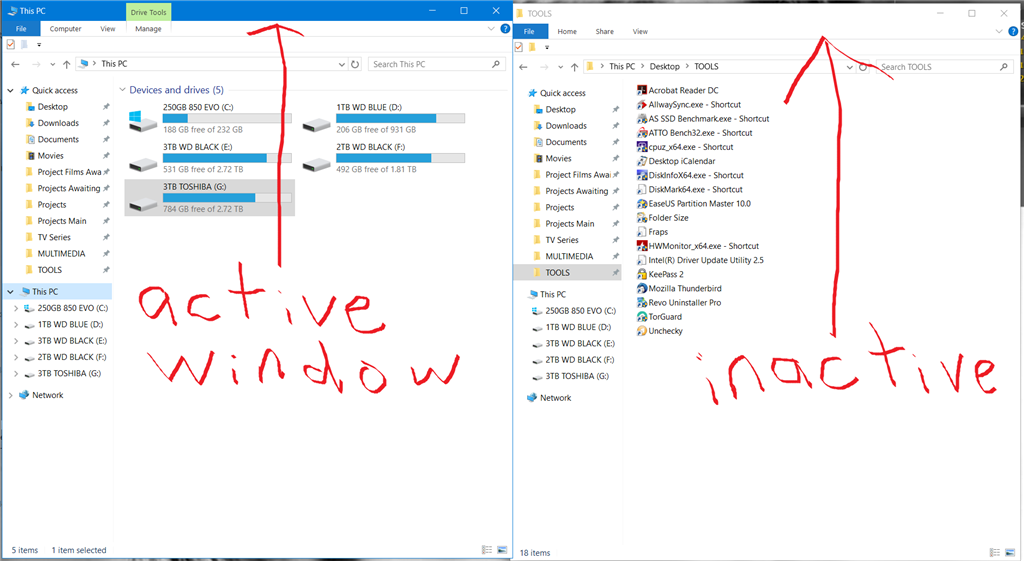
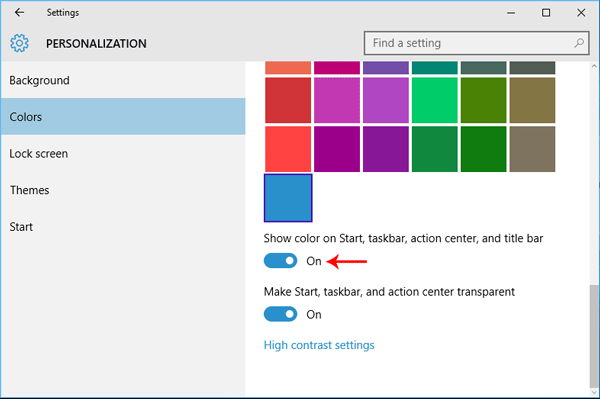
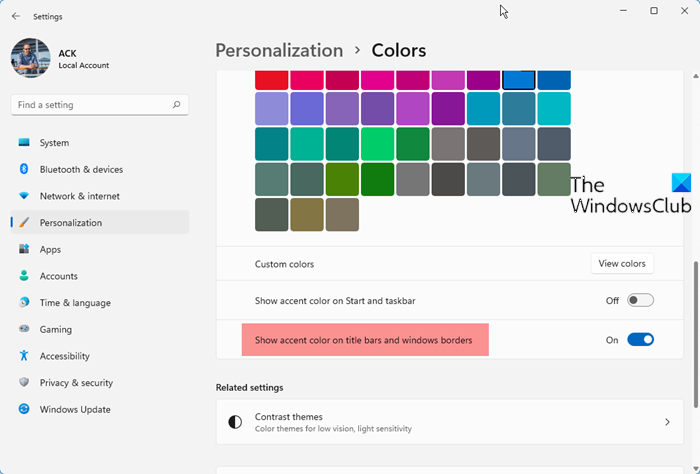
You are in explorer. Try other apps. You'll find they are very different, Outlook for example. Firefox, chrome all break the rules, Firefox looks inactive all the time unless you enable the menu bar and notice the boldness of the text.
The apps themselves are not helping by doing their own thing. As I use mostly Office and Firefox during the working day this may be where the problem actually lies so maybe it's a case of Windows 10 not enforcing the UI look and behaviour onto other apps?
to be honest, that's not my screenshot and i haven't actually used windows in a while
outlook i don't know about, but firefox^[1]^ and chrome draw their own titlebars so they'd have the same problem on linux, be it gnome or otherwise.
any programmes can draw their own titlebars on win or linux (i don't know about mac), but if you only use programmes that use native titlebars (i tend to) then they'll all follow the system settings
[1] this can be disabled in ffx by right-clicking the top bar → customise toolbar → tick title bar (bottom left)
Interesting take. I didn't think of inverse filters but they should definitely be used in a design developer cycle.
Working through the book right now!
I get it, it would rather see development time spent in having desktop icons (disabled by default) and always visible dash like macOS.
Other more important features would be a system-wide way to control the border radius of everything and frankly some kind of decent font rendering that didn't include a blur of 100px around every letter.

@lemmy.ml
From Wikipedia, the free encyclopedia
Linux is a family of open source Unix-like operating systems based on the Linux kernel, an operating system kernel first released on September 17, 1991 by Linus Torvalds. Linux is typically packaged in a Linux distribution (or distro for short).
Distributions include the Linux kernel and supporting system software and libraries, many of which are provided by the GNU Project. Many Linux distributions use the word "Linux" in their name, but the Free Software Foundation uses the name GNU/Linux to emphasize the importance of GNU software, causing some controversy.
Rules
- Posts must be relevant to operating systems running the Linux kernel. GNU/Linux or otherwise.
- No misinformation
- No NSFW content
- No hate speech, bigotry, etc
Related Communities
Community icon by Alpár-Etele Méder, licensed under CC BY 3.0
go to feed...
@lemmy.ml
From Wikipedia, the free encyclopedia
Linux is a family of open source Unix-like operating systems based on the Linux kernel, an operating system kernel first released on September 17, 1991 by Linus Torvalds. Linux is typically packaged in a Linux distribution (or distro for short).
Distributions include the Linux kernel and supporting system software and libraries, many of which are provided by the GNU Project. Many Linux distributions use the word "Linux" in their name, but the Free Software Foundation uses the name GNU/Linux to emphasize the importance of GNU software, causing some controversy.
Rules
- Posts must be relevant to operating systems running the Linux kernel. GNU/Linux or otherwise.
- No misinformation
- No NSFW content
- No hate speech, bigotry, etc
Related Communities
Community icon by Alpár-Etele Méder, licensed under CC BY 3.0
go to feed...
What? This crazyness is coming over from Windows?
All colours are and should be under the full control of the user, as it always has been so. So called "accent colours" removed critical functionality from Windows as well as breaking the UI since windows 8.
As a software tester of 10 years and a CS Degree holder, I certainly would have never passed software that didn't meet these usability tests.
I'm colourblind. I must have full and unhindered colour modification options, the GUI will look the way I decide based on what I want and how my eyes perceive it. This especially means I must have full control over titlebar colours and any other colours that used to differ based on window focus.
At work in Win 10 I have chosen an "accent colour" which seems to me a massive limitation, having had used superior GUI's since Win 3.1 where the user is able to chose and adjust anything from the colour of title bars when focused or unfocused to the font used on numerous UI elements and widgets.
The problem is simple. Windows 10 grants (I say that in a sarcastic way) the user have the option to chose a so called "accent colour". This however fails to do two things. Firstly it forces the design choices of the development team onto every user, something that is clearly wrong for Linux as history shows it was a plus over windows. Secondly, the accent colour fails to address several UI modal changes, completely obliterating them yet the modal elements remain part of the UI!!!
How in windows 10 can I tell if a window has focus or not? In Win 3.1 to 7 and anything running on Linux it was easy: the title bar colour was different. But since Win 8 that was dropped, windows still have focus and modal dialogs but you, the user, can not determine which has what and when.
Now, like I said I'm colour blind which means maybe there is a difference but I can't see it. So what do I do? Well I randomly start typing commands into the wrong powershell window, or I want to control the browser using the keyboard only to discover that Outlook has focus and has started doing things in response to me banging keys. I have two monitors at work and focus moves between them and windows gives me no indication what has focus at all. Nothing I can see, out of the corner of my eye that is.
Thing is there is just one difference, the focused window might have a bold titlebar text or not. Note I bolded that. But I can't see this difference without pixel peeping.
Every day I have to put up with this in the windows world and it annoys the hell out of me because the essential functionality was always there and has been removed because someone tossed a coin*. Maybe GNOME won't fall into the trap of preventing full customisation of the UI, I hope so, user accessibility needs require it. I moved away from GNOME when they moved away from the desktop metaphor as I thought the alternative was terrible, and it still is, so this won't affect me but it will affect loads of new colourblind users from the start.
The user has the last say and should be able to override anything.
HCI (Human Computer Interaction) rules exist for a good reason, stop chucking them away and make them options if needed.
And finally, take it from an actual colourblind computer users and electronics geek. Colour blindness accessibility filters DO NOT WORK. They simply don't because everyone has a different kind/degree/combination of colour blindness. Normal visioned people are easy to demonstrate to as all we have to do is apply such a filter in reverse and they are like "Whoa what the hell" yet they fail to see (pun intended) that it's a simulation that barely represents our individual colour ranges. Windows 10 has a colourblind mode, does nothing. Android has one, which has me try and sort colours to determine my specific adjustments, works better but still barely is used by myself.
The only fix is to give the user full control over all colours because then they, they can adjust the UI for the way they see the universe.
Here is an example from the linked blog. See this GUI. Which window has focus? The one on top? Well if GNOME prevents windows from always remaining above others regardless of focus, yes that would be the case. But if GNOME does allow focus to windows beneath others, well, which has focus? I cant tell.
I had intended on uploading images but that seems to not be working with this post/lemmy instance at the moment. Basically if you look at the blog there are examples. First of all the "pink" example, well that shades of grey to my eyes as pink rarely is a colour I can notice, most pinks are grey. Further down are examples of a stop clock application. Looking at the image I see most of the clocks digits are disabled, thats what grey means, disabled elements. However it turns out that they may be pink? Only the seconds are enabled, this is highly confusing as why would anyone be allowed to think a clock has digits disabled? It makes no sense and has me figure out the answer, which is bad UI design from the start. All the digits should be the same colour. It's basic HCI rules there.
Further down you see the screenshots of the entire desktop with a window above another. In none of those examples can I tell which has focus. I can not assume its the one on top, plenty of UI's have "keep on top" functionality, if I'm coming from something else why would I assume GNOME to be different?
Accent colours are bad. They force users to use static themes and UI choices made by other people, that is bad UI design, really bad. Windows 10 is lambasted for it often. If you are going to do it, do it right. The "accent" feature should be part of a simple customisation mode, but it all gets overridden by the advanced tickbox.
save