How can I quickly "unclog" firefox when it runs out of memory (with 1000/2000 tabs)

2 years ago by interdimensionalmeme to c/firefox

Hi, Once in a while I try to clean up my tabs. First thing I do is use "merge all windows" to put all tabs into one window.

This often causes a memory clog and firefox get stuck in this state for 10-20 minutes

I have recorded one such instance.

I have tried using the "discard all tabs" addon, unfortunately, it is also getting frozen by the memory clog.

Sometimes I will just reboot my PC as that is faster.

Unfortunately, killing firefox this way, does not save the new tab order, so when I start firefox again, it will have 20+ windows open, which I again, merge all pages and then it clogs again !

So far the only solution I have found is just wait the 20 minutes.

Once the "memory clog" is passed, it runs just fine.

I would like better control over tab discard. and maybe some way of limitting bloat. For instance, I would rather keep a lower number of undiscarded youtube that as they seem to be insanely bloated.

In other cases, for most website I would like to never discard the contents.

In my ideal world, I would like the tabs to get frozen and saved to disk permanently, rather than assuming discard tabs can be reloaded. As if the websites were going to exist forever and discarding a tab is like cleaning a cache.


originalfrozenbanana 74 points 2 years ago

Maybe don’t have a THOUSAND tabs

path: 0 10675540, hotness: undefined, score: 74, children: 4
interdimensionalmeme -34 points 2 years ago

I will, not, do that.

path: 0 10675540 10676085, hotness: undefined, score: -34, children: 3
originalfrozenbanana 21 points 2 years ago

Then you will have software that doesn’t work. This is not a Firefox problem, or a problem of extensions, or anything but a user problem.

If your 1998 Toyota Camry is struggling to haul a cargo container up a hill it’s not the car’s fault. You’re doing it wrong. Whatever tasks you’re trying to do with 1000 tabs, a web browser is the wrong tool for the job.

path: 0 10675540 10676085 10685103, hotness: undefined, score: 21, children: 0
Crashumbc 11 points 2 years ago

I'm using the wrong tool in the wrong way and won't stop!!!

Help me!!!

ROFL...

path: 0 10675540 10676085 10692761, hotness: undefined, score: 11, children: 0
possiblylinux127 7 points 2 years ago

Well then we can't help you

path: 0 10675540 10676085 10685943, hotness: undefined, score: 7, children: 0
0oWow 55 points 2 years ago

You're not likely going to get any real help since you're insisting on using the browser in an extreme and unconventional way. Your little world is just one browser/OS crash from losing all of those tabs.

path: 0 10675997, hotness: undefined, score: 55, children: 13
interdimensionalmeme -15 points 2 years ago

I can save all the tabs easily

Here I show how to save 1775 tabs with one click

https://youtu.be/YaSl1Bb750Y

Ordering and sorting them, that is an impossible task That's why i keep them open

path: 0 10675997 10676139, hotness: undefined, score: -15, children: 1
PipedLinkBot 1 point 2 years ago

Here is an alternative Piped link(s):

https://piped.video/YaSl1Bb750Y

Piped is a privacy-respecting open-source alternative frontend to YouTube.

I'm open-source; check me out at GitHub.

path: 0 10675997 10676139 10676151, hotness: undefined, score: 1, children: 0
lemmyvore -27 points 2 years ago

What is amazing to me is how some people will come out of the woodwork to tell a person when they think they're using their browser "wrong". Just let them be if you have nothing to contribute.

path: 0 10675997 10676927, hotness: undefined, score: -27, children: 10
jwt 31 points 2 years ago

If someone is trying to achieve a goal through (what they might not know are) impossible means, "letting them be" isn't going to help them.

Although it might not seem very helpful (and indeed there are better ways of helping) pointing out the flaws in the approach is contributing more than "letting them be". Doesn't cost a thing to be civil about it though.

path: 0 10675997 10676927 10677238, hotness: undefined, score: 31, children: 6
lemmyvore -8 points 2 years ago

What OP is trying to do isn't impossible it's actually very interesting. There are lots of people who use tab workflows instead of bookmarks. And I think everybody would benefit from better in-browser search. Just because bookmarks is how it was done 30 years ago doesn't mean we can't try new things.

path: 0 10675997 10676927 10677238 10678814, hotness: undefined, score: -8, children: 5
jwt 10 points 2 years ago

Unless you bring a solution to the table, taking the position that it isn't impossible is just cheap contrarianism on your part. Sure we can try new things, but if it doesn't work and everyone is commenting the approach isn't helping, then maybe take the hint. Or not, and keep swimming against the stream (in which - seeing OP's other comments - they seem to be more interested than actually solving the problem)

path: 0 10675997 10676927 10677238 10678814 10683083, hotness: undefined, score: 10, children: 4
possiblylinux127 12 points 2 years ago

You are objectively using it wrong. Its is like asking how to make your minivan break the sound barrier because you want to get to work faster.

path: 0 10675997 10676927 10685928, hotness: undefined, score: 12, children: 0
Crashumbc 10 points 2 years ago

They ARE contributing, in this case the correct answer is "don't do that"...

path: 0 10675997 10676927 10692793, hotness: undefined, score: 10, children: 0
0oWow 3 points 2 years ago

Feel free to use your browser how you want, but I will feel free to not help you troubleshoot your problem because it won't help you in the end.

path: 0 10675997 10676927 10684235, hotness: undefined, score: 3, children: 0
chillhelm 47 points 2 years ago

I'm not going to tell you that you're managing your information wrong. I would physically die if I had ever more than 20 tabs (my ADHD couldn't handle it).

But I think you might be using the wrong tool. A browser (like Firefox) is not really designed as an information manager. It's primary purpose is navigating and visualizing web pages. So when you talk about "a few megabytes of text and images" thats not what your browser sees. Your browser handles more than just the text and images. It also handles fetching and prefetching, a browser history for every tab, a JS context and much much more.

What you want is some kind of personalized archiving system that processes websites into machine processable (ie searchable) structures. Firefox is not that. Maybe data hoarder communities will have the answers you seek.

path: 0 10677310, hotness: undefined, score: 47, children: 3
possiblylinux127 3 points 2 years ago

I die at anything more than 5

path: 0 10677310 10685810, hotness: undefined, score: 3, children: 0
interdimensionalmeme -15 points 2 years ago

Well so far, it would be too much friction and extra labour to export each tab to external software.

I'm not even sure what software other than a browser would display live web pages in a more organized manner than firefox ?

I'm pretty sure I just hit a bug that's causing firefox to wake up too many tabs and not handle tab discarding correctly. Firefox does seem like the best tool still even if it's not working right.

What I would like instead is a browser that treats tabs more like virtual machines that you can roll back, suspend to disk and resume. Little package of data that get frozen in time and are externally searchable.

Anyway, here's my setup

path: 0 10677310 10677453, hotness: undefined, score: -15, children: 1
chillhelm 7 points 2 years ago

What I would like instead is a browser that treats tabs more like virtual machines that you can roll back, suspend to disk and resume. Little package of data that get frozen in time and are externally searchable.

Maybe look at ArchiveBox. IIRC it has pretty much everything you ask for including an import from your browser history and bookmarks.

path: 0 10677310 10677453 10683611, hotness: undefined, score: 7, children: 0
Etterra 45 points 2 years ago

The solution is to see a psychotherapist because dude is there something strange happening in your brain and it really needs fixing.

path: 0 10675799, hotness: undefined, score: 45, children: 9
interdimensionalmeme -31 points 2 years ago

I think the machine built to handle hundreds of trillions of operation per second should be better at handling a few gigabytes of text and images.

path: 0 10675799 10675885, hotness: undefined, score: -31, children: 1
riodoro1 36 points 2 years ago

Fuck, you're welcome to create your own web browser if it’s that easy.

Oh sorry, i forgot you have a lot of shit going on.

path: 0 10675799 10675885 10677268, hotness: undefined, score: 36, children: 0
interdimensionalmeme -46 points 2 years ago

Yes, it's a disease called "having a lot of shit going on and not wanted to spend my afternoon sorting tabs" It is cured by "throwing all tabs in the bin and starting over" because today's computer are so incredibly weak they can't handle a few megabytes of text anymore.

path: 0 10675799 10676080, hotness: undefined, score: -46, children: 6
Dirk 19 points 2 years ago

Your solution is a database or information management system.

path: 0 10675799 10676080 10678756, hotness: undefined, score: 19, children: 1
interdimensionalmeme 0 points 2 years ago

I've researching that and it seems the bottleneck is going to be transfering the tab inner information to secondary storage software. This is often a multi step process and also imperfect. With many website expressly frustrating this attempt by deleting and reloading data which is out of sight.

For instance trying to archive a facebook thread. As you scroll down the thread, it loads tge text ahead, but it also delete a few pages behind.

I'm not sure tab data can be expected to translate reliably to another store systen. It might have to stay in the browser.

Best I could figure so far is a rolling video screenshot, but that makes the data huge and difficult and imprecise to search as you now have to OCR evety frame to make it searchable again.

path: 0 10675799 10676080 10678756 10693772, hotness: undefined, score: 0, children: 0
Sanctus 17 points 2 years ago

Okay I know people are being rude. You have to understand its not just text. Your browser sends a request to a server for a webpage and it downloads that webpage, all media included. Its not just text. The only solution here is disabling all of your addons and going one by one until the merge all works. Or finding a work flow that doesn't involve the goal of reaching 20k tabs. Browser are not designed to search through tabs. Firefox has bookmark tags and keywords to search or instantly open a link. But tabs are not meant to be this repository of where you've been.

path: 0 10675799 10676080 10677345, hotness: undefined, score: 17, children: 1
interdimensionalmeme -9 points 2 years ago

I mean, look at how much data a youtube tab actually download, versus how much it occupies in memory. I think the strict memory isolation between tabs, so that one tab crash doesn't take down the entire browser, has become uneconomical. I think combining some tab memory. Especially tabs of the same websites, especially their libraries, would greatly reduce the memory consumption and probably overall speed. I rarely ever get crashes until I bust both my ram and swap. I would sacrifice some tab isolation to get some memory back.

path: 0 10675799 10676080 10677345 10677698, hotness: undefined, score: -9, children: 0
throws_lemy 15 points 2 years ago

because today's computer are so incredibly weak they can't handle a few megabytes of text anymore.

I mean, sites today are more richer compared to earlier 2000s. We have css, more complex js scripts, embedded fonts, embedded videos etc. I'm sure you understand that it takes more than a few megabytes of RAM.

path: 0 10675799 10676080 10678535, hotness: undefined, score: 15, children: 0
possiblylinux127 2 points 2 years ago

You have thousands of things going on?

path: 0 10675799 10676080 10685942, hotness: undefined, score: 2, children: 0
Sanctus 41 points 2 years ago

If you need quick access to this many pages I suggest organizing bookmarks. As this is what they are meant for. Tabs are meant for active pages you are working with. So anytime you get that many tabs with any browser its gonna run like shit.

path: 0 10675236, hotness: undefined, score: 41, children: 10
tyler -1 points 2 years ago

Nah, FF handles thousands of tabs just fine. I literally have just as many if not more tabs than OP and have never seen this issue. It’s either from the merge they’re doing or something else. It would be better if y’all just worked under the assumption that this does work and something is otherwise wrong with op’s setup.

path: 0 10675236 10683124, hotness: undefined, score: -1, children: 2
Sanctus 2 points 2 years ago

The issue is parsing all that. There is no way you can keep that many tabs readily accessible like tabs are meant to be. Which is why these addons were born and are not official parts of Firefox. This is one of those just because you can doesn't mean you should situations. I get they've adopted this workflow, but reading through this it sounds more like daily driving than actual work. Which makes this even more bizarre, you can't read them all, they have to reload when you open them after a while (ie download again) so all points are moot. You aren't saving the page, you are holding onto a shell that will request the page again when you wake it up. If the server went offline never to be seen again your tab will not hold the information.

With this workflow, it might be better to have a crawler dump everything into folder hierarchies that are content searchable, and then search that like google using specialized software. I dont see any other reason you could even have 1k tabs open efficiently, you aren't searching through that, might as well google again and follow the purple links.

path: 0 10675236 10683124 10683321, hotness: undefined, score: 2, children: 1
tyler 1 point 2 years ago

Yeah I think that everyone here is latching onto the workflow part of this, when I don't think that's the problem here at all. OP mentioned that they search these, etc. but the real problem is the merging of windows, correct? So why can't these windows merge properly? Well it's probably the extension sucks (because I can drag hundreds of tabs around in sidebery just fine) or that they have disabled swap mem.

I understand everyone is freaking out about the workflow, but this is the reverse of the XY problem, like what happens on SO. Everyone tells them they're doing it wrong rather than just telling them how to do what they're trying to do. If OP had said "I have 2gb of ram and I have 30 tabs open in different windows and I use this extension to merge them and FF freezes" no one would be batting an eye about helping them.

path: 0 10675236 10683124 10683321 10690391, hotness: undefined, score: 1, children: 0
interdimensionalmeme -21 points 2 years ago

I find organizing bookmarks incredibly tedious. I have bookmarks folder with thousands of tabs in and it's just easier to use google again to re-find the information than to pick them out of bookmarks. Also tabs just keep the title and URL so you can't even search the text inside. So, organizing a library of tabs is like a much worse version of google without previews. I also use the session manager addon but again, when you open thousands of tabs, it clogs up the memory almost instantly. It's taking multiple gigabytes of ram, just to display a few kilobytes of text ! I wish the browser would just render the page as a static searchable text and image and then ditch all the javascript garbage.

path: 0 10675236 10675704, hotness: undefined, score: -21, children: 4
Sanctus 18 points 2 years ago

May I ask why you have to have this level of access to thousands of pages? Even for my job I have maybe 8 active that I use Firefox keywords to jump to.

path: 0 10675236 10675704 10677175, hotness: undefined, score: 18, children: 0
Tywele 8 points 2 years ago

You can also tag your bookmarks and search for those.

path: 0 10675236 10675704 10676806, hotness: undefined, score: 8, children: 2
interdimensionalmeme 0 points 2 years ago

I would prefer not to save and tags tabs 500 times per day. It's easier to let them accumulate and handle them all in memory.

500 tab save and tag per day is too much labour, I would spend half my day just fiddling and sorting bookmarks !

path: 0 10675236 10675704 10676806 10768648, hotness: undefined, score: 0, children: 1
Tywele 2 points 2 years ago

What the hell are you doing that you need 500 NEW tabs every day?!

path: 0 10675236 10675704 10676806 10768648 10768748, hotness: undefined, score: 2, children: 0
interdimensionalmeme -31 points 2 years ago

That takes too long. Organizing tab is the computer's job !

path: 0 10675236 10676100, hotness: undefined, score: -31, children: 1
optissima 29 points 2 years ago

Literally isn't, which is why you're hitting a wall.

path: 0 10675236 10676100 10676193, hotness: undefined, score: 29, children: 0
MangoPenguin 28 points 2 years ago

Have you tried bookmarking things instead of leaving them open as tabs?

path: 0 10686075, hotness: undefined, score: 28, children: 3
interdimensionalmeme 2 points 2 years ago

Yes, I find that it identical to closing a tab. I never go in the bookmarks manager after. It is very clunky to use, it adds extra steps compared to keeping the tab open. At that point, it's usually easier to use google to find it again, since at least google can search text inside the page, not just the title. I do occasionally dump my thousands of tabs into the bookmarks managers, in a single unusable folder. It hasn't yet happenned that one of these tabs was retreived. But I hope in the future that I could dump all these tabs into another piece of software that will fetch all the tab's body data and allow me to search it all with a local LLM based search like "using my bookmarks, create one browser window with all URLs on the topic of the 7 megahertz maser" We're close but not there yet.

path: 0 10686075 10689617, hotness: undefined, score: 2, children: 2
MangoPenguin 3 points 2 years ago

You might be interested in this then, it's an app that uses AI to auto-tag saved bookmarks: https://hoarder.app/

path: 0 10686075 10689617 10699301, hotness: undefined, score: 3, children: 1
interdimensionalmeme 1 point 2 years ago

Neat!, thanks

path: 0 10686075 10689617 10699301 10701373, hotness: undefined, score: 1, children: 0
eager_eagle 27 points 2 years ago

geez, just press Ctrl+W when you're done with a tab, or if the tab is older than a couple hours

I don't understand why some are so attached to tabs. Search your history if you need it again.

path: 0 10675455, hotness: undefined, score: 27, children: 10
interdimensionalmeme -28 points 2 years ago

I tried closing tabs, I have to finish reading them, make sure I got everything and that whatever reason I had for opening that tab was done. The result is that I spend all most all my time trying to close and sort and order tabs instead of doing what I was trying to do in the first place. And then the browser freezes for 10 minutes.

Something is very wrong that 64GB is nowhere near enough to handle a few megabytes of text. And searching text inside of all tabs is an unthinkably difficult operation ?

Where did the web go wrong !?

path: 0 10675455 10675755, hotness: undefined, score: -28, children: 9
settoloki 26 points 2 years ago

It's not the web it's you dude. You're not using the software the way it's intended to be used. There is no reason at all to ever need 1000+ tabs open.

path: 0 10675455 10675755 10675954, hotness: undefined, score: 26, children: 0
eager_eagle 24 points 2 years ago

It's not the web. It seems to me you might have an attention deficit issue. Try improving your workflow.

path: 0 10675455 10675755 10676374, hotness: undefined, score: 24, children: 7
interdimensionalmeme -26 points 2 years ago

My computer should bend to my will, not the other way around.

path: 0 10675455 10675755 10676374 10676648, hotness: undefined, score: -26, children: 6
golden_zealot 25 points 2 years ago

Then invent the technology that makes what you want to do reasonable, otherwise don't blame a drill for being incapable of hammering nails fast enough for you.

path: 0 10675455 10675755 10676374 10676648 10676820, hotness: undefined, score: 25, children: 0
eager_eagle 10 points 2 years ago

Say these problems are fixed for now. How many tabs is enough? How do you see this tab hoarding progression being sustainable at all?

path: 0 10675455 10675755 10676374 10676648 10677439, hotness: undefined, score: 10, children: 4
idkicarus 24 points 2 years ago

Rather than try and force Firefox to deal with thousands of tabs, it’d be easier to use an add-on like SingleFile to download the tabs as self-contained HTML files. After that, you can search their contents using free tools like Agent Ransack or DocFetcher.

If you prefer to keep the data in your browser, then how about using a service like Instapaper that lets you save pages for reading/referencing later as well as search their contents?

path: 0 10679590, hotness: undefined, score: 24, children: 0
Donebrach 23 points 2 years ago

Why do you have so many tabs open?

path: 0 10680242, hotness: undefined, score: 23, children: 0
ArcticAmphibian 22 points 2 years ago

A tab suspender extension might help some, but there's only so much you can do to minimize the impact of thousand(s) of tabs. Cleaning out old tabs more frequently is probably a better habit.

path: 0 10674742, hotness: undefined, score: 22, children: 8
interdimensionalmeme -10 points 2 years ago

I tried a tab suspender, but it would replace tabs with a moz:// address that would end up breaking all my tabs when I copy & pasted them from a text file. Also tab suspender doesn't work once firefox gets into that state. I think the internal scheduler is trying to load tabs and discarding them as fast as possible. What I need is a big "stop button" that stop it all from at least trying to load new tabs.

I think what's happenning is when I merge all windows, many gets get woken up and, like the youtube tabs they seem to gobble up 2 to 4 gb of ram while initializing to that freezes everything.

It's making it really hard to get to 10k 20k tabs when it really falls apart like that with not even 2k tabs.

This makes the browser experience really bogged down where most of the time is spent finishing and closing tabs instead of just getting on with the actual task.

I would really like to spend less time fiddling with my browser and it "just working".

path: 0 10674742 10675053, hotness: undefined, score: -10, children: 7
ArcticAmphibian 20 points 2 years ago

20k tabs? I struggle to see how someone could go through that many tabs, even over a long period of time. Your workflow is something the browser was never made to handle.

Try some popular non-Mozilla tab suspend extensions. I doubt that they all operate the same way.

path: 0 10674742 10675053 10675468, hotness: undefined, score: 20, children: 6
wesker 21 points 2 years ago

20k tabs means there are other problems that need to be addressed

path: 0 10674742 10675053 10675468 10675814, hotness: undefined, score: 21, children: 4
interdimensionalmeme -11 points 2 years ago

Yes, my computer sucks, I need 256GB ram and 128 cpu cores apparently

Although even then it still would be too weak to do something crazy like search for text, in all tabs

path: 0 10674742 10675053 10675468 10675814 10676073, hotness: undefined, score: -11, children: 3
interdimensionalmeme -4 points 2 years ago

The thing is that, it does work fine as long as I don't disturb too many tabs. It's the action of agglomerating all tabs to a single window that wakes up a bunch of tabs unnecessarily Surely there's a shortcut or something to "stop all tabs" immediately. I would even take a "discard all tabs" to flush the tab memory. It seems to be what happens after a while, but it takes more than 5 minutes to happen on its own.

path: 0 10674742 10675053 10675468 10675729, hotness: undefined, score: -4, children: 0
TootSweet 22 points 2 years ago

I've read this entire thread like three times and watched all the videos you've posted, and I still don't understand your workflow at all.

If searching bookmarks/history is harder than using Google to just find the thing you want to get back to, why do you need to keep the things you want to get back to open rather than just using Google to find the page again later? Or when you want to get back to something you (think you?) have left open, do you find it just by scrolling through all your tabs until a title/favicon looks like what you're looking for?

Your last paragraph makes it seem like maybe you want to keep the tabs open so if the page/content gets deleted off of the server, you don't lose it. Is that correct? I'd imagine that doesn't always accomplish that, though, right? (Particularly for something like YouTube.) If that's a significant part of why you keep the tabs open, though, maybe that bit at least is a good question for a data hoarder community.

I haven't been able to find any "discard all tabs" addon for Firefox by Googling. And I can't guess what exactly it does. (Does it save tab states to disk and suspend - but also leave open - all tabs or something?) Are you sure that's the name of the addon you're using?

path: 0 10676422, hotness: undefined, score: 22, children: 2
interdimensionalmeme -12 points 2 years ago

why do you need to keep the things you want to get back to open rather than just using Google to find the page again later?

If it's already in memory, that's one few step to reach it.

My tab manager can't search google

do you find it just by scrolling through all your tabs until a title/favicon looks like what you’re looking for?

I search my live memory with Tab Manager Plus

Sadly, it can't search tab body text, only tab titles.

if the page/content gets deleted off of the server, you don’t lose it. Is that correct?

My software should not discard data without my permission. When it runs out of RAM it should dump to disk cache, not delete. But browser have the builtin assumption that the web remembers everything, which is false. I also think bookmarks should save all tab data, all text, all images, all code, all video, and the code should remain as functional as possible. That's a long way off, currently the only way to do that is freeze the tab with its browser and operating system inside a virtual machine live snapshot.

I haven’t been able to find any “discard all tabs

I believe this one can do, discard selected tabs, but not discard all tabs

https://addons.mozilla.org/...

Discard is the action where all tab content is deleted, keeping only URL, title and favicon

I haven't found discard all tabs either.

I would like "stop all tabs" to work

https://addons.mozilla.org/...

But it will only work after firefox has cleared the clog, it currently freezes with the rest of the browser.

path: 0 10676422 10676600, hotness: undefined, score: -12, children: 1
TootSweet 5 points 2 years ago

If it's already in memory, that's one few step to reach it.

I search my live memory with Tab Manager Plud

Oh, so you're doing something like Googling just to find the page title and then rather than clicking the link in Google, (closing the Google results page, I hope and) searching through your tab titles with Tab Manager Plus to find and switch to the open tab where you already have the page in question open?

Though, I still don't understand why you keep the tab open in the first place rather than juat closing the tab when you're (at least for the moment) done with it and then Googling to find the content again and clicking the appropriate link to get that same content in a new tab when you do need it again. I asked whether the reason was so that if the content is removed from the server, you didn't lose it, but I don't think anything you said in your last post answered that question. You did say:

My software should not discard data without my permission. When it runs out of RAM it should dump to disk cache, not delete.

Which wasn't quite a direct answer to my question. And you then directly admit that the browser doesn't even keep content that's open in a tab:

But browser have the builtin assumption that the web remembers everything, which is false.

So that must not be why you keep content open in tabs, right?

Is it maybe something like if you keep something open in a tab, the presence of that page title in your tab manager gives you confirmation when you later Google to find the page title that such-and-such particular result in the Google results is indeed the thing you're looking for and not a different page than the one you were looking for?

Just as an aside, my web browser use is probably atypical as well. I have my browser forget all cookies, history, cache, etc (basically everything but my bookmarks) every time I fully close it. And I close it every time I switch activities to keep my online personas isolated from each other. (So I'm never logged into my Google account and my Amazon account at the same time, for instance. To reduce targeted ads and such.)

Also, I'm wondering if something more like a caching proxy with maybe page searching capabilities and finegrained control of what is cached and what isn't might fill part of your use case, but I still don't have a firm grasp on your use case.

path: 0 10676422 10676600 10682600, hotness: undefined, score: 5, children: 0
Alexstarfire 18 points 2 years ago

1000 tabs? What for?

path: 0 10675372, hotness: undefined, score: 18, children: 8
interdimensionalmeme -10 points 2 years ago

A small subset of the stuff I'm trying to do.

path: 0 10675372 10675934, hotness: undefined, score: -10, children: 7
Alexstarfire 9 points 2 years ago

Is this your goal?

Cause I gotta say, I don't think abusing your browser is your best bet.

path: 0 10675372 10675934 10676709, hotness: undefined, score: 9, children: 5
possiblylinux127 1 point 2 years ago

He just has a tab for each employee in a company

path: 0 10675372 10675934 10676709 10686105, hotness: undefined, score: 1, children: 3
Alexstarfire 1 point 2 years ago

Ohh lord. I could actually believe that.

path: 0 10675372 10675934 10676709 10686105 10692460, hotness: undefined, score: 1, children: 2
interdimensionalmeme -6 points 2 years ago

I would settle for just taking over my own computer !

path: 0 10675372 10675934 10676709 10676729, hotness: undefined, score: -6, children: 0
possiblylinux127 2 points 2 years ago

"Small"

path: 0 10675372 10675934 10686080, hotness: undefined, score: 2, children: 0
subtext 17 points 2 years ago

I’m sorry I don’t have an answer

Elmo fire gif

path: 0 10674707, hotness: undefined, score: 17, children: 0
rimu 15 points 2 years ago

I'm really curious about the workflow you have that needs that many tabs. How does the History and Bookmark functions fall short of what you need?

path: 0 10675365, hotness: undefined, score: 15, children: 6
interdimensionalmeme -7 points 2 years ago

It's easier to use google than the bookmarks manager, which can't even find text inside the pages. I do often dump all those thousands of tabs into a bookmarks folder. And it has never happened that I went back into that enormous pile to fetch something that would take hours to find again. I have no use for the history either. A gigantic, alphabetic ordered list of everything I have seen in the last 7 days. Again, easier to just use google.

The one thing that is better and faster than google, is not closing those tabs that may contain the stuff I need.

Of course, it's not really possible to search the text body of open tabs, unless you search them one by one.

But I'm going to ask for only one computing miracle at a time !

path: 0 10675365 10675933, hotness: undefined, score: -7, children: 5
optissima 8 points 2 years ago

What I'd recommend, based on the insistence that seeing to not change your workflow, is to locally download the pages you have open with httrack, wget or a similar application. This would allow you to locally search all your tabs and their contents very quickly without Google, they will load faster because of lack of needing to redownload them, which if I understand correctly Firefox is trying to do at some level.

path: 0 10675365 10675933 10676158, hotness: undefined, score: 8, children: 4
interdimensionalmeme 1 point 2 years ago

Thanks, I didn't know that one.

I have been experiementing with a transparent proxy like squid or something like Archive Box, to create static pages on the fly and load that.

But so far I've not made something seamless and pleasant to use. It would have to be at least as low friction as using google.

I am going to try using Mixtral 8x7b to perform natural language search over my archives and pull tabs from the collection of all pages I have ever seen. But that's still a long way away from being operational !

path: 0 10675365 10675933 10676158 10676205, hotness: undefined, score: 1, children: 3
optissima 2 points 2 years ago

....has Google still been giving you the same results recently? This is an extremely weak link in your setup to me. You'd be better off looking at a locally run search engine like peARs or something similar with locally downloaded and indexed files if you insist on using search, and it'll be waaaay more reliable than an LLM here.

path: 0 10675365 10675933 10676158 10676205 10676351, hotness: undefined, score: 2, children: 1
throws_lemy 1 point 2 years ago

If you need offline version of the sites you can save them with SingleFileZ

path: 0 10675365 10675933 10676158 10676205 10678649, hotness: undefined, score: 1, children: 0
possiblylinux127 13 points 2 years ago

Why don't you just open less tabs? Just close the browser when you are done using it

path: 0 10685761, hotness: undefined, score: 13, children: 0
Skunk 12 points 2 years ago

I am not sure what you’re working on but from your answers I’ve read you seems to need access to a lot of information with a few keystrokes, like searching for a keyword or tag.

In my opinion you are using the wrong tool for that. Ditch the browser and learn about the Zettelkasten way of working. It is really powerful for plenty of applications like science, studies, dev, or even the way I use it, author repository of ideas/concepts/stuff I need when writing a book.

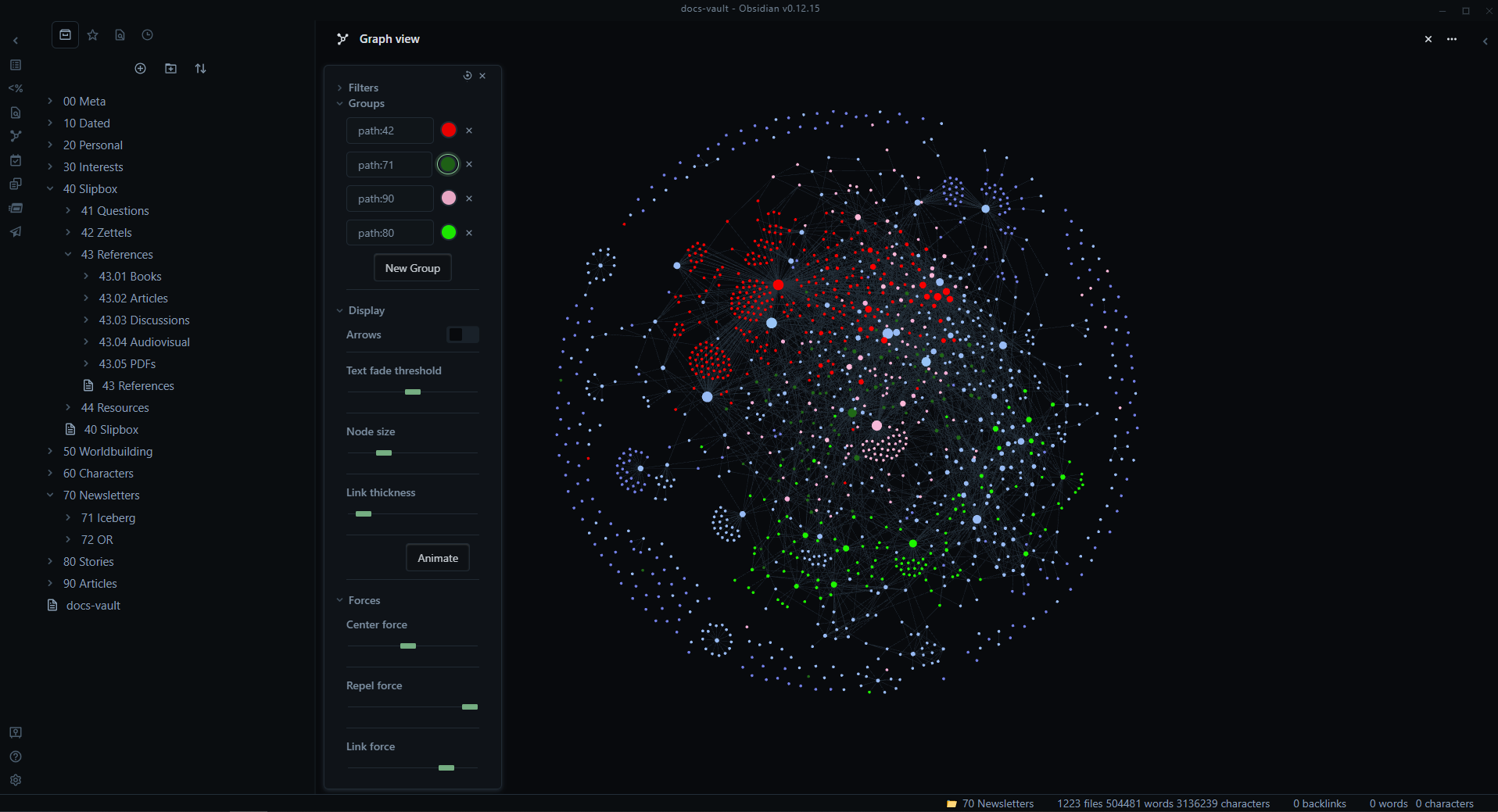
You can do that with several software but I like obsidian for that (and because of all its plugins you could probably find something to automatically copy webpage content)

On the downside side :

  • You’ll have to learn Zettelkasten, Obsidian etc
  • Obviously do the work of writing (or copy pasting) your vault.

But on the plus size :

  • You’ll have all the information you need at your fingertips, searchable with keywords, tags, associations etc.
  • Everything is basic text MD files so it will still be readable by any text editor or terminal in the next century.
  • You can have images, run code, do some mathlib, jupyter etc inside.
  • Text is light, easy to store, backup and retrieve.
  • If you do good enough you can have a satisfying visual representation of your new brain, kinda mindmap (which is also possible)

path: 0 10678483, hotness: undefined, score: 12, children: 3
interdimensionalmeme 1 point 2 years ago

Cool I would love to navigate my data in a manner similar to this. However not obsidian, I am in the process of de-googling and I have severe cloud fatigue. But maybe QOwnNotes

I'm hoping something like Archivebox or squid or some other software can help me, autodump everything in a way that will become accessible to these second party data management software. Hopefully in a manner as transparent as opening a tab.

path: 0 10678483 10689871, hotness: undefined, score: 1, children: 2
PlexSheep 2 points 2 years ago

QOwnNotes is good but the UI is a little bare. Consider logseq

path: 0 10678483 10689871 10695185, hotness: undefined, score: 2, children: 0
Skunk 1 point 2 years ago

Can you please tell me about that obsidian, google and cloud relationship ? Cause I don’t know anything about that and I’m curious.

I don’t use any cloud except my own, self hosting FTW!

path: 0 10678483 10689871 10694916, hotness: undefined, score: 1, children: 0
orcrist 10 points 2 years ago
path: 0 10695831, hotness: undefined, score: 10, children: 0
moonpiedumplings 10 points 2 years ago

Zotero is a citation manager, with a firefox extension to save an article (but really, a tab) with one click.

It also has fulltext search. You can search snapshots of everything you save.

"But I can't save all my tabs at once"

(There are some solutions, but nothIng official)

Save as you go. Computers simply don't have enough ram for 2000 tabs.

Anyway, it also seems to be able to run javascript plugins, and I saw you have some experience with that.

It also has support for folders, so you can organize it a bit better than tabs work for that.

path: 0 10679121, hotness: undefined, score: 10, children: 1
interdimensionalmeme 1 point 2 years ago

Zotero

I like the sound of that, thanks !

path: 0 10679121 10679498, hotness: undefined, score: 1, children: 0
Undaunted 9 points 2 years ago

I have no direct solution to you exact problem but your usage of tabs sounds like a nightmare.

A while back I found Omnivore which works like a charm if you want to "freeze" the contents of a website to read them later. You can also self host it if you like.

I took it a step further because I love Obsidian as personal knowledge management and I want to have everything in one place. There's a plugin to sync all your saved pages from Omnivore to Obsidian. In the template for it I then have my marked highlights, the links to the version in Omnivore and the original URL and also the whole content. So I have all of that in markdown which is really nice to work with.

Maybe that's a solution you too could be happy with.

path: 0 10677330, hotness: undefined, score: 9, children: 1
interdimensionalmeme 1 point 2 years ago

Thanks, never heard of Omnivore

"Distraction free. Privacy focused. Open source"

They do hit the right notes. I was going to try QOwnNotes but I'll put that on my list.

path: 0 10677330 10677576, hotness: undefined, score: 1, children: 0
Observer1199 9 points 2 years ago
path: 0 10678148, hotness: undefined, score: 9, children: 4
interdimensionalmeme -7 points 2 years ago

browser hygiene habits

You used that term, and frankly I recoil a bit a this term because of the implication that it's not a deficiency of the software but that it's the users who are wrong.

Still, I typed in the phrase into chatgpt

And I see "reading lists" as an alternative to bookmarks (that I find to be, straight up unusable)

So I found this reading list addon give a try.

https://addons.mozilla.org/...

I have a very specific use for a "reading list", which I take to be something like a FIFO stack of links. And that would be going through youtube videos.

Putting this in case someone else is reading this thread looking for answers.

However, it's a side bar thing, and you have to add links one at a time, can't select multiple tabs and add them

As for opening 500+ tabs to buy a thing.

You do know that sellers now use algorithmic pricing and often there will be hundreds of sellers for the same thing.

Plus the price will be obfuscated with various artifices that all have to be overcome to find the best seller with the best price.

Defeating all of that means openning a shit-ton of tabs.

Here's an example of the process I've designed for aliexpress

https://github.com/...

path: 0 10678148 10678353, hotness: undefined, score: -7, children: 3
Observer1199 9 points 2 years ago
path: 0 10678148 10678353 10678657, hotness: undefined, score: 9, children: 2
interdimensionalmeme 2 points 2 years ago

No, I have to setup all the tabs in just the right way. Then for each tabs it gets the price and shipping information I paste that into excel Combine the total together and sort with ascending price Then I repeat that for every quantity value for 1,2,3,4,5,7,10,15,20,25,50,75,100 Then I find the minimum quantity to get the best price.

This is because if you go to the website and just ask "order by price" it either hides most results, or straight up lies and still place them out of order. It also lies about the shipping cost. But it can't lie on the last page before clicking buy.

I expect the internet to continue becoming more deceptive and manipulative in this manner, my method is almost not good enough. If my tools don't continue to evolve it will simply become impossible to find the best price for anything. It will all become an endless maze where they measure how much mental stamina you're willing to waste to save another dollar. At that point the price of things will become whatever the maximum you individually will bear.

path: 0 10678148 10678353 10678657 10689825, hotness: undefined, score: 2, children: 1
Observer1199 4 points 2 years ago
path: 0 10678148 10678353 10678657 10689825 10690797, hotness: undefined, score: 4, children: 0
tiredofsametab 8 points 2 years ago

Reduce to a sane number. Like less than 20.

path: 0 10676032, hotness: undefined, score: 8, children: 0
leo 8 points 2 years ago

You have 64GB RAM and that's still not enough for your browser. Wow.

I've come away from this with only more questions. What does your Downloads folder/Filesystem look like? Do you have notebooks or any real world allocation of information? What's that like? What kinds of things do you keep in a junk drawer?

Absolutely fascinating.

path: 0 10676913, hotness: undefined, score: 8, children: 6
interdimensionalmeme -1 points 2 years ago

I do not waste time sorting, emails, downloads and bookmarks

For my linux ISOs, which I have approx 60 terabyte of, I use dedicated sorting software and it does a really good job of keeping it all organized. I also make liberal use of symlinks and hardlinks to keep the original alive while also keeping things organized.

As for notes, I have notepad++ with an endless series of titled untitled text files of everything I ever want to remembered. Shared accross computers using a local git server

On my phone I have google keep which has a list of notes that has long since become far too long to scroll to the bottom off of. I am in the process of degoogling and I want to switch to a selfhosted file centric markdown note taking web app, not decided on which but this video is probably going to be one of them.

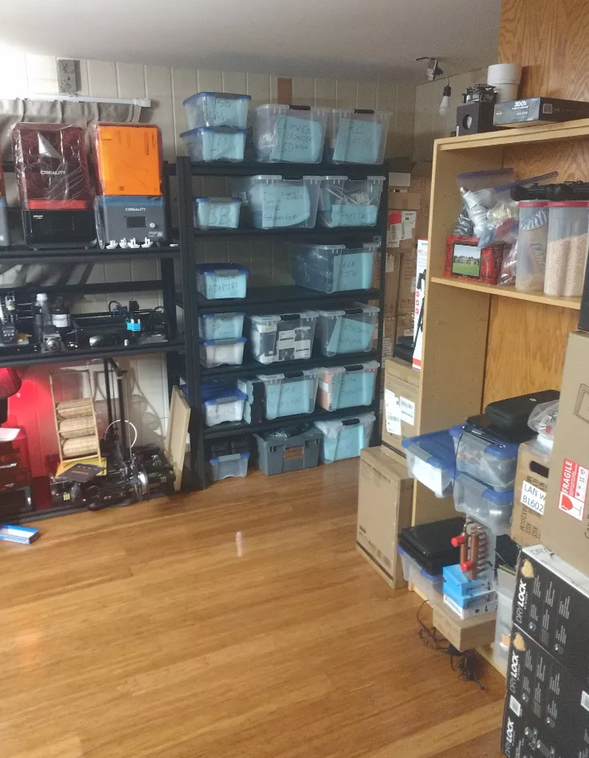
I don't have a junk drawer, my stuff is sorted into bins, here is a glimpse of that

path: 0 10676913 10677073, hotness: undefined, score: -1, children: 5
Theoriginalthon 6 points 2 years ago

Why do you need 60TB of Linux Isos? Or do you mean "Linux Isos ;)"

path: 0 10676913 10677073 10677370, hotness: undefined, score: 6, children: 1
interdimensionalmeme 2 points 2 years ago

Yes the ;) variety

path: 0 10676913 10677073 10677370 10677674, hotness: undefined, score: 2, children: 0
leo 2 points 2 years ago

Those ISOs must go back YEARS! Same with the files! What sorting software helps keep track of all that?

Notepad++ surely has some type of global search feature to help find the thought you saved for later, right? I'm utterly impressed with how much stuff you seem to have around, yet can still find and make sense of it. I would have long since buried myself under it all and given up.

path: 0 10676913 10677073 10677443, hotness: undefined, score: 2, children: 2
interdimensionalmeme 0 points 2 years ago

Yes, files that go back to 1996 when I first got online. Much older stuff that I got afterwards

I was using Kodi and I am switching to Emby.

Various renamers

https://picard-docs.musicbrainz.org/...

https://github.com/mobeigi/filebot

and many custom bash and batch scripts

Yes, notepad has "search in all open files" which would be great in firefox, "search in all tabs" and then it shows you a tab list with the search text in context with excerpts, kind of like how google does. Then with one click you could jump to that place in the text in that tab.

path: 0 10676913 10677073 10677443 10677663, hotness: undefined, score: 0, children: 1
leo 1 point 2 years ago

Kodi and Emby. Ohhhhhh. ISOs. Ha! I knew exactly the types of sorting software that was coming when the idea clicked.

"Search in all tabs" would be so awesome. I don't do 1000 tabs, but when doing research, I regularly have 30-40 I'm flipping through, and I tend to lose my place, know I saw something, and need that exact tab, and it's always a bit of a chore to track it down before I forget why I wanted the tab in the first place.

I hope Firefox gets where you need it to be soon. I recently read the story of the 7000 tab person, so it's clearly a use case.

path: 0 10676913 10677073 10677443 10677663 10677805, hotness: undefined, score: 1, children: 0
Fetus 8 points 2 years ago

I terminate Firefox and reopen it any time it's chewing up my RAM, but I usually don't have more than 500 tabs open at any one time. My tabs persist when Firefox starts again, but tabs don't fully load until I click on them again. This saves my memory from getting chewed up immediately, and can usually go a week or so before I need to do it again.

path: 0 10675422, hotness: undefined, score: 8, children: 13
FigMcLargeHuge 12 points 2 years ago

What? Even 500 tabs? I don't understand this. I get about 10 open and I can't read what they are. Please share a pic of what it has to look like with that many tabs open because I totally do not get this? I feel like this would be akin to asking "I can't see out of my car windshield because I have completely covered it with sticky notes. How can I get to where I need to go?" This is not how browsers were designed to work.

path: 0 10675422 10675698, hotness: undefined, score: 12, children: 11
sugar_in_your_tea 3 points 2 years ago

I often have 100+, so I set a fixed width for tabs so I can see more and they don't get too small. To find tabs, I use the drop down to see a scrollable list. But honestly, the biggest win is the "switch to tab" feature when typing in the URL bar.

I see about 20 at a time, and they're usually all related to the same topic because I opened them around the same time.

When I'm done with a project, I "close tabs to the right" and it's clean again.

path: 0 10675422 10675698 10675758, hotness: undefined, score: 3, children: 3
FigMcLargeHuge 4 points 2 years ago

Interesting. I still don't think I could use that workflow. I use bookmarks, and the dropdowns in the bookmark toolbar when I need to organize links into groupings. And even then I only keep the necessary dropdowns in my list. Everything else I organize by bookmark folders and subfolders.

path: 0 10675422 10675698 10675758 10675955, hotness: undefined, score: 4, children: 1
sugar_in_your_tea 3 points 2 years ago

Bookmarks take work, especially when my projects run for a couple weeks at a time. I rarely need to reference stuff after those weeks, so I'd constantly be adding and removing bookmarks.

But everyone's workflow is different.

path: 0 10675422 10675698 10675758 10675955 10676043, hotness: undefined, score: 3, children: 0
interdimensionalmeme 4 points 2 years ago

Try this addon https://addons.mozilla.org/...

It's really great, but the default settings are unusable

set open in own tab

set to vertical view

set to darkmode

Looks like this when zoomed all the way out

https://youtu.be/6TEMLxkEIPo

You can select tabs, press enter, it will open them in another window

You can select by right click, or by typing keywords in the search

There are also many other operation you can perform

also these

https://addons.mozilla.org/...

https://addons.mozilla.org/...

https://addons.mozilla.org/...

https://addons.mozilla.org/...

https://addons.mozilla.org/...

https://addons.mozilla.org/...

https://addons.mozilla.org/...

https://addons.mozilla.org/...

https://addons.mozilla.org/...

https://addons.mozilla.org/...

The full list here

https://pastebin.com/w3CzYxLE

path: 0 10675422 10675698 10675758 10675973, hotness: undefined, score: 4, children: 0
interdimensionalmeme 2 points 2 years ago

Here is a quick scroll through my "tab manager plus" view, zoomed out hopefully this doesn't contain doxxing information

https://youtu.be/6TEMLxkEIPo

path: 0 10675422 10675698 10675956, hotness: undefined, score: 2, children: 5
FigMcLargeHuge 4 points 2 years ago

Thanks for sharing. That was wild... You probably have more tabs than I have bookmarks.

path: 0 10675422 10675698 10675956 10676011, hotness: undefined, score: 4, children: 3
interdimensionalmeme -4 points 2 years ago

Just buying one little dodad on ali express has me opening 500-1000 tabs, for just one search ! I really wish the computer could keep up with me !

path: 0 10675422 10675698 10675956 10676011 10676170, hotness: undefined, score: -4, children: 2
PipedLinkBot 1 point 2 years ago

Here is an alternative Piped link(s):

https://piped.video/6TEMLxkEIPo

Piped is a privacy-respecting open-source alternative frontend to YouTube.

I'm open-source; check me out at GitHub.

path: 0 10675422 10675698 10675956 10675972, hotness: undefined, score: 1, children: 0
tyler 1 point 2 years ago

I have over a thousand just like OP and it works fine. Use a tree style tab browser and it’s much more usable than chrome or anything like that. OP’s problem is not having too many tabs.

path: 0 10675422 10675698 10683170, hotness: undefined, score: 1, children: 0
possiblylinux127 1 point 2 years ago

You could just set Firefox to clear everything on close.

path: 0 10675422 10685936, hotness: undefined, score: 1, children: 0
DmMacniel 5 points 2 years ago

Why do you need so many open tabs to begin with? What is your usecase?

path: 0 10676473, hotness: undefined, score: 5, children: 0
enbyecho 4 points 2 years ago

You are manually caching web content. Were you aware that (a) your browser does that for you; (b) the internet does that for you ?

I'm as guilty of this as anyone and can tell you from experience that it's sutpid.

path: 0 10699977, hotness: undefined, score: 4, children: 0
jbhq 3 points 2 years ago

Install Onetab

path: 0 10684910, hotness: undefined, score: 3, children: 0
cupcakezealot 3 points 2 years ago

i use auto tab discard and it works great

path: 0 10679473, hotness: undefined, score: 3, children: 1
possiblylinux127 1 point 2 years ago

It blows my mind how many tabs people open. I rarely use more than 4.

I feel like Firefox should just start hard limiting the number of tabs.

path: 0 10679473 10685770, hotness: undefined, score: 1, children: 0
PipedLinkBot 0 points 2 years ago

Here is an alternative Piped link(s):

https://piped.video/Tggq4jPPZaA

Piped is a privacy-respecting open-source alternative frontend to YouTube.

I'm open-source; check me out at GitHub.

path: 0 10674672, hotness: undefined, score: 0, children: 0
Gallardo994 0 points 2 years ago
path: 0 10692705, hotness: undefined, score: 0, children: 0
GenderNeutralBro -9 points 2 years ago

I came in here knowing exactly what the comments would look like, and I'm still disappointed. "Just don't use so many tabs" is not an answer. If you don't have anything constructive to say, just move on instead of getting uppity about...not using browsers very heavily or understanding other use cases.

Yeah, thousands of tabs seems extreme. But "you should dedicate a larger amount of time and effort all day, every day to make the computer's job easier" is a bad take. That's obviously worse than OP's existing workflow.

Sorry OP, I don't have a real answer either. You might find Arc Browser's tab system to suit you better, but since it's chromium-based I suspect performance might be worse.

Edit: out of curiosity, how much memory does your PC have, and how much is Firefox using during these freezes? I wonder how much of the delay is caused by swapping.

path: 0 10676462, hotness: undefined, score: -9, children: 12
hanrahan 12 points 2 years ago

Just don't use so many tabs" is not an answer.

Yes it is. If somone is holding a knife upside down and complaining it doesn't cut their steak, are you rude and ignore them? or comment that they're doing it wrong? OP has the knife upside down.

FF (or any browser AFAIK) is not designed to do this , OP is doing it wrong is a valid answer.

On the flip side OP wants FF to change so it can do what they want, which is also valid. After all, a sensible person adapts to the environment around them, an insane person expects the environment to adapt to them, therefore all progess is made by insane people. Have at it OP :)

path: 0 10676462 10677639, hotness: undefined, score: 12, children: 2
GenderNeutralBro 1 point 2 years ago

Yes it is.

It is worse than OP's existing workflow, even though the existing workflow sucks. "Do this thing that sucks even more" is not an answer. "I don't have this problem, so you must be mentally ill" is also not an answer.

an insane person expects the environment to adapt to them, therefore all progess is made by insane people

LOL. I love this.

path: 0 10676462 10677639 10681257, hotness: undefined, score: 1, children: 0
tyler 0 points 2 years ago

FF was designed to do this. There have been hundreds of bug reports that have been fixed over the years to literally make FF handle thousands of tabs just fine. If instead you had operated under the assumption that something was wrong you literally could help OP resolve the issue which is most likely something like their swap mem or the extension itself being written badly.

path: 0 10676462 10677639 10683311, hotness: undefined, score: 0, children: 0
dependencyinjection 8 points 2 years ago

Frankly the answer is to not use so many tabs.

I think it’s crazy to need more than 10 active tabs open, let along thousands. I’m a software developer who will regularly go down rabbit holes and I’d never dream of opening so many tabs.

The fact is OP isn’t using the browser in a way that it was designed for. Plus they’re being unreceptive and rude in some of their replies.

path: 0 10676462 10677511, hotness: undefined, score: 8, children: 5
possiblylinux127 1 point 2 years ago

Anything more than 10 and titles become illegible

path: 0 10676462 10677511 10685858, hotness: undefined, score: 1, children: 1
GenderNeutralBro 1 point 2 years ago

Vertical tabs are the only way to live. Sidebery and Tree Style Tabs are a couple options.

path: 0 10676462 10677511 10685858 10687178, hotness: undefined, score: 1, children: 0
tyler 0 points 2 years ago

Ff literally was designed for this. It has had a significant number of bug reports over the years that improved this exact thing, opening thousands of tabs. That’s not the problem (I also have thousands of tabs open). If instead you had operated under the assumption that that wasn’t the problem maybe you could have helped OP find the actual problem, which I bet is probably that they disabled swap mem or the extension they’re using isn’t written well.

path: 0 10676462 10677511 10683278, hotness: undefined, score: 0, children: 2
dependencyinjection 4 points 2 years ago

I have to ask, how does one even manage thousands of open tabs?

Like how do you find the 1 in 1756 tabs that you are looking for?

Excuse me for thinking that that is an insane way to work and there is no way it can be productive. Like if you have a thousand open at any given moment, what are they all. What are you doing that warrants this? What’s wrong with bookmarks.

I think the consensus here has been clear in that you guys are in the minority of people. And that’s on Lemmy where we skew tech literate and would mostly be power users. I just can’t see how it can be productive.

Not calling you out here. Like I really need to know your workflow with some examples of the why?

path: 0 10676462 10677511 10683278 10684160, hotness: undefined, score: 4, children: 1
tyler 0 points 2 years ago

You have different windows, different Multi-account containers. And if you type in something into your address bar it will just automatically jump to an open tab if you already have it open. No need to perform another search and find it. It's not hard to maintain this many tabs. Just like it's not hard to know where stuff is in your house. You keep the tools and cars in the garage, the yard equipment in the shed etc. You have thousands of items in your house or apartment, you don't have trouble keeping those separated do you? Unless you're one of those people that just tosses stuff as soon as they don't need it anymore, but I don't think that's the majority of people, at least not from talking to my therapist it isn't.

And it's not about being productive. Like, if I have one window open it might be for the research for a thing I want to buy, for example we're thinking about getting starlink for camping. So I have a window open with like 50 fucking tabs because choosing a powersupply, figuring out the calculations for how much wattage I'm going to be using, etc. I need all those open. I mean I could move that into an obsidian doc, but that's a hell of a lot of stuff to write down for something I only need to research and buy once. And then it gets left open because I already did the research and it's much easier to find if I have to step away to do something else, or I put off the research for a week since we're not camping yet.

The same goes for work stuff. We're testing stuff in salesforce and I have 10 tabs open for every test because you have to verify every single field of data I'm pushing from the backend into salesforce.

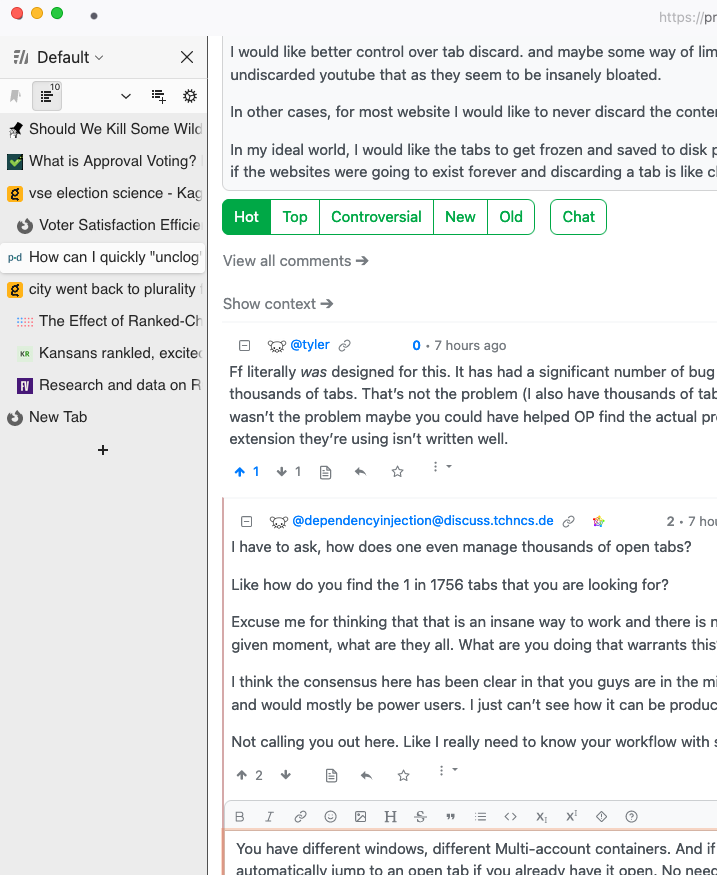
But it's not like I'm even noticing the 950+ tabs that are open. I don't have that window open. I use sidebery so I can see all the tabs in my window with their full names at a glance (here's an example of the current window where I've been responding to lemmy comments.

And a lot of the times I open an article to read, then someone messages me to help them, I jump over to help them, and then I come back to the article in a week. Or two weeks. Or three months. And then after I'm finished with it I close it. But I'm not gonna bookmark that. Bookmarks are for stuff you keep coming back to. Managing bookmarks in a browser isn't like managing a bookmark in a book you're reading. Deleting them is harder, filing them is harder, etc.

path: 0 10676462 10677511 10683278 10684160 10690306, hotness: undefined, score: 0, children: 0
pop 4 points 2 years ago

Yeah, thousands of tabs seems extreme. But "you should dedicate a larger amount of time and effort all day, every day to make the computer's job easier" is a bad take.

Computers don't magically make things easier, it just does as it is told(as instructed by code). Computers don't come out as a self-made human assistant that adapts to your personal needs and can magically do anything you want.

If it's so much of a burden that smarter people haven't figured it out, go at it. You might just fix it.

But "to make computer's job easier" is the dumbest shit I've heard in a while.

path: 0 10676462 10677675, hotness: undefined, score: 4, children: 0
possiblylinux127 1 point 2 years ago

How could one manage to open more than 100 tabs is beyond me. Just close the browser. This is insanity. I don't know how you keep track of all those pages.

path: 0 10676462 10685836, hotness: undefined, score: 1, children: 0
interdimensionalmeme -6 points 2 years ago

I am going to keep beating that drum until firefox gets better It's already improving, I used to struggle at 700 tabs now I almost make it to 2000. Of course it is mostly artifice as most tabs get fully discarded and what I want is all tab texts in live memory and the ability to search all tab text. Maybe even text search in all pictures in all tabs using object recognition, but clearly we're not anywhere near that yet !

path: 0 10676462 10676514, hotness: undefined, score: -6, children: 0
firefox
firefox

@lemmy.ml

login for more options
23083
1239
420

/c/firefox

A place to discuss the news and latest developments on the open-source browser Firefox.


Rules

1. Adhere to the instance rules

2. Be kind to one another

3. Communicate in a civil manner


Reporting

If you would like to bring an issue to the moderators attention, please use the "Create Report" feature on the offending comment or post and it will be reviewed as time allows.


go to feed...