
I get 82% (27 not blocked. I use Firefox ESR with uBlock and Privacy Badger.
You are right, I ran the test on Mull + uBlock Origin on a phone running an ad/tracker blocker at OS level, and this tool reported connections that I couldn't find in my logs.
It however helped me identify appmetrica.yandex.ru which was not blocked.
This test is wrong for sure. It doesn't detect YouTube ads as being blocked despite them never appearing in this browser thanks to ublock origin.
I also highly doubt that any domain from DoubleClick.com would be allowed through ubo.
Yeah, I have a quite aggressive pihole and a lot of the domains it says aren't blocked are 100% blacklisted in pihole (and testing them gives an error message so they are blocked...)
Mull (Firefox) + uBlock + PiHole.
My setup (Firefox+uBlockOrigin) blocks Doubleclick.net. Also, ads.youtube.com is under Social Trackers, maybe it's not the actual ads on youtube, but some tracker? BTW, I have no idea how the internet works, maybe it is wrong...
YouTube ads are just other YouTube videos that you can watch willingly if you know their ID. The mechanism of serving them might therefore not involve the client connecting to any domains other than www.youtube.com, and it probably doesn't or it would be very easy to block them otherwise.
100% on Safari on iOS with AdGuard and PiHol
4% is good, right guys?
I get 90% on both mobile and PC.
Firefox on PC with UBlock Origin. Fennec on Android with UBlock Origin.
Both are behind an AdGuard DNS but I think UBlock Origin does most of the heavy lifting here.
If I turn off the "cosmetic filter" it goes up to 92% 🤷
Edit:
Adding the following to "My filters" in UBlock Origin brought it up to 97%
@@*$redirect-rule
100% with cosmetic filter disabled
Trying a few different browsers I have installed:
- Firefox in Strict mode with LocalCDN: 42% (eww)
- Brave (stock): 72%
- Brave w/ stock uBlock Origin: 78%
- 100% w/ custom filters enabled
- Opera w/ uBlock: 75%
- Vivaldi (stock): 55%
- LibreWolf w/ uBlock and LocalCDN: 70%
96% on /e/OS with the Mull browser with uBlock and Privacy Badger
92% on /e/ on the tor browser with the same extensions?? that's weird
Yeah I really like it! What do you use?
Before adding "@@*$redirect-rule" to uBlock Origin filters:
- With uMatrix enabled: 99%, everything except ads-api.twitter.com and ads.youtube.com was blocked.
- With uMatrix disabled: 83%, 125/150 blocked.
After adding "@@*$redirect-rule" to uBlock Origin filters:
- With uMatrix enabled: 100%, 150/150 blocked.
- With uMatrix disabled: 85%, 127/150 blocked.
Using Firefox with uBlock Origin, Privacy Badger and some others.
4% on duck duck go browser. 87% on fennec.
91% with pihole + ublock on Firefox. Time to add some domains to the blacklist
I get 100% on both desktop and mobile.
Desktop: Firefox with uBO, Disconnect, Privacy Badger, and Decentraleyes
Mobile: Safari, Firefox Focus, Orion (with uBO and Privacy Badger) + AdGuard and AhaDNS Blitz
All these plus ControlD and AdGuard as DNS + manually added blocklists on my router.
I've been using UBlock for years and was surprised that out of the box, AdGuard had a much better score!
I have quite a few browsers installed, all with adblock.
surprisingly, vivaldi did the best with 85%
Firefox focus gave me a 93% while fennec gave me a 91%. I run ControlD as a DoH provider that is suposed to block ads, trackers, malware, and big social (X, spybook, instabully, etc). I am also running ublock origin in fennec.
Edit: damn, adding privacy badger took it from 91% to 96%.
Edit 2: ouch
- Fennec + privacy badger 39%
- Fennec + privacy badger + ublock 87%
- Fennec + privacy badger + ublock + Controld DNS 96%
93% with NextDNS on an iPhone.
100% with Cromite's built-in ad blocker + adguard filtering
88% with Mull (default ublock settings)
99%
This is with Firefox in strict privacy mode with uBlock, Privacy Possum, Local CDN and CanvasBlocker. I don't think any other of my addons matter for this.

Edit: I also use Mullvad VPN which might block some stuff on the way too.
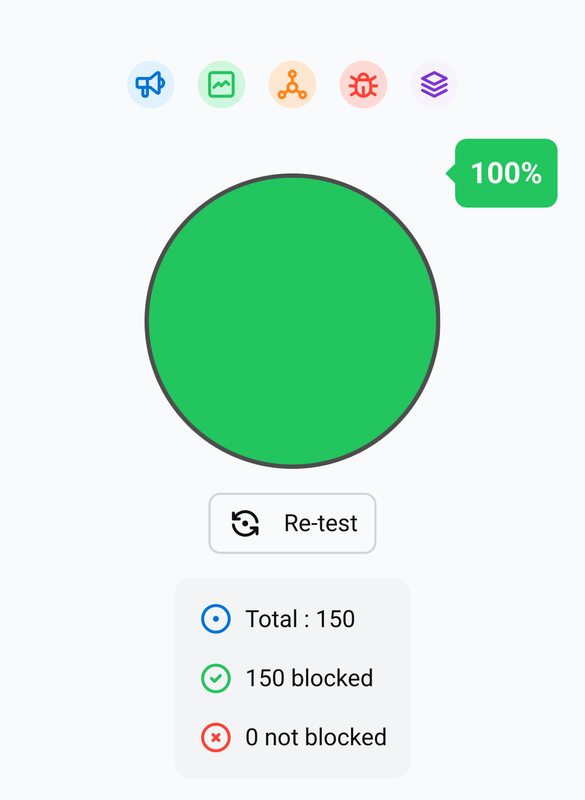
5% on stock chrome for Android. Guess this week is the week I switch to firefox mobile (73% with stock uBlock Origin)
100% with Adblocker Ultimate.
90% with uBlock Origin.
I usually use Adblocker Ultimate.
To check it, I disabled all the other extensions.
@eruchitanda @tram1 with Ublock i get 100% if it is configured with some list, etc.
97% on FF Android with ublock origin. Adguard Home is my network DNS as well.
These results are not at all what I expected. Safari + several blockers seems to be best, followed by Brave of all browsers. Firefox and FF focus got the worst rating! I really thought Focus would do a better job. Then again, all cookies get deleted so at least that part won’t matter much.
91% on Chrome mobile behind PiHole. Fairly good for a minimum effort whole network solution.
83 with Firefox, uBlock, Privacy Badger and DuckDuckGo Privacy Essentials
96% on Brave at home (pfBlocker).
81% on Firefox with uBlock Origin at home (pfBlocker).
93% with Firefox and privacy badger on Windscribe VPN adblocking enabled. 55% with Windscribe disabled.
Interestingly, I get a better result with only nextdns profile with hagi pro on iOS 87%, compared to nextdns + iCloud private relay 37%. What gives? Nextdns still handles my requests with private relay enabled, I can see it in the logs of nextdns.
I also use the Firefox focus safari extension.
Score is also slightly less with nextdns and proton vpn at 81%.
I rather liked to iCloud private relay nextdns combo, should i change.
Orion gave me 100%, but that browser isn’t as polished compared to safari on iOS.
More tech savy people analysed the dns jumps, and I think the understanding was it goes through both IPR’s and Nextdns’s DNS. If so, I still imagined this block test to show a result where everything had been filtered by nextdns at some point in the route.
74% with ublock origin for Firefox
93% on my iPad with an ahaDNS profile installed. The only thing that makes it through are Apple’s stuff. All things considered, I’m fine with that.
Just trying on mobile first, 57% in the in-app browser and 55% in Vivaldi vs 87% in Firefox. Even if the percentage is wrong it's interesting for comparing between browsers. Looking forward to trying on desktop (I haven't seen an ad on desktop in years) and seeing if I can improve adblocking on my phone later today
93% with Firefox and Ghostery behind Windscribe VPN. I've got a few other addons disabled like Decentraleyes and Ublock, but a combination of those with Ghostery didn't do any higher. Pretty sure I disabled them because Ghostery did everything they did. The stuff let in are to make websites like Youtube and Google usable. It's a tradeoff.
53% with stock Firefox Focus on Samsung galaxy
99% in Firefox with uBlock Origin, Privacy Badger, Decentraleyes and AdGuard Home.
I got 93% on mobile with the same setup.
Although I'm not sure if decentraleyes is working
93% blocked running on my exentionless chrome on my phone. Damn I love pihole.
I added advice-ads.s3.amazonaws.com and ads.youtube.com to my ublock filter and those two still aren't getting blocked, anybody know how fix? the other two sites I added block fine.
89% without @@*$redirect-rule in My Filters, 96% with it added. Just using uBlock Origin with all filters on regular Fennec for Android (Firefox stable fork), and dns.adguard-dns.com private DNS sprinkled on top. Getting rid of that redirect rule though since I'm guessing it'll just cause breakage for me.
Here is an alternative Piped link(s): https://piped.video/fJTuldpMwCg?t=37
Piped is a privacy-respecting open-source alternative frontend to YouTube.
I'm open-source, check me out at GitHub.
90% on Vanadium (which has no ad blocker) + Mullvad VPN. Good enough.
100% using Orion on macOS, no extensions.
91% On Firefox with Privacy Badger, Nord VPN, Ghostery, a DNS filter as well.
With the inbuild Vivaldi adblocker

Enabled only two filterlists
Apart other 2 for blocking cookie advices.
87 % on mobile, 97 % on the desktop
For me it's trackers from Twitter and YouTube that are responsible for the remaining 3 %.

@lemmy.ml
A place to discuss privacy and freedom in the digital world.
Privacy has become a very important issue in modern society, with companies and governments constantly abusing their power, more and more people are waking up to the importance of digital privacy.
In this community everyone is welcome to post links and discuss topics related to privacy.
Some Rules
- Posting a link to a website containing tracking isn't great, if contents of the website are behind a paywall maybe copy them into the post
- Don't promote proprietary software
- Try to keep things on topic
- If you have a question, please try searching for previous discussions, maybe it has already been answered
- Reposts are fine, but should have at least a couple of weeks in between so that the post can reach a new audience
- Be nice :)
Related communities
much thanks to @gary_host_laptop for the logo design :)
go to feed...
@lemmy.ml
A place to discuss privacy and freedom in the digital world.
Privacy has become a very important issue in modern society, with companies and governments constantly abusing their power, more and more people are waking up to the importance of digital privacy.
In this community everyone is welcome to post links and discuss topics related to privacy.
Some Rules
- Posting a link to a website containing tracking isn't great, if contents of the website are behind a paywall maybe copy them into the post
- Don't promote proprietary software
- Try to keep things on topic
- If you have a question, please try searching for previous discussions, maybe it has already been answered
- Reposts are fine, but should have at least a couple of weeks in between so that the post can reach a new audience
- Be nice :)
Related communities
much thanks to @gary_host_laptop for the logo design :)
go to feed...
save