
For me, it's hands down Flameshot. The best screenshot tool in the world - I've got it hooked up to my PrtScrn key for super easy screenshots.
I also love Kwrite as a Notepad++ alternative, and KolourPaint as a MSPaint alternative
What's your favorite Linux Desktop software?
3 years ago by OsrsNeedsF2P to c/linux
For me, it's hands down Flameshot. The best screenshot tool in the world - I've got it hooked up to my PrtScrn key for super easy screenshots.
I also love Kwrite as a Notepad++ alternative, and KolourPaint as a MSPaint alternative
MPV has automatic native wayland support, VLC doesn’t (yet, see https://wiki.archlinux.org/...)
I haven’t found any other large differences in functionality when it comes to simply playing video (only thing I use either one for).
VLC is also less accurate to the source than mpv is.
See the notice on this wiki that contains some comparisons.
I don't know the full details but this is a quote I have seen from reddit about VLC:
- uses wrong matrix for RGB conversion (results in wrong colors)
- uses point upscaling for chroma planes
- introduces strong banding
- wrong chroma location (MPEG-1 for everything)
- Old subtitle renderer that in more Typesetting heavy situation will say fuck you
- all the other bugs (including some that haven't been fixed in years) make it equally unsuitable media player.
It is probably possible to get things in order by digging into the settings in VLC, but mpv prioritizes accuracy by default.
For me I got mad at VLC cause it was opening video track in separate window for some reason.
Both are comparable in terms of video playback (both use hardware acceleration and ffmpeg) but mpv's appeal is that it's ultimately a minimal (as in lack of apparent GUI) command line tool rather than a fully featured application like VLC. I like mpv because of it's non-features which is why it's the backend for a lot of Desktop environment video players.
How does Amberol hold up with libraries in the high thousands? So many nice looking music played keep struggling with my music folders.
Really makes me miss Winamp sometimes.
Amberol does hold up really well with high threshold music folders in my experience. I had a 24+ hours worth of music that loaded successfully in less than a minute.
Amberol has a "restore playlist" feature which loads your last playlist quickly.
Mpv is a good engine, but I prefer something like smplayer+mpv for all the extra functionality. I also like that VLC has tons of features, like full file/codec info and stats. I know there are other ways to get that info, but it's very easy in vlc.
Firefox with tree style tabs, with the user CSS that removes tabs and combines bookmarks bar into the title bar.
Away from computer right now but I'll take a screenshot in an hour or so.
And Emacs. :)
Back at my computer now!
OK, here's my screenshot:
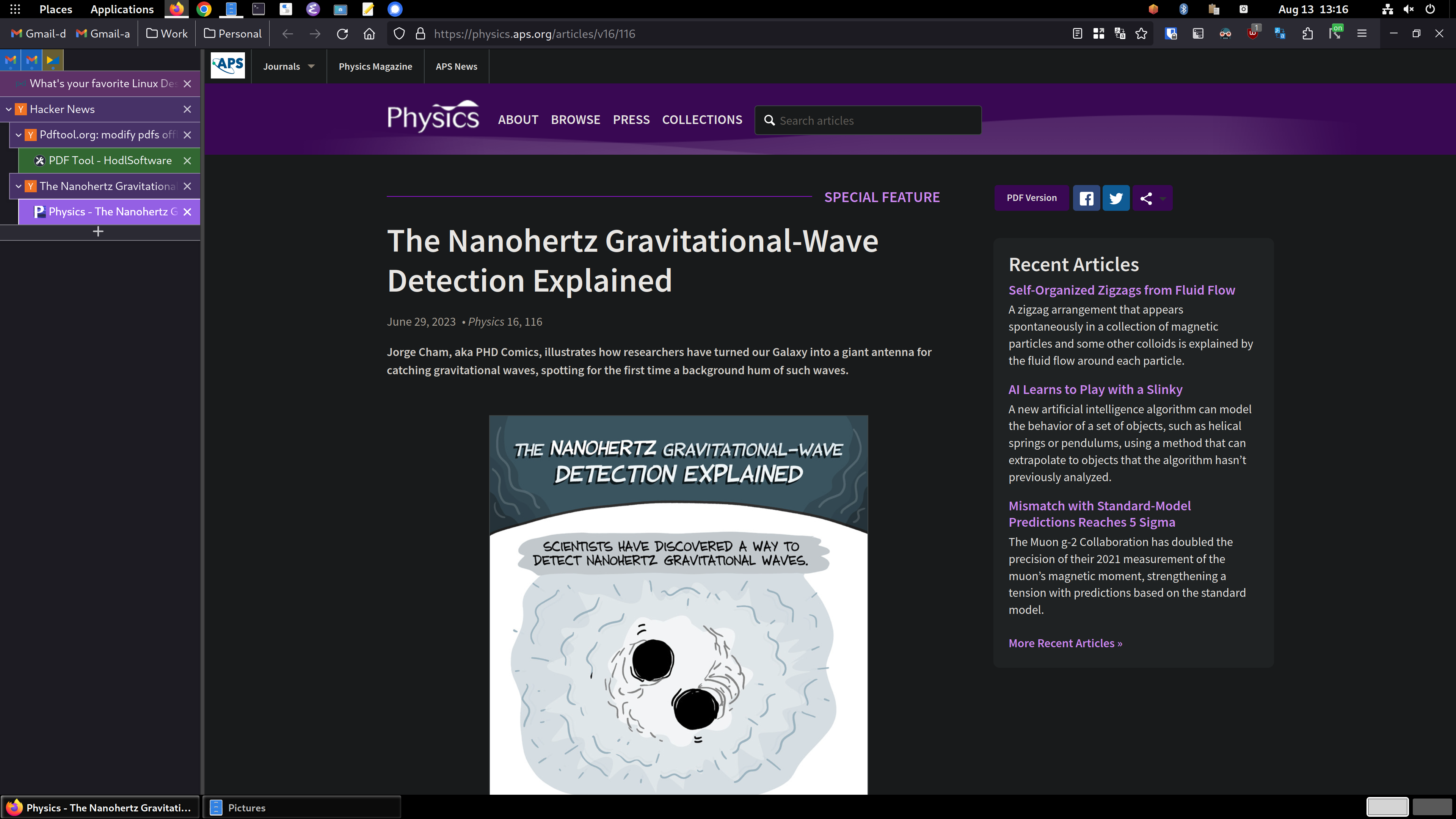
So, you can see the tree style tabs (TST) in the sidebar area on the left. I'm using the "photon" theme for TST. with another extension for TST called TST Colored Tabs. If you middle-button-click a link, it's opened in a new tab like usual, but TST also assigns it as a child tab of the page you were viewing. It's incredibly useful for keeping track of where you are and what you're doing. Especially in my DevOps job, I have dozens of tabs open and chaos would reign supreme if I used top-of-window tabs like standard. You can see the bookmarks toolbar has been dragged up into the title bar using the customize toolbar window accessed by right clicking on the title bar.
To accomplish this you need to enable a setting in about:config called toolkit.legacyUserProfileCustomizations.stylesheets, set that to true. Then exit Firefox.
Then create a directory called chrome in your profile directory, which on Linux is in ~/.mozilla/firefox/PROFILENAME/, which you can get from the about:profiles page. Inside the chrome directory, you create a file called userChrome.css and add this stuff to it:
#main-window[tabsintitlebar="true"]:not([extradragspace="true"]) #TabsToolbar > .toolbar-items {
  opacity: 0;
  pointer-events: none;
}
#main-window:not([tabsintitlebar="true"]) #TabsToolbar {
    visibility: collapse !important;
}

#sidebar-box[sidebarcommand="treestyletab_piro_sakura_ne_jp-sidebar-action"] #sidebar-header {
  display: none;
}

/*
    Display the status bar in Firefox Quantum (version 61+)
    permanently at the bottom of the browser window.
    Code below works best for the Dark Firefox theme and is based on:
    https://github.com/MatMoul/firefox-gui-chrome-css/blob/master/chrome/userChrome.css
    This userChrome.css file was last modified on: 28-Jun-2018.
    Tested to work with Firefox 61 on Windows.
    Related blog post: http://www.optimiced.com/en/?p=1727
*/

#browser-bottombox {
  height: 20px;
  border-top: solid 1px #505050;
}

.browserContainer>#statuspanel {
  left: 4px !important;
  bottom: 0px;
  transition-duration: 0s !important;
  transition-delay: 0s !important;
}

.browserContainer>#statuspanel>#statuspanel-inner>#statuspanel-label {
  margin-left: 0px !important;
  border: none !important;
  padding: 0px !important;
  color: #EEE !important;
  background: #333 !important;
}

window[inFullscreen="true"] #browser-bottombox {
  display: none !important;
}

window[inFullscreen="true"] .browserContainer>#statuspanel[type="overLink"] #statuspanel-label {
  display: none !important;
}

/*
  Begin section to move system UI buttons to the same UI bar/box
  as the addressbar
*/

/* Adding empty space for buttons */
#nav-bar {
    margin-right:100px;
}

/* For dragging whole window by mouse*/
#titlebar {
    appearance: none !important;
    height: 0px;
}

/*
  Fix for main menu calling by Alt button
  THIS BREAKS THE UI!!
  */
/* #titlebar > #toolbar-menubar {
    margin-top: 10px;
} */

/* Move minimize/restore/close buttons to empty space */
#TabsToolbar > .titlebar-buttonbox-container {
    display: block;
    position: absolute;
    top: 5px;
    right: 1px;
}
And there you go! TST has more tips and configuration details in its Github project: https://github.com/piroor/treestyletab and https://github.com/...
emacs with doom FTW.
Looking forward to learning how to get tree tabs in FF.
I updated my original comment above yours. I hope my comments/instructions are understandable, please let me know if I wasn't clear on anything!
Wine/Proton. It's a one-stop solution for gaming on Linux (for current games). Lutris is also worth mentioning as a frontend/launcher.
Check out Bottles for running Wine and derivatives from a GUI :)!
Although, I find it a sad commentary that the most upvoted (even by me) in this thread is something to made to run non-linux software. :(
that's one way to look at it, but if not for WINE and proton we'd not have had the renaissance of desktop Linux that's well under way :)
And I totally agree with you. I just lament that games and other made for Windows software is what's enabling that. People should just want a free and opensource operating system as a matter of self interest... but no. It's games and Windows apps. Yet another sign that our species is just sick in the head. :)
I'm with you that we need some deprogramming when it comes to how we're far too complacent with the privacy-ignoring and humanity-disrespecting behaviour of Microsoft. But at least personally I was always someone who accepted it with gritted teeth because the alternatives sounded like a downgrade in other ways.
Now that Linux is faster, smoother, more user friendly and compatible than ever, it made the decision to delete my Windows partition much less daunting.
And now if Linux does give me headaches (it's not a perfect experience!) I'm much less likely to immediately give in and reinstall Windows because I'm now accustomed to the aspects that I didn't realise were so important to me before.
Oh we need it, it's just how to make linux survive in a capitalist world where things are only made for platforms that can make them money.
I'm a bit of a fan of Okular. It just does a good job displaying PDFs and is not annoying. The table of content works well if the document has one. There is text select and block select for when you need to get content out of the PDF. You can tell Okular to ignore DRM with a simple checkbox in the settings, for files that "don't allow" selecting and copying text or "don't allow" printing.
gparted because it’s the best partitioning manager with a gui that I’ve used
Im dipping my toes in self hosting and syncthing is just :chefs kiss:. I use it only with Obsidian, Signal & Aegis so far (and will sync my configs as well on linux), and the safety net it gives is just awesome.
Cant go without kdeconnect anymore
Graphical:
Non-graphical:
Ansible + Podman from Red Hat really a game changer in Industry Standard. Sometimes I want to just say, Fk Docker because they don't listen from security perspective, until Red Hat made Podman, and they are thinking.... (3 years), then implement the rootless container... same on HPC.. fk docker...
KDE Connect, Spectacle
Being a flutter dev (and shameless fanboy) I will suggest people try:
appflowy - a FOSS near-clone to Notion.
spotube - FOSS music streaming using the spotify API for metadata and youtube for music playing/downloading. Completely free of ads and works surprisingly well as long as the music you like is mirrored to YouTube.
honourable mentions:
Plex, Nextcloud, Radarr, Sonarr, qbittorrent. Not your usual apps for these kinds of threads but they're absolutely top-tier for linux home servers.
It's not a drop in replacement for spotify, of course. It just uses Spotify's public API for fetching playlists and routes them through Youtube to play the audio of music videos hosted there, but as a free option it's one of my faves :).
If you want podcasts or certain spotify-only remixes you'll still need spotify.
Wow it's available for Android too, it's even on the Play Store (which I didn't expect)!
Yup, it's Flutter so it's easy to port to other platforms. There's Mac, Windows and iOS builds too!
It is, and I've used it for a while. I don't recall why I stopped it, it was a long time ago; perhaps I didn't notice any meaningful difference in performance? Stock kernels are good enough for most purposes.
It's probably Neovim. I spend most of time in a day while working on it. Its suitable for almost all code and text editing jobs.
Also I should have to add okular which is really nice for reading pdf's and mangas.
Honestly I didn't know Kirta was free because the first time I saw it was on Steam, later found out it was free but it's such a good product I'm happy I found it there first.
Does VSCodium not already do everything meld does with extensions though?
Fair enough, if you're interested there's an extension for Vscode/ium called Diff & Merge that seems to do the job. Code also has support for diff and merge for git repos I believe built into the git extension
The most popular that I use are:
shutdown command (i use it daily)Honorable mention: Molly (the FOSS version, a privacy focused client for Signal)
Edit: Almost forgot about QEMU+kvm for virtualization
The question is weird to me, but I'll plug Strawberry Music Player. It's a fork of Clementine, which was a fork of Amarok from when Amarok was still good.
Konsole
xmonad - tiling wm because I'm too lazy to place windows by handsfirefox - since a lot of things I'm working with is web based and I like my adblock and don't want google spying on meurxvt - a terminal that is fast enough for most applications yet doesn't use as much memory as fancier onestmux - a terminal multiplexer - terminal tabs are not as nice plus lets you leave stuff running remotelyneovim - I need a text editor and it works great for that purposes covering all my needsI dunno if it counts, but I use libreoffice more than anything else. It's a very well made piece of gear.
I've written multiple novels with it, short stories, essays, a home brew ttrpg system, etc. It doesn't just do "good enough", it is on par with anything else I've ever used.
Honestly, I installed it on my windows PC recently, and I found it really clunky. And it sounds like there's no dark mode?
I do IT for a living, and for as big of a bitch Office is, it does work pretty damn good... When it's working. I felt like I went back in time a decade when I was working with Calc.
I'm not trying to fight, but I'm genuinely curious, do you only use Writer? Have you worked with Word lately to compare how they've changed? Thanks
Not OP, but I like that libreoffice:
Works on Linux without wine/bottles
Isn't 9GB
Has no hooks into 0365 or Office.com or any other web junk I don't need
Can be updated in less time than reimaging a workstation
Doesn't change major elements of the GUI including available options and default styles each major update
I also trust the document recovery options more, and enjoy using 'free' software when possible
Dark mode is coming to the latest release of LibreOffice, or very soon, so I've heard.
It's possible in current and recent older versions to change the default colours to almost-but-not-quite emulate a dark mode. I have to admit it's not a quick thing to do, nor is it perfect once done, but it can be attempted. (That said, maybe I gave up changing things at "good enough" which is why it's not perfect.).
Oh, I've used it, and it isn't worth the price. They could offer it for free and I still can't say I'd switch. It isn't that there aren't differences, there are. They just aren't enough to matter.
Writer, that's the bread and butter. Calc is mainly for tracking timelines, "lore", etc. Draw isn't a common use.
Dark mode isn't as superior when writing long form though. It's nice, but it's easier to catch weird patterns for me (dyslexia). Calc vs excel, well that's not really a competition for professional use, though calc functions well enough for the kind of use I put it to.
I've replaced Flameshot with Spectacle on my system because it is preinstalled on Plasma, has almost the same set of features and, in my experience, work snappier. Also, Flameshot can have issues working on Wayland
I use KeePassXC on the daily, so that's definitely going on the list. Spectacle does screenshots amazingly well. neovim is a great fork of vim, handles all my text editing and IDE work. GIMP is basically a given for image editing. And also a fan of LMMS for whenever I work with audio/music.
+1 for btop - so much easier to find and kill runaway processes.
Firefox, emacs, grep, konsole
Based on time spent using them, Firefox, Steam, and Terraria. Wait, do games not count?
The real answer is actually probably Gnome itself. The DE, I mean. The workflow suits me perfectly, and I even like a lot of the basic Gnome apps, although their naming convention get on my nerves sometimes (your official web browser is called "Web" and your official music player is called "Music"? But the one that makes me actively angry is calling their official text editor... "Text Editor." C'mon, folks.)
This has been the case for me since Gnome 3 dropped. Which was quite a surprise for me since I thought of Gnome 2 as a less user friendly, uglier XFCE and kinda hated it. I still kinda feel that way about Mate, but Memo kicks ass and it's much better than Gnome 2 was overall.
Interesting, maybe it's because I wasn't in the community yet when Gnome 2 was a thing but I always disliked Gnome 3 and love Gnome 40. The changes aren't even that big but I simply wasn't able to adopt to the Gnome 3 workflow and with 40 it clicked immediately.
Oh man I thought I was the only one when it comes to the naming conventions. I've seen it on Cinnamon as well and it's absolutely annoying if you want to figure out the exact name of the software, only to get hit with "Text Editor" but I suppose this does make it easier for those new to Linux to get accustomed to their new environment (probably also the real reason they do this) though I still wish we could switch that behavior off somehow.
Well... kind of. The difference is that the official Gnome text editor's actual name is Text Editor. It's not a case of the desktop calling, for instance, Pluma or Xed "Text Editor". The Gnome music app is literally called " Music."
Not sure if it counts, but obsidian for notes and my daily journal, and latte-dock to replace the stock KDE app bar.
Oh, and emacs with doom for general text editing and most coding tasks.
Mixxx is the only Linux-native DJ software that I know of, but it's still amazing. If it's missing featutes compared with Serato or Recordbox I'm not good enough to miss them yet, and the features it doea have are damn impressive.
Likewise, Inkscape and Gimp are both great. I know that Gimp takes a lot of heat for not being as "good" as Photoshop, but it's just different. The few times I've tried Photoshop were as painful to me as Gimp seems to be for others. And since I don't need the CMYK functionality that Gimp is missing, I'm happy with Gimp.
LaTeX has a steep learning curve, but using anything else for documents is like stone knives and bearskins in comparison.
LaTeX has a steep learning curve, but using anything else for documents is like stone knives and bearskins in comparison.
Have you seen or tried "typst" yet? It's a modern alternative to LaTeX. Haven't tried it yet but looks promising.
To add to Inkscape and GIMP, Krita is also pretty damn nice.
The clipboard history app is great, but I still wish it let you pin/bookmark things you don't want it to auto-delete. There was a pull request to add it in a while ago, but it was nixed because it would make the tool "too competent" and app-like. Except that it's a pretty standard feature of clipboard managers, wouldn't make things any more complicated for those who feel like ignoring it, and none of the alternative apps work with global shortcuts on Wayland!
I still can't believe Discord operates in the 2015 GNU/Linux mindset of handing the user a DEB package and telling them to f off. But then again it labels its chatrooms "servers" in the client so what do I know.
I believe the linux Deb is still "unofficial"
Been really liking hyprland recently. Also I couldn't live without syncthing. Neovim has a special place in my heart also but not just for desktop.
Kasts for podcasts, since it sync with Gpoddersync on my nextcloud.
Spectacle always makes me smile with how easy and featureful it is for a screenshot app.
Okular is a better PDF viewer than any proprietary app I've used.
I'll have to try kasts and okular, at the moment I'm using castbox as a PWA which doesn't suck but generally desktop apps feel nicer to use
I'm not sure what the gnome disk usage analyzer looks like but WizTree on windows is excellent at showing you where stuff is and how much space it takes up
Exactly like it but waaaay faster. Something about the protocol it uses speeds up things quite a bit
Here's a screenshot of the Gnome one, which is actually called baobob:
https://commons.wikimedia.org/...
Wiztree looks interesting, I'll see if I can install it, although my work machine is pretty locked down, so I wouldn't be surprised if it's off limits.
Nah it's all about that gVim /s
Shortwave is by far my favorite radio app. Simple interface, auto records songs, access to thousands of radio stations from all over the world, and when scaled down, it turns into a little retro radio interface!
I prefer Lollypop for music, but can completely agree with 0 AD. I'm amazed that is FOSS.
Does Hyprland count? It's so effortlessly slick
Micro. It's a terminal text/code editor that shares keybindings with modern text editors.
I'd suggest Jitsi as an alternative to Zoom.
I literally live inside the combo of
And very rarely leave the comfort of my cozy habitat 😁
At work, I'm "forced" to use a Mac but thanks to #FOSS I've got the whole combo setup on my work laptop too except Evolution sadly.
That's what Linux VM's are for. Written to you via such a VM.
Ouch! That sucks!
Neovim.
Cinnamon is hands down my favourite DE. I always see people talking about GNOME and KDE, to me Cinnamon is the best of both worlds. Strongly recommend it with the Orchis GTK theme, which is made for GNOME but works fine on Cinnamon.
My favourite graphical app in the more traditional sense is Firefox. If CLI apps are allowed, I'm a big fan of GNU Nano, a CLI-based minimalistic editor, basically Emacs Lite.
I don't see how nano is anything like Emacs... Though if you like nano you might also like micro.
I'll definitely give it a try, thanks! I tend to categorise all CLI editors in my head as either Emacs-like or Vim-like, based mostly on keyboard shortcuts. Nano's shortcuts look more like Emacs than like Vim, so, Emacs Lite.
The Caja file manager. Hell the MATE desktop environment in general is just perfect for me. Xfce is acceptable too, though the inclusion of CSD in recent Xfce releases has made me a bit more wary of it when it comes to theming.
I also use Waterfox as my browser. A Firefox fork that has the option to put tabs below address bar (where they belong imo) out of the box without needing to muck around with the userChrome.css file.
I do like my easy effects, absolutely no competition for anything I've ever used on windows
Definitely the clipboard manager. On kde, it's klipper. This is actually such an underrated piece of software that I can't live without. Windows has one too, but they added their's a little after all the linux desktop environments got one by default.
Blender for 3D modeling/sculpting + rendering.
ArmorPaint for painting on 3D Models, but I learned recently about 3DCoat, and it has a Linux version…
I like listening to Podcasts (while I work on my PC) with KDE's “Kasts”. Use my Nextcloud provider to sync my listening status on the Desktop with my Android Podcast App (AntennaPod) for a flawless continuation on mobile.
I guess it's probably also available for servers but the most innovative and interesting peace of software I used in years is Distrobox, I like the AUR and love Debian and Fedora so that's a bridge I have been waiting for!
Pinta. It's like paint.net but works on Linux. Quick and simple way to edit images on Linux.
Well, the permanently open applications on my system are: claws-mail, Pale Moon (browser forked from Firefox), konqueror (TDE file manager), konsole (TDE terminal), and Aqualung (music player). Other good friends include kate, Inkscape, and OpenSCAD (despite its flakiness). And I get a lot of mileage out of DOSBox.
If the OP hadn't specified desktop software, I'd also name Portage.
Kubernetes, Docker and mpv.
I can't decide which one is my favourite. But thanks for the tipp, flameshot seems really amazing!
Off the top of my head, currently it's WezTerm. https://wezfurlong.org/wezterm/
I just use the one built into gnome, it's the best one I've found yet having come from lightshot on windows, it just works exactly how I'd expect it to and doesn't get in my way
As for my favourite think it's gotta be either obsidian or Vscode/ium
They are essentially built with the same text editing component, more specifically, kwrite makes use of kate through kparts for the editing component only, to provide a more stripped down interface as compared to kate.
So usually, when I have both and want the most features, its technically unnessessary bloat to have kwrite installed? (Except I feel like I want a stripped down interface for that moment I guess)
Telegram Desktop is pretty good.

@lemmy.ml
From Wikipedia, the free encyclopedia
Linux is a family of open source Unix-like operating systems based on the Linux kernel, an operating system kernel first released on September 17, 1991 by Linus Torvalds. Linux is typically packaged in a Linux distribution (or distro for short).
Distributions include the Linux kernel and supporting system software and libraries, many of which are provided by the GNU Project. Many Linux distributions use the word "Linux" in their name, but the Free Software Foundation uses the name GNU/Linux to emphasize the importance of GNU software, causing some controversy.
Community icon by Alpár-Etele Méder, licensed under CC BY 3.0
go to feed...
@lemmy.ml
From Wikipedia, the free encyclopedia
Linux is a family of open source Unix-like operating systems based on the Linux kernel, an operating system kernel first released on September 17, 1991 by Linus Torvalds. Linux is typically packaged in a Linux distribution (or distro for short).
Distributions include the Linux kernel and supporting system software and libraries, many of which are provided by the GNU Project. Many Linux distributions use the word "Linux" in their name, but the Free Software Foundation uses the name GNU/Linux to emphasize the importance of GNU software, causing some controversy.
Community icon by Alpár-Etele Méder, licensed under CC BY 3.0
go to feed...

Amberol is probably one of the biggest hidden gems in GNOME apps. It's a simple easy music player whose background color changes based on the song's artwork.
Parabolic is another GNOME app for downloading videos from youtube using yt-dlp. It's super easy to use and even allows for multiple concurrent downloads.
mpv is one of those rare moments where using a proprietary implementation is objectively worse. Must install on any personal computer/mobile device.
save