
For example Slack or Telegram or something else. The program has a single window, I click the "x" and it is closed. GNOME doesn't have a tray with program icons by default, I didn't install any extensions besides Vitals to monitor the CPU temperature. I don't even have a visible Dash. Just vanilla GNOME. In Windows, some programs will go to the background and will still be running when you close the window, usually there's a setting for that in each program. I wonder whether in GNOME I can do the same or if I should change my mindset and leave everything open at all times. This is more of a habit than necessity.
What happens in GNOME when I close the program's window?
6 months ago by steel_for_humans to c/linux4noobs
steel_for_humans 6 points 6 months ago
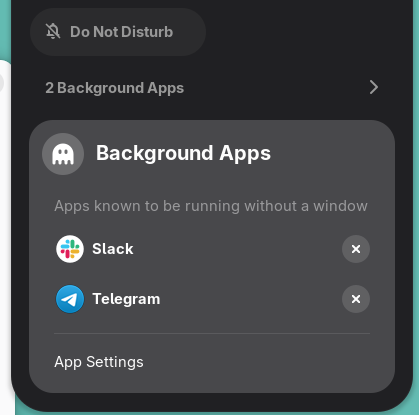
I forgot about that! Indeed, I just closed Telegram and Slack and they are shown in the menu. Thanks!
kurcatovium -1 points 4 days ago
This is retarded behavior and one of the reasons really I dislike Gnome.
TabbsTheBat 7 points 6 months ago
If it's an app with background functionality it goes in the background, but with no indication it does because there's no tray for them to have an icon in
steel_for_humans 7 points 6 months ago
OK, but it DOES work in the background. I generally like GNOME's minimalism, but this is a bad design choice IMO. Maybe I need that AppIndicator after all. :)
On my first day on GNOME I missed Slack notifications for 4 hours. It was great, no distractions and laser focus on my work! ;)
TabbsTheBat 8 points 6 months ago
Yeah it's one of things that really fuels the memes GNOME devs not designing for their user's needs lol
I feel like everyone I know who uses GNOME has at least appIndicator since a ton of apps rely on the basic function of having a system tray
GregorGizeh 4 points 6 months ago
Appindicator and dash2dock are your biggest friends on GNOME. Those, and alphabetical app grid.
TabbsTheBat 2 points 6 months ago
Yeah I saw someone said that. I've not used newer versions of GNOME extensively, but last I used it, it didn't have any indicators, nor has anyone mentioned them being added to me :p

linux4noobs
@programming.dev
4496
307
83
linux4noobs
Noob Friendly, Expert Enabling
Whether you're a seasoned pro or the noobiest of noobs, you've found the right place for Linux support and information. With a dedication to supporting free and open source software, this community aims to ensure Linux fits your needs and works for you. From troubleshooting to tutorials, practical tips, news and more, all aspects of Linux are warmly welcomed. Join a community of like-minded enthusiasts and professionals driving Linux's ongoing evolution.
Seeking Support?
- Mention your Linux distro and relevant system details.
- Describe what you've tried so far.
- Share your solution even if you found it yourself.
- Do not delete your post. This allows other people to see possible solutions if they have a similar problem.
- Properly format any scripts, code, logs, or error messages.
- Be mindful to omit any sensitive information such as usernames, passwords, IP addresses, etc.
Community Rules
- Keep discussions respectful and amiable. This community is a space where individuals may freely inquire, exchange thoughts, express viewpoints, and extend help without encountering belittlement. We were all a noob at one point. Differing opinions and ideas is a normal part of discourse, but it must remain civil. Offenders will be warned and/or removed.
- Posts must be Linux oriented
- Spam or affiliate links will not be tolerated.
go to feed...
linux4noobs
@programming.dev
4496
307
83
linux4noobs
Noob Friendly, Expert Enabling
Whether you're a seasoned pro or the noobiest of noobs, you've found the right place for Linux support and information. With a dedication to supporting free and open source software, this community aims to ensure Linux fits your needs and works for you. From troubleshooting to tutorials, practical tips, news and more, all aspects of Linux are warmly welcomed. Join a community of like-minded enthusiasts and professionals driving Linux's ongoing evolution.
Seeking Support?
- Mention your Linux distro and relevant system details.
- Describe what you've tried so far.
- Share your solution even if you found it yourself.
- Do not delete your post. This allows other people to see possible solutions if they have a similar problem.
- Properly format any scripts, code, logs, or error messages.
- Be mindful to omit any sensitive information such as usernames, passwords, IP addresses, etc.
Community Rules
- Keep discussions respectful and amiable. This community is a space where individuals may freely inquire, exchange thoughts, express viewpoints, and extend help without encountering belittlement. We were all a noob at one point. Differing opinions and ideas is a normal part of discourse, but it must remain civil. Offenders will be warned and/or removed.
- Posts must be Linux oriented
- Spam or affiliate links will not be tolerated.
go to feed...
Not sure if this is standard GNOME behaviour but on Fedora Silverblue under the control centre (where volume, bluetooth etc are) there is a Background Apps section if an app is running in the background.
save