
What you are thinking of is not a package manager but a compiler.
ptz 102 points a year ago
Let the hate of the crowd wash over me, but I don't even like Flatpak, and I've got love-hate (mostly hate) relationship with AppImage as well.
Just give me a system package or a zipped tarball.
In recent years, have had to just get used to needing to build most projects from source.
MoonlightFox 25 points a year ago
Why the hate part of AppImage?
bjoern_tantau 98 points a year ago
For me it is the "Windowsy" feeling of downloading an executable from some website. I prefer having all my packages managed in one place.
MoonlightFox 38 points a year ago
Makes sense, I kinda like it from a distributor standpoint. Flatpak is my favorite though.
cecilkorik 31 points a year ago
For simple "apps" it is fine, but my computer is not a phone and I don't use it like one. I mostly don't want simple apps that have their own little sandbox to play in.
I want full-scale applications that are so big they have to use system libraries to keep their disk size down. I also don't want them in a sandbox. I want them to have full access to the system to do everything they need to do, I want them to integrate with far-flung parts of the system and other applications too. I only use applications I trust and don't want them constantly pestering me about configuring permissions and access in just the right ways and opening all the right doors and ports and directories to make them work, I trust them by installing them, they have permission, and the easier they make it to access everything I will inevitably be asking them to access, the happier I am.
My practical concern with distribution methods like AppImage and Flatpak is that now I have to do a lot of extra thinking every time I'm installing anything. To pick how I'm going to install something, I have to solve the matrix of "what kind of distribution method do I prefer for this type of software" combined with "what distribution methods are available for this software" and "what versions are the available distribution methods for this software" and "what distribution method provides the best way for this software to get updates".
In the olden days, when the distro's package manager was the only choice, all I had to care about was "is it available in my distro" and the decision tree was complete. I appreciate all the availability of choice that things like AppImage provide, but it doesn't actually make it easier for me, it just makes it easier for the packager of the software. They're doing less, but making more work for me, as a user. Distro packages are a lot of work for the maintainer precisely because they at least make an effort to solve many of these issues for the user. The value-add that maintainers provide is real.
Monstrosity 10 points a year ago
So, vibes?
bjoern_tantau 13 points a year ago
And the added work with keeping them updated.
Samueru_sama 6 points a year ago
path: 0 16744538 16744625 16744728 16750225, hotness: undefined, score: 6, children: 0
sensiblepuffin 4 points a year ago
Interesting you compare it to Windows, given how in OS X you literally just drag applications into your Applications folder to install them.
klu9 2 points a year ago
InternetCitizen2 21 points a year ago
I go the opposite way. I like the ideas of container formats lol
friend_of_satan 3 points a year ago path: 0 16744538 16744625 16744683 16744742 16747289, hotness: undefined, score: 3, children: 0
MoonlightFox 5 points a year ago
Not trying to be annoying like a kid here 😅, but why not?
ptz 5 points a year ago
At least for appimage, it doesn't create application launchers. And it's 50/50 whether the icon in the window list works or not.
I also build a lot of Docker images, and container formats throw a wrench in that if that's the only way the application/utility is packaged. So I end up building from source.
Samueru_sama 5 points a year ago
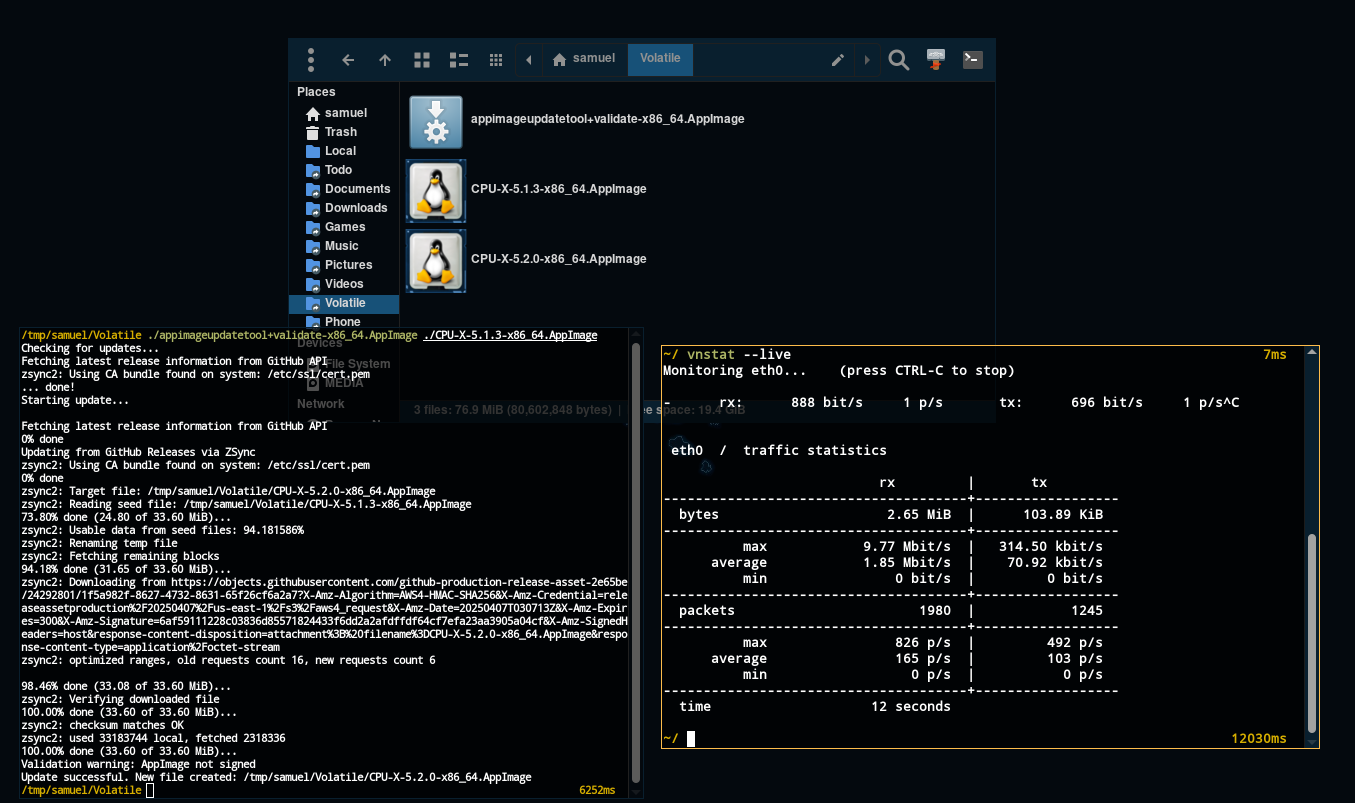
AppImage is meant to be updated using the embedded zsync info the runtime, that is the user should never have to open the app to update it.
The user needs to have something like AM, appimagelauncher or appimaged that is then able to parse the info and update the appimages using appimageupdatetool
This method also provides delta updates, meaning it doesn't download the entire app but only a diff, see this test with CPU-X where it downloaded 2.65 MiB to update the app:
Feathercrown 43 points a year ago
path: 0 16750066 16751580, hotness: undefined, score: 43, children: 0
Bishma 56 points a year ago
A stab at my personal ranking: .deb > appimage > flatpack > curling a shell script
I can't help but love a .deb file (even when not via repo), I've almost exclusively used Debian and it derivatives since the late 90s. And snap isn't on the list because it got stored in a loopback device I removed.
cley_faye 13 points a year ago
Ubuntu support online (I mean, the size of the community) can be useful. And besides the snap and "ubuntu advantage" thing, they're mostly a more up to date vanilla Debian, which is extremely convenient because, Debian.
It's obviously good for people used to Debian, but it's also great for other, because of the regular updates. But in fairness with your point I've been thinking about moving to mint since it's basically a de-snapped ubuntu.
iknowitwheniseeit 0 points a year ago
You can consider using Armbian x64, which is very similar to Ubuntu minus Snap.
MonkderVierte 12 points a year ago
xbps > pacman > apt imo
wildbus8979 22 points a year ago
Well for one a .deb comes out of the box with an uninstall machenism. As well as file hashes, package singing, etc...
Bishma 13 points a year ago
I never fully trust a shell script and usually end up reading any I have to use first, so I know what they do. And after so many years dpkg holds no mysteries for me and Discover will install .debs if I double click while in KDE.
Bishma 6 points a year ago
Yeah. They all come with risks, but I psychologically struggle to run shell scripts unless I know what's in them. And the same brain dysfunction makes my automatically distrust a script that doesn't set pipefail.
cley_faye 10 points a year ago
If made correctly (which is hilariously easy), it's a clean install and uninstall process, support some level of potential conflict regarding files that are shared with other packages/commands, support dependencies out of the box, and with minimal work can be made easy to update for the user (even automatically updates, depending on the user's choices) by having an (again, very easy to setup for a dev) repository. With the added value of authenticity checks before updating.
All this in a standardized way that requires no tinkering, compatibility stuff, etc, because all these checks are built-in.
Note that some of this probably applies to other system package management solutions, it's not exclusive to .deb.
Monstrosity 7 points a year ago
dpkg -i <nameofpackage.deb>
Which can be read as: (Debpackage) -install <nameofpackage.deb>
That's it!
Also, if you haven't already, install tldr (apt install tldr), then you can 'tldr deb' (or any other command) to get a few examples of their most used functions.
wolfinthewoods 3 points a year ago
It might be different for other distros, but for me on MX Linux, I just click on the .deb and it opens a shell with a root prompt and installs the file automatically. Easy peasy.

kibiz0r 6 points a year ago
Well, Nix is a programming language, so there’s no getting around having to learn basic principles of coding.
That said, I feel like coming into Nix with a lot of programming experience actually worked against me at first, because I made a lot of assumptions that weren’t true and basically had to “unlearn” certain things.
The main things being:
- Lazy evaluation is trippy as hell sometimes
- The language truly does not allow for side-effects. Everything you might think is a side-effect is really executed from outside the language runtime itself
- It might be more accurate to think of Nix as a database, where the keys are the parameters of what to build and the values are directories full of the built artifacts
What really made it click for me was seeing how a derivation object is basically equivalent to a path. So if I do ”${pkgs.foo}/bar”, that’s the exact absolute path (plus /bar) where Nix will end up storing the output of the pkgs.foo derivation. Even without actually building the derivation, you can know where it will end up.
Anyway, the documentation is pretty shitty, so you basically have to scour every community resource you can find and read way more of it than it seems like you should have to. Discord/Matrix servers help a lot too. And learning to navigate the source code for nixpkgs.
Also: Don’t start with NixOS, imo. Start with dumb throwaway stuff where you make a derivation that downloads a file and unzips it and runs a single command. Once you understand that, do something that requires understanding a bit of nixpkgs, like using overlays. Then you can use NixOS. Otherwise, there’s too much going on all at once.
Edit:
- Nix pills is good
- Vimjoyer is amazing
unknown1234_5 36 points a year ago
my issue with snaps is honestly just that they are controlled too much by just one entity (canonical) and there is no reason for them to exist because flatpak already does everything they do.
trevor 3 points a year ago
My issue with snaps is also the power that Canonical has to fuck you over one day, because of the centralization that you mentioned, but also that their shitty fucking packaging format sucks ass and breaks everything but the most basic of apps. I've wasted hours trying to help people with their broken applications that were hijacked when they typed apt install whatever and "whatever" was actually a fucking broken snap package.
Flatpaks and AppImages actually do the fucking things they're supposed to. Snaps don't, and Canonical is pulling a Microsoft by hijacking your package manager.
Also, Snap sandboxing only works with AppArmor, so if you were hoping that all the breakage was worthwhile because you get sandboxing, you don't if you're on anything but a handful of distros 🙂
Venus_Ziegenfalle 27 points a year ago
Gentoo is too busy compiling to notice what's going on around it
stebator 6 points a year ago
I use NixOS and Flatpak (Nix-Flatpak) to install software that is not available in Nixpkgs. Unlike Arch's AUR, Nixpkgs has fewer popular packages. However, Nixpkgs beats AUR in terms of quantity because many Nixpkgs packages are redundant.
sensiblepuffin 25 points a year ago
Plus make it hell on earth to a) access drives other than the one flatpak is installed on, b) interoperate with non-flatpak applications, and c) retain any amount of free space on my drives (exaggeration for effect).
OsrsNeedsF2P 5 points a year ago
This is a "security" feature and I'm so tired of it. Same thing with Wayland, random crap doesn't work sometimes
sensiblepuffin 20 points a year ago
Wayland is trying to replace a standard that people have been saying is obsolete for a decade. I'll give them a bit of leeway.
rtxn 21 points a year ago
I just want to point out the dependencies of Konsole (arguably a small and simple application in concept): glibc gcc-libs icu kbookmarks kcolorscheme kconfig kconfigwidgets kcoreaddons kcrash kdbusaddons kglobalaccel kguiaddons ki18n kiconthemes kio knewstuff knotifications knotifyconfig kparts kpty kservice ktextwidgets kwidgetsaddons kwindowsystem kxmlgui qt6-5compat qt6-base qt6-multimedia sh.
OsrsNeedsF2P 20 points a year ago
Psst .. the first KDE app you installed via your package manager also put "the entirety of KDE" onto your system.
thepreciousboar 1 point a year ago
At least if you install other apps you already have KDE. If you install another Flatpak, it's likely this will need another version of the KDE runtime, so it's 2.5 more GB for a 450kB application.
racketlauncher831 1 point a year ago
Indeed. As much of how loved and popular KDE is, fuck it. I use the glorious XFCE. XFCE is beautiful too. Fuck, I'm not the maniac who would waste 2GB just for my DE to look beautiful.
MoonlightFox 30 points a year ago
I have really started to like AppImage. You just download a single file make it executable and it just works.
I use Cursor for coding, and it has an appimage that replaces itself when it updates.
klu9 6 points a year ago
I use AM package manager for that.
bdonvr 12 points a year ago
That's cool.
It would still be even cooler if the app makers just packaged them for distros. Or even just Flatpak.
But that's a cool project I'll keep it in mind for my next go with an immutable distro
Samueru_sama 3 points a year ago
Or even just Flatpak.
AM was started because flatpak sucks.
With flatpak devs can't agree to use a common runtime, so the user ends up with a bunch of different runtimes and even EOL versions of the same runtime, making the storage usage 5x more than the appimage equivalent and this is much worse if you use nvidia which flatpak will download the entire nvidia driver again.
flatpak could not bother to fix the hardcoded
~/.vardirectory, something that AM fixes by simply bind mounting the existing application config/data files to their respective places when sandboxing which yes it is able to sandbox appimages with aisap (bubblewrap).flatpak threw the mess of handling conflicting applications to the user, so you have to type nonsense like
flatpak run io.github.ungoogled_software.ungoogled_chromium, AM just puts the app toPATHlike everyone else does, even snap doesn't have this issue.

klu9 3 points a year ago
I do wish something like AM's functions was built into an all-in-one package manager for my distro. The closest I found was bauh which handles "AppImage, Debian and Arch Linux packages (including AUR), Flatpak, Snap and Web applications". Which seems like an all-in-one solution.
But the problem with bauh (that last time I tried it) is that it accesses only a small number of (often very out-of-date) AppImages from the largely moribund AppImageHub.com, unlike AM, which pulls in the latest releases from loads of GitHub repos, and adds more on a frequent basis or request.
dinckelman 19 points a year ago path: 0 16744611 16745057 16747881 16748254, hotness: undefined, score: 19, children: 1
gamermanh 8 points a year ago
Some apps are a bitch and a half for some reason, other apps just work
Make a .desktop file, slap it in ./local/share/imdrawingafuckingblank and boom, it's integrated into your shell menu like any other app
The Nexus Mod App and Foundry VTT work flawlessly and it's so nice
MoonlightFox 8 points a year ago
As a somewhat Linux noob I just made a folder called ~/Apps and launch them through terminal. Not ideal, but I don't care enough to fix it.
Your suggestion makes me kinda want to fix it though. Doesn't seem like to much work
Monstrosity 11 points a year ago
Change ~/Apps to ~/bin or ~/.bin & you are doing it like a seasoned pro.
Completely ideal, actually.
MoonlightFox 5 points a year ago
Haha, wow. Thanks!
klu9 2 points a year ago
AM puts all AppImages in /opt for me, as well as automatically creating menu entries, easy updates etc.
Fisch 1 point a year ago
I've used Linux for years and I also have a ~/Applications folder where I put AppImages, applications cloned with git and stuff like that in. E.g. I have the last Yuzu AppImage in there, since it got taken down, but I also made a .desktop file for it, so I can launch it through the application menu. Btw, you should be able to just double click AppImages in your file explorer to open them.
Samueru_sama 2 points a year ago
appimaged does exactly that automatically for you.
see: https://streamable.com/dm575h
With that said I prefer AM, because it also adds the applications to PATH, meaning you type yuzu on the terminal and it launches yuzu as well.
A_Union_of_Kobolds 1 point a year ago
Also a noob and this seems like the most reliable way for sure. As long as I'm in the right directory I'm good
Monstrosity 27 points a year ago
I tried a snap package on my pop-os system once & it poo'ed folders all over my system, then didn't actually uninstall when I uninstalled it.
No thank you.
fembinary 12 points a year ago
thats the thing with snaps: they go all over the place on your system, so even if you uninstall it (which itself is a tiring and cumbersome task at times!), they magically stay everywhere on the systems, with tons of folders and files.
lengau 1 point a year ago
They're downloaded somewhere under /var/snap and by default a snap only has access to a limited set of directories - one under /var/snap for system-wide data (generally used by snaps that run services like cups or MySQL) and one under ~/snap for each user. When you snap remove an app, it bundles that up into a file that's kept for a while in case you reinstall, but it won't if you use --purge.
Obviously many apps request access to other places (such as non-hidden directories in your homedir) so they can read or write stuff, but that's down to the app to then behave correctly (same as with any other packaging system).
pinball_wizard 6 points a year ago
Why do you need flatpak
Not OP, but I like Flatpak (in addition to Apt) because it doesn't require escalation to add or remove packages, so my kids can self-serve adding or removing games.
bluewing 6 points a year ago
If you are going to be running an Atomic/immutable distro, you really want to use things like flatpack/snap/appImage to keep your user space separate from the OS.
Oh, you can sledgehammer an rpm/deb/what ever into the underlying OS. But if you do that, why did you choose an immutable distro in the first place? It's kind of the whole point.
OmegaLemmy 4 points a year ago
ensures software support when the developer in question is a moron
LeFantome 3 points a year ago
Flatpak is a common way to install something newer than you can get in your repo. If you are using apt in Debian Stable, Flatpak is a miracle. This is even the reason Ubuntu installs Firefox as a snap (their version of Flatpak).
ryannathans 8 points a year ago
Like not updating or shared dependencies duplicated for every single app image
Just use flatpak
AnimalsDream 7 points a year ago
Absolutely my favorite. Just download and go. Super portable.
AnimalsDream 2 points a year ago
It would, if there were no other options for package management. Package formats don't have to be either/or. My systems typically end up with mixes of native packages, flatpak, appimages, and you could technically consider Steam a package management system as well.
srestegosaurio 2 points a year ago
Last time I read something from the main dev I almost ran stright into the woods.
Also idk about how it is the management situation, portals integration, etc…
renegadespork 20 points a year ago
.tar.gz should be appimage.
deathmetal27 2 points a year ago
There were only three characters so it kinda got left out.
SpaceNoodle 12 points a year ago
Because fuck you, that's why
StellarSt0rm 12 points a year ago
Because with snap lsblk gets very cluttered, making it hard(er) to find any disk you're looking for.
Edit: lsblk or any other command that lets you see all the connected disks really
ThisGuyThat 3 points a year ago
This annoys me when I don't have a command aliased to filter them.
StellarSt0rm 2 points a year ago
And it annoys me that I have to make an alias just to filter them, my fish config must only have what's necessary 😤
srestegosaurio 15 points a year ago
Flatpak and SystemD Portable services are actually pretty good.
That's the direction I see Linux going. I personally use NixOS because I am sad.
Strawberry 4 points a year ago
I looked into Nix but it seemed like it locks you into using bash for your shell. Is that the case?
MissingInteger 6 points a year ago
The default shell on NixOS is bash, but it can be easily changed.
Strawberry 2 points a year ago
Sorry I was meaning in the context of using nix-shell for isolated reproducible environments. I read that things can go wrong if you try to use a shell other than bash
MissingInteger 3 points a year ago
You could use something like nix-your-shell.
LeFantome 14 points a year ago
Tar is not a package manager, it is just a packaging format. AppImage has the same problem.
Flatpak is a bit of a crappy package manager but at least it is one. And, due to its use of container technology, it allows the same packages to run on any Linux kernel (any Linux distro). That is pretty useful.
Of the other package managers, apk 3 is my favourite but the only distro that uses it is Chimera Linux. Pacman is good. dnf / RPM is ok. apt / deb is in last place for me. The recent Ubuntu 25.04 launch snafu illustrates some of the problems with apt. The first Linus Tech Tips Linux challenge really highlighted the dangers of apt.
I only used snap briefly but instantly hated it. Fstab was a mess. It was slow. It was proprietary. I fled before I could form an educated opinion.
Samueru_sama 3 points a year ago
it allows the same packages to run on any Linux kernel (any Linux distro). That is pretty useful.
flatpak itself depends on namespaces, so saying that it works on any kernel is quite a stretch.
Can flatpak do this? This is a GIMP3 appimage running on ubuntu 10.04 without any container:
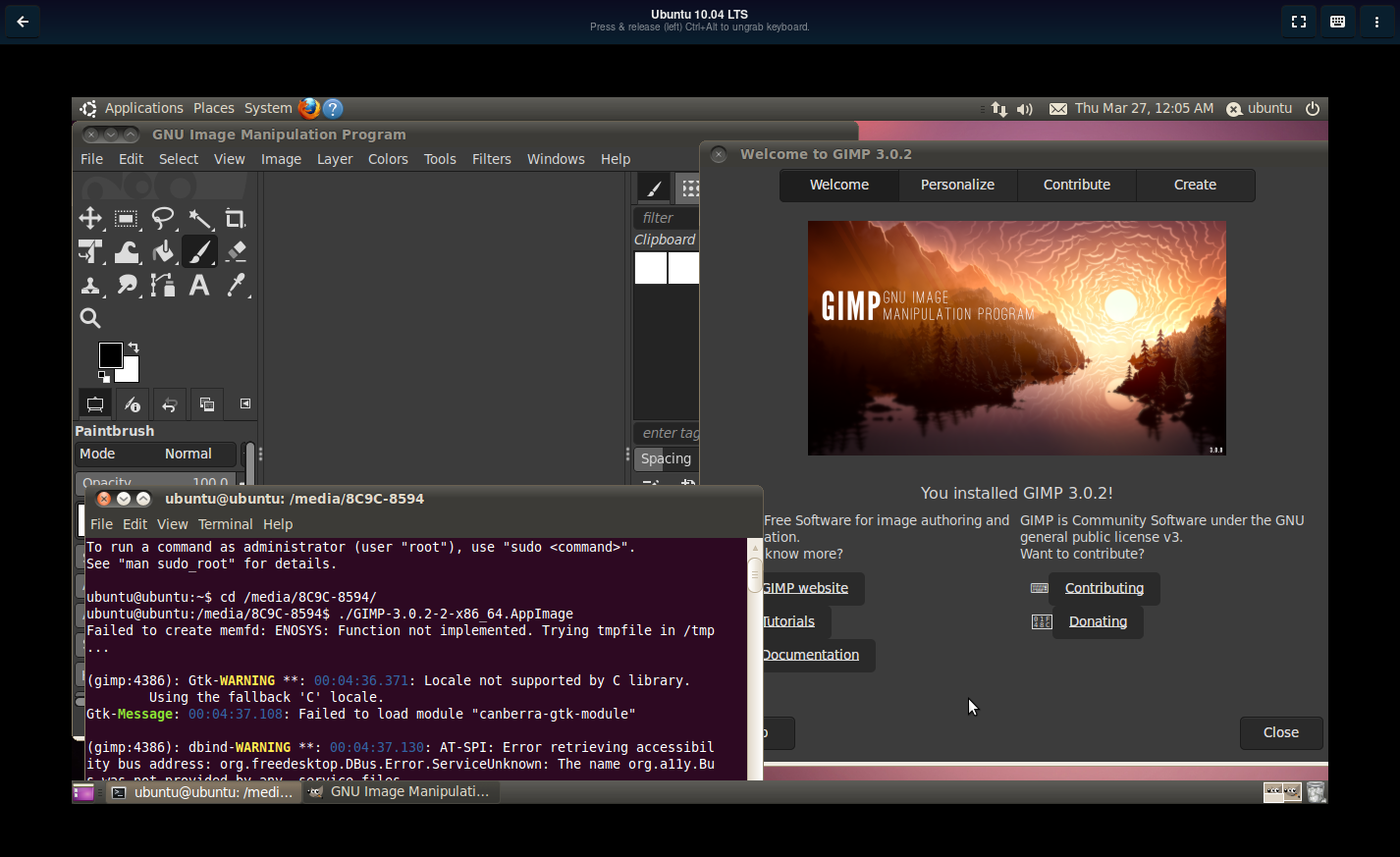
The kernel is so old that even the appimage runtime itself complains of missing functions and has to fallback to a workaround.
UPDATE: flatpak can't work because bubblewrap itself can't:

PR_SET_NO_NEW_PRIVS is only available since kernel 3.5
easily3667 4 points a year ago path: 0 16772455 16780304 16783170 16783599, hotness: undefined, score: 4, children: 0
Samueru_sama 3 points a year ago
I'm not, it's a vm that I use to test.
There is quite a lot of systems still stuck on kernel 2.6 that can't be updated, so it is always nice to make sure what I do can work on such.
Sonotsugipaa 8 points a year ago
Wait hold on wait, does that bullshit have something with Firefox being distributed through Snap?
If it does, I'm going to sn... also fucking lose it
Sonotsugipaa 2 points a year ago
Ah gotcha, it's not the cause but it makes the problem way worse
phoenixz 1 point a year ago
It basically IS the cause as it's the system doing the updates without asking. But snap has other issues too. For one, it's the slowest installer in recorded human history, it takes literally ten times longer on snap to install anything. Why? Beats me, in theory it ought to be faster as it shouldn't have to resolve dependencies but here we are. Try installing anything with snap, it takes forever.
Then, snap is closed source eon the server side, so fuck all of that, that's already 200% of reasons not to use it ever. I don't trust closed source software anymore
FooBarrington 20 points a year ago
Yeah, but Snap is the equivalent of Tesla...
FooBarrington 6 points a year ago
Yes please, and more cake!
atomicbocks 6 points a year ago
Mark Shuttleworth is a greedy bastard and it’s finally starting to show.
OsrsNeedsF2P 1 point a year ago
Eh. He's done more for Linux than you, I, or anyone else in this thread for that matter.
atomicbocks 1 point a year ago
He came into a vacuum created by Microsoft being litigious in the 90s. There were other companies already doing a better job. (Caldera, for example) As with many rich assholes, he was simply in the right place at the right time with millions already in hand.
OR3X 2 points a year ago
I once uninstalled a flatpak and it rendered another installed flatpak unlaunchable. Not even the repair function would fix it. Ended up having to use timeshift to rollback. Not sure if that was the fault of Flatpak or that one specific app but it was pretty frustrating.
fossilesque 2 points a year ago path: 0 16764714 16767522 16767872, hotness: undefined, score: 2, children: 2
fossilesque 1 point a year ago path: 0 16764714 16767522 16767872 16770011 16770291, hotness: undefined, score: 1, children: 0
Realitaetsverlust 1 point a year ago
How exactly are appimages annoying? I think they are awesome tbh
Samueru_sama 1 point a year ago
So, I would say the primary complaint should be a lack of package management.
fossilesque 1 point a year ago path: 0 16764714 16771405 16771453, hotness: undefined, score: 1, children: 5
Samueru_sama 1 point a year ago
So, I would say the primary complaint should be a lack of package management.
fossilesque 1 point a year ago path: 0 16764714 16771405 16771453 16780318 16784545, hotness: undefined, score: 1, children: 3
corsicanguppy 8 points a year ago
Don't worry, Snap: Flatpak and Tarballs are NOT better by much. And, chances are, the system package manager may be lacking in so many validation requirements that it's not iso27002-compliant and thus could be junk.
There-there, Snap. Most people won't even know why you suck.
blind3rdeye 28 points a year ago
Probably, but the stink will linger for quite a long time.
There's a burger place near my house that I use to go to almost every week. But then the quality started going down, and I stopped going there. That was two years ago. Maybe they fixed the problems, but I'm not going to know - because I no longer go there. Snap is like that.
UnfortunateShort 11 points a year ago
I think the main complaint is that it seems like Canonical is trying take control of Linux packaging. Don't they handle their stuff in a way that pretty much prevents third party 'Snap Stores'? Like, their backend being closed source and their software only accepting their own signatures?
Fizz 5 points a year ago
I dont know for sure so disregard what I say. but I remember reading that users could host their own snap repos but canonicals one was the only one at the moment. Everything about snap is open source except the webserver.
lengau 5 points a year ago
Yeah the API is open and there used to be an open store, but lack of interest ended up with the project shutting down. As it turns out people don't like alternative stores nearly as much as they like the idea of alternative stores.
SwingingTheLamp 5 points a year ago
Has it? My complaints are: I have to use VPN software for work that replaces /etc/resolve.conf with a symlink to another location, one that sandboxed snaps can't access. There's no way to grant them access; the "slots" that you can connect are fixed and pre-defined. You can't even configure the file path; it's defined right in the source code. Not even as a #define, but the string literal "/etc/resolve.conf". That seems like poor practice, but I guess they're not going for portability.
Also, I have /usr and /var on different media, chosen for suitability of purpose, and sized appropriately. Then, along comes snap, violating the File Hierarchy Standard by filling up /var with application software.
Minor annoyances are the ~/snap folder, and all of the mounted loopback filesystems which make reading the mtab difficult.
possiblylinux127 4 points a year ago
Even OCI containers are better
possiblylinux127 2 points a year ago
Sort of
They aren't OCI containers and the sandboxing is weak at best
SpaceNoodle 1 point a year ago
Let's not get ahead of ourselves
MonkderVierte 1 point a year ago path: 0 16745474 16747092 16747899, hotness: undefined, score: 1, children: 0
deathmetal27 2 points a year ago
Unfortunately imgflip prints text in all caps only.
MyNamesTotallyRobert 1 point a year ago path: 0 16874701, hotness: undefined, score: 1, children: 0
ZILtoid1991 1 point a year ago
What's wrong with Snap?
EDIT: I had minimal exposure to Snap, sometimes Snap was my only option to get some software on Linux in a decent version and without getting into dependency hell while trying to compile it (why can't someone make a package manager for C/C++?). I do see the issue with proprietary servers though.
pinball_wizard 17 points a year ago
What's wrong with Snap?
Proprietary servers.
JackbyDev 5 points a year ago
Can you elaborate a little? I imagined this meant something like Visual Studio Code' Marketplace (which doesn't allow non Microsoft products to connect), but I don't see anything about that on Snap's TOS.
To be clear, I'm not saying you're wrong or anything, I'm just trying to understand.
InternetCitizen2 3 points a year ago
People want a full open stack, and the server is closed. Its less a technical complaint and more a philosophical one.
Not the person you are asking, just trying to add context on why some find that problematic for those who are reading later.
pinball_wizard 3 points a year ago
I don't think it's a TOS thing, just a lack of open source server software? To the best of my knowledge, it's just not possible to host my own snap server. At least, I didn't find any solution when I looked. Which seems weird, for an open source operating system.
tsugu 1 point a year ago
Everything else is FOSS besides the server and snaps can even be installed locally. I wrote a section of an article about most of the complaints. Most of the complaints I hear are just elitistic bullshit that makes new users confused and spreads misinformation.
ianhclark510 0 points a year ago
Fuck flatpak, all my homies hate flatpak
ILikeBoobies -1 points a year ago
Appimage>your inferior packaged application method

linuxmemes
@lemmy.world
33075
2390
6507
Hint: :q!
Sister communities:
Community rules (click to expand)
1. Follow the site-wide rules
- Instance-wide TOS: https://legal.lemmy.world/tos/
- Lemmy code of conduct: https://join-lemmy.org/docs/code_of_conduct.html
2. Be civil
- Understand the difference between a joke and an insult.
- Do not harrass or attack users for any reason. This includes using blanket terms, like "every user of thing".
- Don't get baited into back-and-forth insults. We are not animals.
- Leave remarks of "peasantry" to the PCMR community. If you dislike an OS/service/application, attack the thing you dislike, not the individuals who use it. Some people may not have a choice.
- Bigotry of any kind will not be tolerated. This is an LGBTQ+-friendly community -- if that is a problem for you, you should leave.
3. Post Linux-related content
- Including Unix and BSD.
- Non-Linux content is acceptable as long as it makes a reference to Linux. For example, the poorly made mockery of
sudoin Windows. - No porn, no politics, no trolling or ragebaiting.
- Don't come looking for advice, this is not the right community.
4. No recent reposts
- Everybody uses Arch btw, can't quit Vim, <loves / tolerates / hates> systemd, and wants to interject for a moment. You can stop now.
5. 🇬🇧 Language/язык/Sprache
- This is primarily an English-speaking community. 🇬🇧🇦🇺🇺🇸
- Comments written in other languages are allowed.
- The substance of a post should be comprehensible for people who only speak English.
- Titles and post bodies written in other languages will be allowed, but only as long as the above rule is observed.
6. (NEW!) Regarding public figures
We all have our opinions, and certain public figures can be divisive. Keep in mind that this is a community for memes and light-hearted fun, not for airing grievances or leveling accusations.
- Keep discussions polite and free of disparagement.
- We are never in possession of all of the facts. Defamatory comments will not be tolerated.
- Discussions that get too heated will be locked and offending comments removed.
Please report posts and comments that break these rules!
Important: never execute code or follow advice that you don't understand or can't verify, especially here. The word of the day is credibility. This is a meme community -- even the most helpful comments might just be shitposts that can damage your system. Be aware, be smart, don't remove France.
go to feed...
linuxmemes
@lemmy.world
33075
2390
6507
Hint: :q!
Sister communities:
Community rules (click to expand)
1. Follow the site-wide rules
- Instance-wide TOS: https://legal.lemmy.world/tos/
- Lemmy code of conduct: https://join-lemmy.org/docs/code_of_conduct.html
2. Be civil
- Understand the difference between a joke and an insult.
- Do not harrass or attack users for any reason. This includes using blanket terms, like "every user of thing".
- Don't get baited into back-and-forth insults. We are not animals.
- Leave remarks of "peasantry" to the PCMR community. If you dislike an OS/service/application, attack the thing you dislike, not the individuals who use it. Some people may not have a choice.
- Bigotry of any kind will not be tolerated. This is an LGBTQ+-friendly community -- if that is a problem for you, you should leave.
3. Post Linux-related content
- Including Unix and BSD.
- Non-Linux content is acceptable as long as it makes a reference to Linux. For example, the poorly made mockery of
sudoin Windows. - No porn, no politics, no trolling or ragebaiting.
- Don't come looking for advice, this is not the right community.
4. No recent reposts
- Everybody uses Arch btw, can't quit Vim, <loves / tolerates / hates> systemd, and wants to interject for a moment. You can stop now.
5. 🇬🇧 Language/язык/Sprache
- This is primarily an English-speaking community. 🇬🇧🇦🇺🇺🇸
- Comments written in other languages are allowed.
- The substance of a post should be comprehensible for people who only speak English.
- Titles and post bodies written in other languages will be allowed, but only as long as the above rule is observed.
6. (NEW!) Regarding public figures
We all have our opinions, and certain public figures can be divisive. Keep in mind that this is a community for memes and light-hearted fun, not for airing grievances or leveling accusations.
- Keep discussions polite and free of disparagement.
- We are never in possession of all of the facts. Defamatory comments will not be tolerated.
- Discussions that get too heated will be locked and offending comments removed.
Please report posts and comments that break these rules!
Important: never execute code or follow advice that you don't understand or can't verify, especially here. The word of the day is credibility. This is a meme community -- even the most helpful comments might just be shitposts that can damage your system. Be aware, be smart, don't remove France.
go to feed...
A magnetised needle and a steady hand is a better package format.
save